A busy month’s Jobber invoice can carry two Receptionist lines. The first reads “Receptionist – 30 Conversations / Month at $29.” Right under it sits a second line, “Receptionist Additional Usage,” for $23.70.
That’s a hypothetical month of 60 conversations: 30 past the allowance at $0.79 each, so $52.70 for the Receptionist in total. Jobber’s help center names both of those invoice lines. How big the second one gets depends on your count and one setting.
On Jobber’s Core, Connect and Grow plans, the AI Receptionist is a $29-a-month add-on that includes 30 conversations per billing cycle, then charges $0.79 for each extra conversation on your next monthly invoice. You can instead set it to pause at the limit, and the add-on stays at $29. On Plus, it’s included with unlimited usage.
One caveat on that 30. It’s the figure in Jobber’s Receptionist help article and on the invoice line above, but one other Jobber help page lists 100 conversations. Your Receptionist dashboard (Manage on the Conversations card) and your invoice line show the allowance on your account.
It also needs a Jobber dedicated phone number. Your existing business number can forward to it.
Prices here are Jobber’s published US list prices as of October 2026, in USD, before sales tax, for the four plans on Jobber’s pricing page. Older or app-store plans can differ, and Jobber can change prices with 14 days’ notice. The rules come from Jobber’s pricing page, help center and Terms of Service, not from a Jobber account, and every business below is a hypothetical example.
Counting conversations the way Jobber does
The add-on doesn’t bill by minutes or by calls. It bills by conversations, and Jobber counts calls and texts differently.
A call counts when the Receptionist actively engages the caller. Calls it identifies as spam, and calls where no real interaction takes place, don’t count.
A text conversation starts when the Receptionist first replies to an incoming message and stays open for up to 24 hours. Messages inside that window are one conversation, not several. After 24 hours, or in a new session, it’s a new one.
So a customer who texts at 6 p.m. and again at 9 the next morning, still inside 24 hours of the first reply, is one conversation. A customer who calls twice and talks to the Receptionist both times is two. A chatty texter is cheap; a repeat caller isn’t.
Here’s how that plays out over a hypothetical week at a two-truck plumbing shop:
- 9 calls the Receptionist answers and talks to: 9 conversations
- 2 robocalls it tags as spam: 0
- 1 caller who hangs up during the greeting, with no real interaction: 0
- 3 text threads, each finished inside 24 hours: 3
That’s 12 conversations for the week. It’s one made-up week at one made-up shop, so don’t multiply it into a month for your own business. Count your own calls and texts instead.
On those calls, the Receptionist answers questions, takes requests, books into your calendar and escalates by keyword, as Jobber describes it. The counting rules are in Jobber’s help article, Receptionist, powered by Jobber AI.
What a month on the add-on costs
With overage on, the math is one line: monthly add-on bill = $29 + $0.79 × (conversations − 30), and just $29 if you stay at 30 or under.
| Conversations in the month | Add-on bill | Average per conversation |
|---|---|---|
| 20 | $29.00 | $1.45 |
| 30 | $29.00 | about $0.97 |
| 60 | $29 + 30 × $0.79 = $52.70 | about $0.88 |
| 120 | $29 + 90 × $0.79 = $100.10 | about $0.83 |
The $29 covers a quiet month. Past the allowance, every conversation adds the same $0.79, so the bill tracks your volume almost one for one.
Jobber’s own feature page says the Receptionist handles “over 20 calls per week on average.” Jobber doesn’t say whose average that is, so treat it as Jobber’s claim, not a forecast for your shop. As plain arithmetic, 20 calls a week is about 87 a month (20 × 52 ÷ 12), which on the add-on would be $29 + 57 × $0.79 = $74.03, before a single text.
That’s why the count matters more than the sticker. Before switching it on, look at how many calls you missed last month and how many text threads you had, then run them through the formula.
The Receptionist isn’t the only Jobber charge that grows with your volume. If your customers pay through Jobber too, our guide to Jobber Payments fees on card, ACH and instant payouts works through what comes out of each invoice you collect.
Overage or pause: the choice that caps the bill
When you reach the allowance, Jobber gives you two options. You set them in the Receptionist dashboard, under Manage on the Conversations card.
Continue and pay overage. The Receptionist keeps answering and booking, and each conversation past the allowance adds $0.79 to the next invoice.
Pause. The Receptionist stops responding to calls and texts at the limit. A caller who reaches it gets message-taking instead, which doesn’t count toward your limit. While paused, it can’t book appointments or take other actions, and it resumes at the start of your next billing cycle. You can forward calls elsewhere in the meantime.
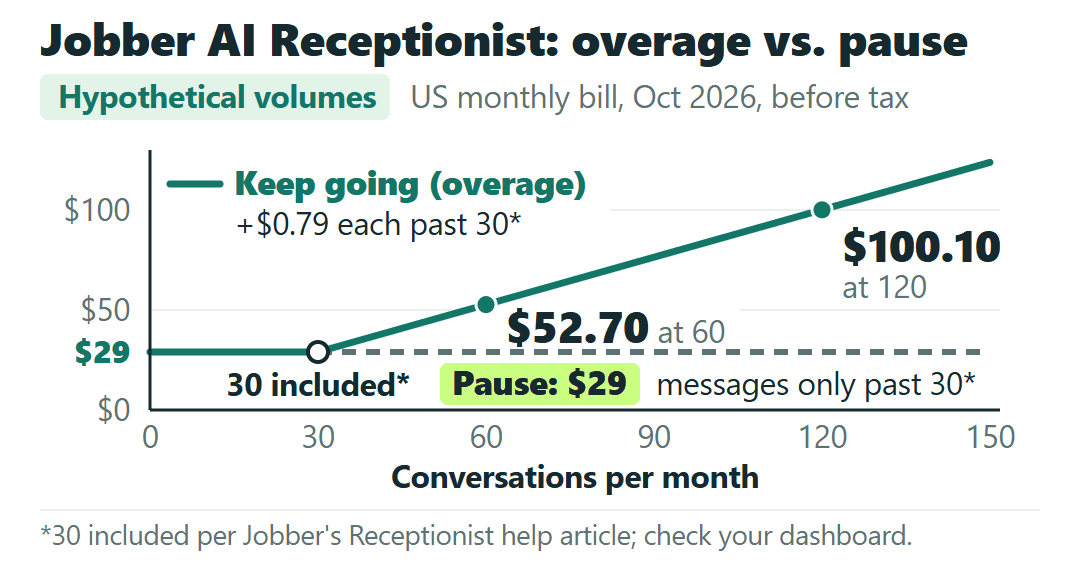
With pause on, the add-on never costs more than $29 a month. The trade is what late-month callers get: a message instead of a booking.
Jobber emails admins at 23 conversations (75% of the limit) and at 30 (100%), based on the 30-conversation allowance in its help article, and shows an in-app banner when 10 are left. Those alerts give you time to change the setting mid-month if a busy week is eating the allowance.
When Plus beats the add-on, counting the Receptionist alone
Plus includes the Receptionist with unlimited usage. But Plus starts at the “Includes 5 users” tier: $499 a month with no commitment, $439 on a 1-year commitment, or $399 billed annually, per Jobber’s pricing page. There’s no 1-user Plus.
To compare, keep the same team-size tier and the same payment option on both sides:
Break-even conversations = your included allowance + (Plus price − your plan price − $29) ÷ $0.79
The examples below use 30, the allowance in Jobber’s Receptionist help article; check yours on your dashboard. Take a hypothetical shop on Grow at the 5-user tier with no commitment, $299 a month. Plus at the same tier is $499, a gap of $200. The add-on bill reaches $200 at about 247 conversations a month ($29 + 217 × $0.79 = $200.43; at 246 it’s $199.64). If the same shop pays annually, Grow is $229 and Plus is $399, a $170 gap, which the add-on reaches at about 209 conversations ($170.41).
Those two numbers belong to that one example. Your plan, your tier and how you pay all move the break-even, so run your own figures through the formula.
This compares only the Receptionist part of the bill. Plus also bundles other add-ons and features, and whether you’d use those is a separate question.
Moving plans has its own rules under Jobber’s Terms of Service. An upgrade triggers a prorated charge right away. On a 1-year commitment, you can’t downgrade before the 12 months are up. And changing plans can mean losing legacy or grandfathered pricing.
The number it answers on, and how the add-on bills
The Receptionist works on a Jobber dedicated phone number, and Jobber requires one even if you keep using your existing business number. You keep that number by forwarding calls to the dedicated one, through your phone provider (after a set number of rings or after hours, for example) or by linking Google Voice.
Choose the dedicated number carefully: once selected, it can’t be changed.
In the US, the number has to be registered with your business details, Tax ID, a website or social link, a privacy policy and terms of service. Jobber says a submitted registration may take up to 3 weeks to process, and two-way texting depends on it, so start that paperwork early. The field list is in Jobber’s guide to registering your dedicated phone number.
The add-on itself carries little commitment. Only admin users can add it, and it isn’t available during a free trial. Added mid-cycle, it’s prorated for the rest of that billing period. You can cancel it any time and keep access until the period ends, but charges aren’t refunded.
If a review quotes $99 a month, it predates the change: Jobber’s pricing page listed the Receptionist at $99 as late as June 2026 and at $29 by July 2026.
Watch the count
I think the $29 is the least important number on this page. The bill moves with your conversation count, and the one setting that caps it, pause or keep going, is worth deciding before the first call comes in, not after the first overage line. Plus only enters the picture as a Receptionist decision if your count runs into the hundreds, and the allowance on your own account is a quick look at Account and Billing and the Conversations card. Twenty-nine dollars for the allowance on your dashboard, 79 cents for each conversation past it.