Here’s one hypothetical week at a small plumbing shop that runs on ServiceM8: three people, the owner, one tech and a part-time office helper. By Friday they’ve created 12 new job cards: eight service calls, two quotes and two recurring visits for weekly maintenance customers. One of the quotes was accepted and switched to a work order. On Thursday the tech went back to finish one of the service calls and invoiced it then.
On ServiceM8’s US paid plans, the three people don’t change the bill. The 12 cards do. The accepted quote didn’t become a second card, and the Thursday return trip and its invoice stayed on the job it started as. A four-week month at that pace is 48 cards, just under Starter’s 50. Averaged across a year it’s 52 a month (12 × 52 ÷ 12), so some months will run past it.
ServiceM8 prices its US plans by new jobs per month, not by user: Free is $0 for 30 jobs, Starter $29 a month for 50, Growing $79 for 150, Premium $149 for 500 and Premium Plus $349 for 1,500+. Every paid plan has unlimited users; Free is limited to one. There are no contracts, setup fees or per-user fees. The number that picks your plan is how many new job cards you create in a month, counting every recurring visit, and a few features can push you one step higher whatever that number is.
Prices are ServiceM8’s US monthly list prices in USD from its US pricing page, and the credit rules come from its pricing FAQ and help center, all checked October 2026. If you look them up yourself, make sure you’re on the US page. None of this comes from using a ServiceM8 account, and the shop above, like every business in this post, is an illustration.
What turns into a job card, and what doesn’t
ServiceM8 uses one job credit each time you create a new job card. Its help center puts it as one credit per job number. Three rules decide your count:
- A quote that’s accepted and switched to a work order uses one credit, not two. A job can start as either one.
- Doing more on the same job doesn’t use another credit. Scheduling, quoting or invoicing the same job again still counts once.
- Every recurring visit is its own job card. ServiceM8 creates each instance of a recurring job as a new card, so a weekly customer is about 4–5 credits a month, not one.
The last rule is the one I’d check hardest if you run maintenance routes or cleaning schedules. Bring a count of visits to the plan table, not a count of customers. ServiceM8 lays out the rule in its help article “What counts as a job credit?”
Five US plans, each sized by a job count
| Plan | Per month | New jobs per month | Users |
|---|---|---|---|
| Free | $0 | 30 | 1 |
| Starter | $29 | 50 | Unlimited |
| Growing | $79 | 150 | Unlimited |
| Premium | $149 | 500 | Unlimited |
| Premium Plus | $349 | 1,500+ | Unlimited |
Only Premium Plus sells jobs beyond its allowance, at 20¢ per extra job. Free, Starter, Growing and Premium have no per-job price; what happens when you run over on those is further down.
Two smaller lines sit next to the table. The US pricing table lists text messages as included on paid plans and 10¢ per text on Free. And the plan price leaves out card-processing fees, paid add-ons such as ServiceM8 Phone, and tax.
If you’ll take card payments on your invoices, that processing fee is the next number to run; what payment fees take out of a $300, $1,200 and $3,000 invoice works through three job sizes.
The Free plan, if you work alone
Free is one user and 30 new jobs a month. It can go higher in one way: each card payment you take through ServiceM8 and Stripe earns one bonus job credit for that billing month, with no cap, as long as you have a Stripe account connected to ServiceM8. ServiceM8’s own example is 15 invoices paid by card, which makes 45 jobs that month. Without card payments taken that way, Free stays at 30.
The user limit doesn’t bend. The moment a second person needs to log in, you’re on Starter at $29 or higher.
From your count to your plan
This is the method I’d use, and it needs nothing but ServiceM8’s own numbers:
- Count new job cards for a typical month and for your busiest month: one-off jobs plus every recurring visit, with quotes that become work orders counted once.
- Pick the smallest plan whose job number covers that count. Free only works if you’re the only user.
- Move up if you need one of the features listed below, whatever your count.
- Above 1,500 jobs on Premium Plus: $349 + $0.20 × (your jobs − 1,500).
Here’s that method run on six hypothetical businesses. Each row prints its own inputs, and none of them is the right plan for every business that size.
| Business (inputs) | New job cards a month | Plan and price |
|---|---|---|
| Solo handyman, 1 user, about 6 new jobs a week | About 26 | Free, $0 |
| Owner plus 1 helper, 2 users, one-off jobs | 45 | Starter, $29 (Free allows 1 user) |
| Same 2 users and 45 jobs, sending multi-option Proposals | 45 | Growing, $79 (Proposals start there) |
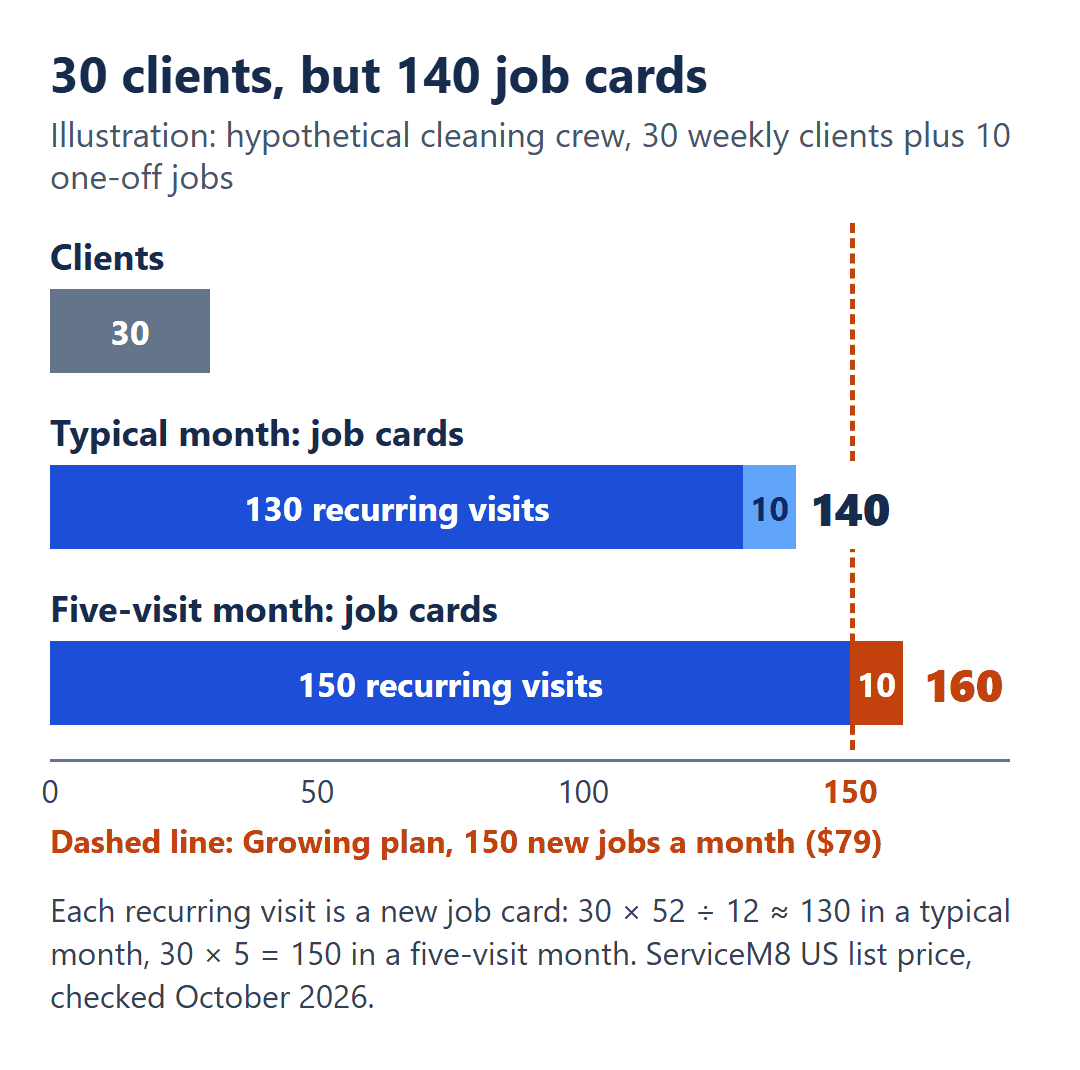
| Cleaning crew, 4 users, 30 weekly clients plus 10 one-off jobs | 30 × 52 ÷ 12 ≈ 130, plus 10 = 140 | Growing, $79 (covers 150) |
| Plumbing or HVAC shop, 4 users, 3 techs at 4 new jobs per workday, 21 workdays | 3 × 4 × 21 = 252 | Premium, $149 (Growing covers 150) |
| Larger operation, 10 users, one month | 1,800 | Premium Plus, $349 + 300 × $0.20 = $409 |
All of these are before card-processing fees, paid add-ons and tax. Notice that the user count never changes a price above the first row; it only rules out Free.
The cleaning crew shows why step 1 asks for your busiest month too. In a month with five weekly visits per client, it creates 30 × 5 + 10 = 160 job cards, which is more than Growing’s 150.
Features that move you up whatever your count
- Growing ($79) is the first plan with Proposals (multi-option quotes), Bundles, Inbox (email-to-job), Asset Management and building your own Forms.
- Premium ($149) is the first plan with Job Costing, Markup Billing and Knowledge.
On Free and Starter you can still buy ready-made forms from ServiceM8’s Form Store; building your own takes Growing or higher. My practical reading: if you send multi-option quotes or want to see costs against each job, read the plan off this list first and the job table second, because the feature can cost more than the count.
The month you run past your number
Go back to the plumbing shop from the top, averaging 52 cards a month on a 50-job plan. Here’s what ServiceM8 says happens when it runs out:
- You get 7 more days. You can keep creating jobs and working as normal. If your billing month resets in that window, your credits reset; otherwise you’re prompted to upgrade.
- Those 7 days may not cover a whole busy stretch. It depends on where you are in your billing month when you run out.
- Unused credits don’t carry over. Credits reset each billing month, so a quiet month doesn’t bank jobs for a busy one.
- There’s no lock-in. You can upgrade or downgrade at any time, and unused credit from your old plan goes toward the new one on a pro-rata basis.
Put together, a business that’s over its plan only in its busy season can move up for that stretch and back down afterward. Take a hypothetical lawn crew at about 120 job cards most months, on Growing (150 jobs, $79), that hits 190 in May. It’s 40 over, gets 7 days of normal use and then an upgrade prompt unless its billing month resets first, and it can switch to Premium (500 jobs, $149) for May and return to Growing after. What that May costs depends on the pro-rata credit, so I haven’t put a dollar figure on it.
Two points ServiceM8’s pricing pages leave open, and they’re worth asking before you count on a particular reset date:
Does my billing month, and the credit reset, follow the calendar month or the date I subscribed? When I set up a recurring job, at what point does each future visit use its job credit?
Using the 14-day trial to get a real count
ServiceM8 offers a 14-day free trial with full access to every feature, and you only enter payment details if you decide to subscribe. Payment is by credit or debit card online, or by In-App Purchase with your Apple ID.
Two weeks is enough to see your real job-card count instead of an estimate. Create jobs the way you normally would, recurring visits included, and look at the number at the end of each week. If part of your decision is software that bills by the login instead, how two other field-service plans count logins for a small HVAC team shows that model with its own numbers.
Then take your busiest week, multiply it out the way the plumbing shop did, and set it against the job column. On a paid plan, your head count won’t move the price; the job cards and the features you need will. Current prices and the Free-plan rules are on servicem8.com/us/pricing and servicem8.com/us/free-plan.