Picture a hypothetical HVAC shop: three techs in the field, an owner who writes the quotes and runs the schedule, and books that already live in QuickBooks Online. The owner has narrowed the choice to Jobber or Housecall Pro and opens both pricing pages to compare the entry plans.
For this shop, the entry plans aren’t the comparison. Neither vendor’s lowest plan connects to QuickBooks Online, so the first plan the owner can actually use sits a step up on both sides. And both vendors charge by who logs in, not by how many trucks are on the road.
On Jobber, QuickBooks Online sync starts at Connect. On Housecall Pro, it requires the Essentials or MAX plan. Jobber’s 5-user Connect bundle is $199 a month with no commitment, $169 a month on a 12-month commitment, or $149 a month billed annually as one upfront charge for the year.
Housecall Pro’s current list prices aren’t in this post, because its pricing page blocked access when this was researched. The questions to put to its sales team are further down.
Jobber figures come from Jobber’s official pricing page and Housecall Pro facts from its official help center, both checked October 17, 2026. Prices are US list prices before sales tax. Service Stackwise has no paid or commission relationship with either company, and nothing here comes from using an account.
Where QuickBooks Online sync starts on each side
Both requirements come from the vendors’ own documentation, so this is the one part of the comparison you can line up directly.
| Vendor | Sync available on | No sync on |
|---|---|---|
| Jobber | Connect and higher | Core (one user, $49 a month with no commitment) |
| Housecall Pro | Essentials or MAX | Basic |
Housecall Pro’s QuickBooks Online integration guide states it plainly: to connect the two, “you must be on either the Essentials or MAX Housecall Pro plans.” Jobber lists QuickBooks Online sync among the features Connect adds over Core.
QuickBooks Online itself is a separate bill either way, bought from Intuit. Housecall Pro connects with four QuickBooks Online plans: Simple Start, Essentials, Plus and Advanced. Watch the name overlap: QuickBooks Online Essentials and Housecall Pro Essentials are different products from different companies.
If your books are still in QuickBooks Desktop, keep in mind that both requirements above are for QuickBooks Online, and the move itself has its own plan choice and cost: QuickBooks Desktop to Online for small contractors: which plan, what it costs, and what doesn’t convert.
A solo operator isn’t who this comparison is built for. Jobber Core covers one user without the sync, and Housecall Pro Basic can’t connect to QuickBooks Online at all.
Your Jobber price depends on who logs in
If the owner writes quotes and someone in the office dispatches, those are paid accounts too. The number that sets your price can be larger than your crew.
The two examples below are Jobber only, because every input is on Jobber’s own pricing page. Housecall Pro prices that couldn’t be confirmed don’t belong in the same table as a total you can trust.
Contractor A: four logins
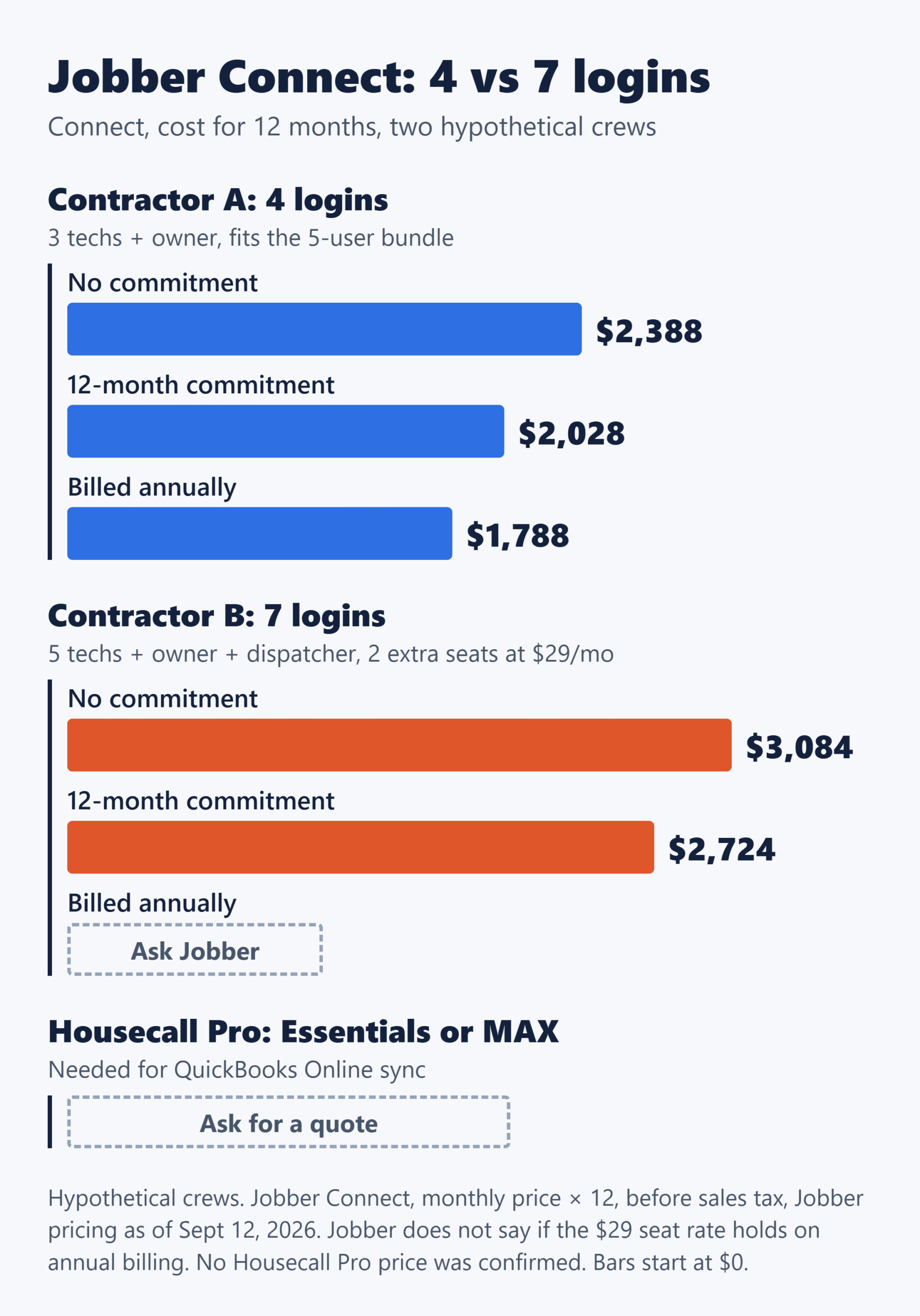
Hypothetical Contractor A has three techs plus the owner. That’s four paid accounts, which fits inside Jobber’s 5-user bundle, so there’s no extra seat to buy.
| How you pay | Connect | Grow | When you’re charged |
|---|---|---|---|
| No commitment | $199/mo $2,388 a year |
$299/mo $3,588 a year |
Monthly, cancel anytime |
| 12-month commitment | $169/mo $2,028 a year |
$259/mo $3,108 a year |
Monthly, for the full 12 months |
| Billed annually | $149/mo $1,788 a year |
$229/mo $2,748 a year |
The whole year at the start |
Jobber’s page shows monthly figures only, not an annual dollar total, so each year figure here is the monthly price × 12. On the annual option, that works out to one charge at the start of the term ($149 × 12 = $1,788 for Connect), plus sales tax where it applies.
Contractor B: seven logins
Hypothetical Contractor B has five techs, the owner and a dispatcher. That’s seven paid accounts, two past the bundle. Jobber lists extra users at $29 a month each, so two seats add $58 a month.
| How you pay | Connect + 2 seats | Grow + 2 seats |
|---|---|---|
| No commitment | $257/mo $3,084 a year |
$357/mo $4,284 a year |
| 12-month commitment | $227/mo $2,724 a year |
$317/mo $3,804 a year |
| Billed annually | Ask Jobber | Ask Jobber |
The annual row is blank on purpose. Jobber publishes the extra-user price as a single figure and doesn’t say whether it holds on annual prepaid billing. If it does, Contractor B would pay $207 a month on Connect ($2,484 over 12 months) and $287 on Grow ($3,444). Confirm the seat rate before you prepay a year.
Nothing special happens at seven logins. The gap between A and B is just two seats at $29 each. To price your own shop on the monthly options: the 5-user bundle price, plus $29 for each login above five, plus sales tax.
Connect or Grow: what the extra $100 a month is for
At no-commitment pricing, Grow costs $100 a month more than Connect for the same 5-user bundle ($299 against $199). Over Connect, it adds two-way SMS, job costing, automatic time tracking, customizable quotes with visuals and reviews, optional line items and custom workflow automations.
Connect already has the QuickBooks Online sync, plus automated client reminders, automatic payment collection, quote and invoice follow-ups, job checklists, and time and expense tracking. If you don’t need two-way texting with customers or job-level costs, that may be the whole list you need.
One thing to watch: Jobber’s 14-day free trial runs on Grow, with no credit card required. If you then buy Connect, two-way SMS and job costing go away. Test the workflow you’ll actually pay for, not the one the trial shows you.
Three Jobber add-ons are sold separately on Connect and Grow: Marketing Suite at $99 a month, Receptionist at $29 a month and Pipeline at $49 a month. If a quote you’re weighing includes any of them, it’s no longer a plan-to-plan comparison.
On the Housecall Pro side, ask which plan carries two-way texting and job costing before you compare anything. Its help center lists Price Book Commissions on the HVAC, Electrical & Plumbing package, Essentials and MAX, but doesn’t give a price.
Monthly, 12 months or a year upfront: what happens when you leave
Jobber’s cancellation terms depend on how you pay:
- No commitment: cancel anytime, and the plan ends at the close of that billing period.
- 12-month commitment, billed monthly: billing continues to the end of the 12 months, even after you cancel.
- Billed annually: the full year is charged at the start. Cancel mid-year and you keep access to the end of the term, but the initial payment is non-refundable.
So the lowest monthly rate is also the one you can’t walk away from. For Contractor A on Connect, paying a year upfront comes to $600 less than no commitment ($2,388 − $1,788), in exchange for a charge you won’t get back if the software doesn’t work out.
Housecall Pro’s billing doc describes a different exit. Cancellation starts in a support chat, but it isn’t fully processed until a team member has spoken with the account owner by phone, and the billing team replies within one to three business days. Build that lead time into any switch. No equivalent Jobber procedure doc was reviewed, so this isn’t a claim that leaving Jobber is easier.
Housecall Pro also offers a 30-day money-back guarantee, but it covers the monthly subscription fee only; setup fees, postcards and chargebacks aren’t refunded. It applies only if the guarantee was offered to you at sign-up and recorded in Housecall Pro’s system, and the doc doesn’t address annual plans.
Two login details matter here too. Housecall Pro’s billing doc lists additional logins as available only on MAX, so on Essentials, adding a person may mean changing plans rather than buying a seat. And archiving a team member’s profile doesn’t remove their additional login from your plan. You have to ask support by chat or phone, so the bill doesn’t shrink on its own when someone leaves.
Costs that sit outside the subscription
Payment processing grows with what you collect, not with the plan you pick. Keep it out of the plan comparison and run it against your own card and bank volume. Both vendors publish their US rates.
| How the customer pays | Jobber | Housecall Pro |
|---|---|---|
| Card, standard rate | 2.9% + 30¢ | 2.99% when the customer pays an online invoice; 3.49% when your team keys in, scans or charges a card on file |
| Card in person | Tap to Pay: 2.7% + 30¢ | Swipe, tap or chip: 2.59%, plus $5 a month per active Tap to Pay device |
| Bank payment (ACH) | 1% | 1% |
| Faster payout | Instant Payouts: +1% | Instapay: +1% |
Housecall Pro also charges 3.49% on American Express and on commercial, corporate or business cards, however they’re taken. If your office charges saved cards by hand, plan on the top rate, not the headline one.
To see what Jobber’s three rates take out of a single job, and what the instant-payout fee adds when cash is tight, the next read is Jobber Payments fees: what comes out of a $1,200 invoice by card, ACH or instant payout.
GPS is another line item. Housecall Pro’s Vehicle GPS Tracking is $20 per vehicle per month with no contract, so four trucks add $80 a month on top of the plan. The help doc doesn’t say which plans can buy it, which is one more question for the quote.
What to get in writing from Housecall Pro
Housecall Pro’s pricing and terms pages returned access errors on every attempt during research in September 2026. Its help center was reachable, and every Housecall Pro fact above comes from there. That’s a limit of this research, not a judgment about the product, but it means there’s no honest side-by-side total to show you.
So ask for a quote built on the number of logins you actually need, and get answers to these in writing:
What do Essentials and MAX cost today, monthly and annually? On annual billing, what is the actual amount charged for the year, and is sales tax added on top?
How many users does each plan include? Can I add a login on Essentials, and what does an added login cost?
Does the subscription auto-renew, and what happens to my payment if I cancel partway through an annual term?
Which plans can buy Vehicle GPS Tracking, and which plan includes two-way texting and job costing?
What do data migration and onboarding cost, and how long do they take? Is there a QuickBooks Online discount for Housecall Pro customers, and on what terms?
Ask Jobber the migration question too. Neither vendor publishes what moving your data costs or how long it takes.
Putting the two quotes side by side
If QuickBooks Online isn’t negotiable, the real choice is Jobber Connect or Grow against Housecall Pro Essentials or MAX, priced at your login count rather than your tech count.
The Jobber side you can price today. Choose Grow only if two-way SMS or job costing will change how you run jobs; otherwise Connect does the QuickBooks work for $100 a month less at no-commitment pricing. Choose the billing option by how sure you are: no commitment costs the most and is the only one you can stop at will, while a year upfront costs the least and doesn’t come back.
Then hold the decision until the Housecall Pro quote is in writing, built on the same logins and the same billing option. That’s the only total worth comparing yours against.
Sources: Jobber pricing · Housecall Pro: QuickBooks Online integration guide · Housecall Pro: billing and account management · Housecall Pro: payment processing options · Housecall Pro: vehicle GPS tracking