CompanyCam charges by plan first, then by login. Core covers 1 user and can add a second, but it can’t go past 2 users. The third person who needs their own login moves you to Crew. The US list prices are $79, $149 and $299 a month for Core, Crew and Scale on monthly billing, or $63, $119 and $249 a month billed annually. Those are prices for the plan, not per user. Crew and Scale include 3 users, and each extra login adds $34 a month on monthly billing or $29 a month on annual billing. Annual billing means you pay the whole year up front. It’s non-refundable, and a seat you remove mid-year stays paid until renewal.
Quick Answer: What CompanyCam Costs a Contractor
- List prices (USD), for the plan: Core $79, Crew $149, Scale $299 a month on monthly billing. Billed annually, they’re $63, $119 and $249 a month, paid up front as $756, $1,428 and $2,988 for the year before extra users.
- Users included: Core 1 (2 users maximum), Crew 3, Scale 3. With 3 or more people who need their own login, Crew is the lowest plan you can be on.
- Extra logins: $34 a month each on monthly billing, or $29 a month each billed annually, on any plan.
- Not everyone needs a seat. Customers can get a project link through Guest Access (Crew and Scale) without a login. Subcontractor companies can join as Project Collaborators with their own free CompanyCam account (Scale). Anyone you invite as a User is billed.
- Annual billing is less flexible when people come and go. Adding someone mid-year is charged right away, prorated to the end of the year. Removing someone doesn’t refund their seat before renewal.
This guide is for a US contractor or trade business of about 1 to 20 people, such as a roofing, restoration, remodeling, HVAC, painting or landscaping company. It assumes you’re signing up now and paying CompanyCam directly in USD. It covers the Core, Crew and Scale plans only and doesn’t compare CompanyCam with other software.
All prices and rules are CompanyCam’s US list prices and policies from companycam.com and the CompanyCam help center, checked in October 2026. They aren’t results from using an account. Check current prices at companycam.com/pricing before you buy.
In this guide
- CompanyCam Plans and Prices (US, 2026)
- Count Logins, Not Everyone on the Job
- The Third Login Moves You to Crew
- When a Small Team Still Needs Crew or Scale
- Annual vs. Monthly When Your Headcount Changes
- Changing Plans or Leaving
- Your Plan and Cost in Five Steps
CompanyCam Plans and Prices (US, 2026)
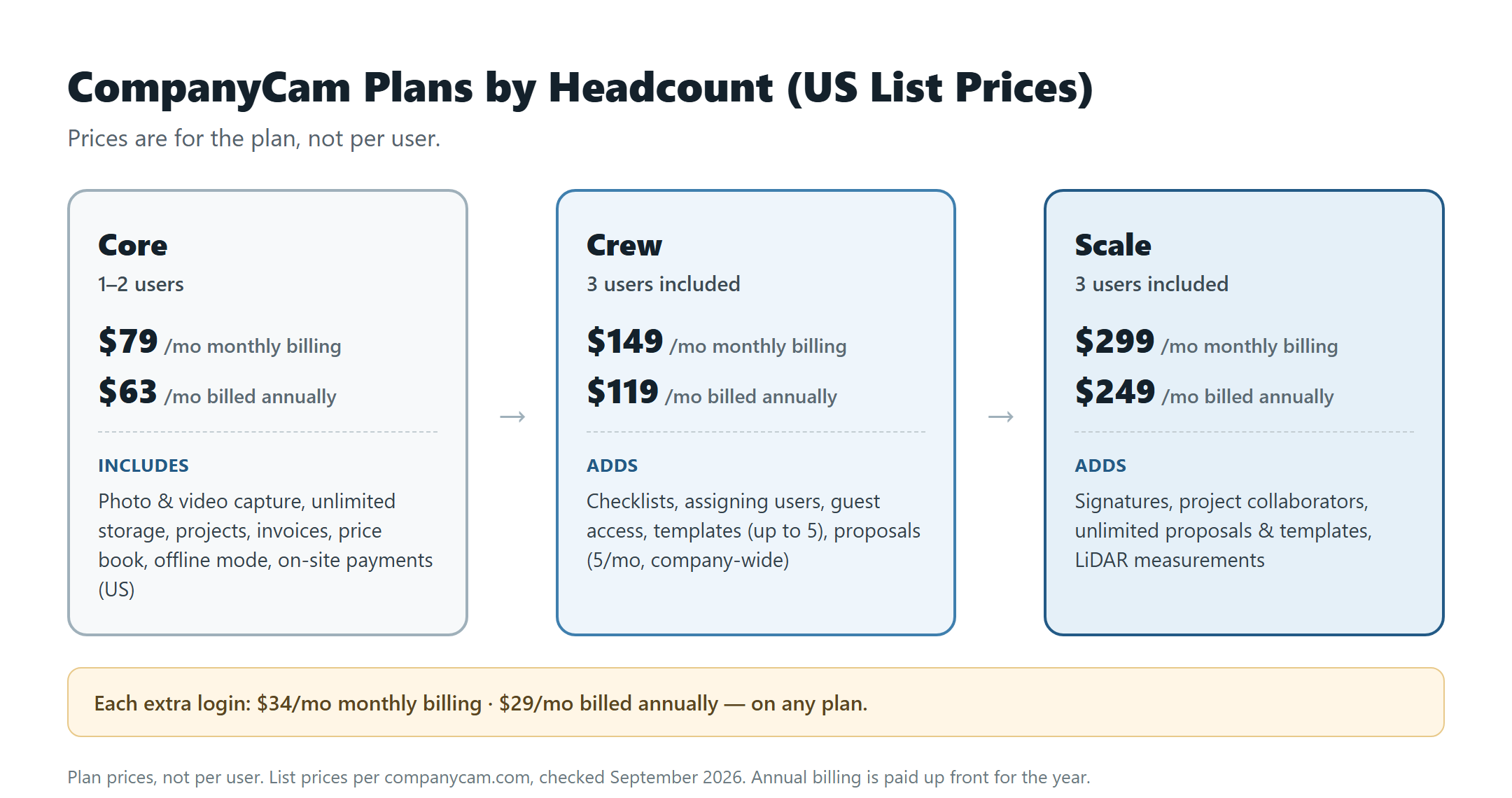
These are list prices in USD per companycam.com, checked October 2026. Each price is for the plan with its included users, not per user. The table shows only the users, prices and features that decide which plan a small contractor needs.
| Plan | Users included | Monthly billing | Billed annually (per month) | Annual bill, paid up front | What the plan adds (features this guide covers) |
|---|---|---|---|---|---|
| Core | 1 (can add 1 more; 2 maximum) | $79/mo | $63/mo | $756 | Photo and video capture, unlimited storage, projects, invoices, price book, offline mode, on-site payments (US) |
| Crew | 3 | $149/mo | $119/mo | $1,428 | Core’s features plus checklists, assigning users, guest access, templates (up to 5), proposals (5 a month, company-wide) |
| Scale | 3 | $299/mo | $249/mo | $2,988 | Crew’s features plus signatures, project collaborators, unlimited proposals and templates, LiDAR measurements |
| Each extra login (any plan) | — | $34/mo | $29/mo | $348 per seat | — |
Monthly vs. annual: 12 monthly payments come to $948 on Core, $1,788 on Crew and $3,588 on Scale. Billed annually, the same plans cost $756, $1,428 and $2,988. That’s $192, $360 and $600 less a year on the plan price. An extra seat costs $408 a year on monthly billing and $348 billed annually, a $60 difference.
What the table leaves out: Enterprise has custom pricing for teams of 50 or more users. Optional add-ons such as Marketing Suite are billed separately from the plan. Any processing fees for on-site card payments aren’t included in these prices. If you signed up for Scale before September 17, 2026, and haven’t moved to the new pricing, you may still be on $249 a month or $199 a month billed annually. Subscriptions through the Apple App Store are limited to 3 users.
Count Logins, Not Everyone on the Job
CompanyCam defines a seat as one person with their own login. Anyone who needs to capture photos, manage projects or access job documentation in your account gets a seat, whether they work in the office or in the field. Every person you invite as a User is added as a billable user.
Two groups can work with you without taking a paid seat:
- Customers, homeowners and property managers: Guest Access gives them a project link without a CompanyCam login, at no cost. It’s on Crew and Scale, not Core.
- Subcontractors and partner companies: Project Collaborators connects their own CompanyCam account to your project. The account is free for them to create. Inviting collaborators is a Scale feature.
If you invite a subcontractor as a User in your own account instead, that person is a paid seat like anyone else on your team.
The Third Login Moves You to Crew
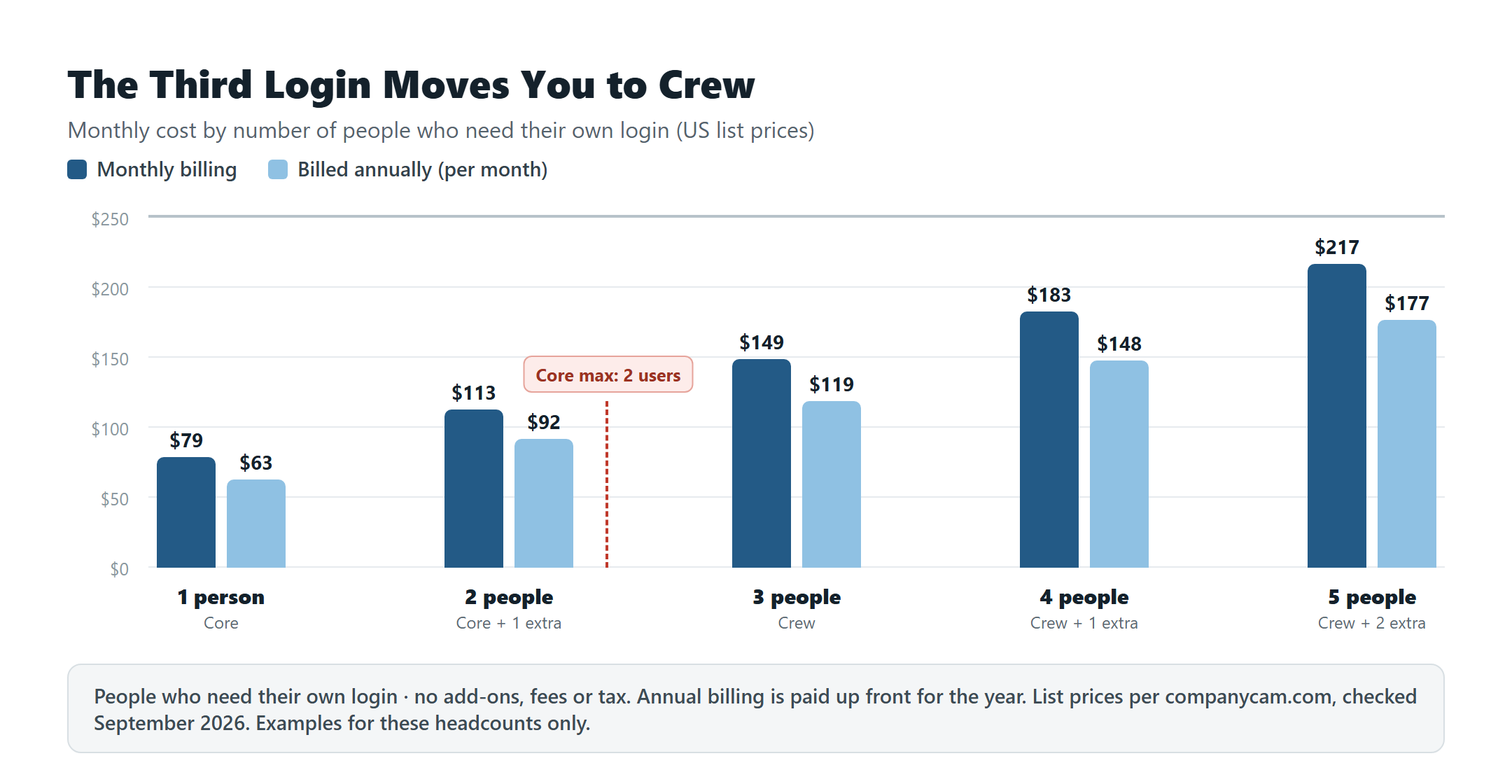
Core includes 1 user, and you can add a second at the extra-login price. It can’t be expanded beyond 2. When a third person needs a login, you move to Crew, which starts with 3 users included. Going from 2 logins to 3 adds $36 a month on monthly billing ($113 to $149) or $27 a month billed annually ($92 to $119).
Examples at list price, counting only people who need their own login and assuming no feature that requires a higher plan:
| People with a login | Plan | Monthly billing | Billed annually (per month) | Annual bill, paid up front |
|---|---|---|---|---|
| 1 | Core | $79 | $63 | $756 |
| 2 | Core + 1 extra | $79 + $34 = $113 | $63 + $29 = $92 | $1,104 |
| 3 | Crew (Core holds 2 at most) | $149 | $119 | $1,428 |
| 4 | Crew + 1 extra | $149 + $34 = $183 | $119 + $29 = $148 | $1,776 |
| 5 | Crew + 2 extra | $149 + $68 = $217 | $119 + $58 = $177 | $2,124 |
| 8 | Crew + 5 extra | $149 + $170 = $319 | $119 + $145 = $264 | $3,168 |
These totals exclude add-ons, payment processing fees and any sales tax. They show what each headcount costs at list price, not a price that fits every roofing or HVAC business. Your own number depends on how many people need a login and which features you need.
When a Small Team Still Needs Crew or Scale
Headcount sets the lowest plan you can use. Of the features this guide covers, a few can move you up even with 1 or 2 people:
- Crew: checklists, assigning users and tasks across your team, guest access for customers, templates (up to 5) and proposals (5 a month, company-wide).
- Scale: signatures, project collaborators, unlimited proposals and templates, and LiDAR measurements on compatible devices.
Photo and video capture, unlimited storage, projects, invoices, price book, offline mode and on-site payments (US) come with every plan, including Core.
For example, a 2-person team that needs checklists pays for Crew: $149 a month on monthly billing or $119 billed annually, instead of Core with a second user at $113 or $92. Crew and Scale both include 3 users and share the same extra-login price. So Scale costs $150 a month more than Crew on monthly billing, or $130 a month more billed annually ($1,560 a year), at any headcount of 3 or more.
Annual vs. Monthly When Your Headcount Changes
CompanyCam’s annual terms, from its Annual Subscription Policy:
- You pay for the full year up front. Your card is charged the full yearly bill on the day you subscribe. The plan renews automatically on the anniversary of your first payment, and CompanyCam sends a reminder email before charging you.
- Adding a user mid-year is charged the same day you invite them, prorated for the rest of the subscription year.
- Removing a user doesn’t refund the seat. When you deactivate someone, the seat stays open for you to fill with someone else. At renewal, your cost adjusts up or down to your number of active seats.
- Annual plans are non-refundable. You can cancel any time and keep access until your renewal date, but you won’t get a refund or credit for unused time or unfilled seats.
- You can switch to monthly billing at any time. CompanyCam credits the remaining time on your annual plan to your monthly invoices.
On monthly billing, you pay month to month. If someone leaves, you deactivate them and stop paying for their seat, and anything they contributed stays in your account. If you cancel, billing stops at the end of your current cycle, and you keep access until then.
Example, with its assumptions: a roofing company on Crew needs 5 logins from March through October and 3 from November through February, because 2 workers are seasonal. Billed annually with 5 seats, it pays $2,124 up front ($177 a month). The 2 seats it deactivates in November stay paid, and open for it to fill, until renewal. On monthly billing, counting whole billing months, it would pay $217 a month for 8 months and $149 a month for 4 months, or $2,332 for the year. In this case annual still costs $208 less. If the 2 seasonal workers needed a login for only 4 months, monthly billing would come to $2,060, which is $64 less than annual.
Billed annually, you pay $192 to $600 less a year on the plan price, depending on the plan, and $60 less per extra seat. Whether annual costs less for you depends on your headcount through the year. Add up 12 monthly bills at the number of logins you expect each month, and compare the total with the annual bill for the most seats you’ll need at once. Seats added partway through an annual year are charged prorated, so your annual cost can come in lower than that. With a steady headcount, annual costs less. When some logins are needed for only part of the year, monthly can cost less, because you stop paying for a seat when someone leaves.
Changing Plans or Leaving
- Upgrading or downgrading: you can change plans at any time from Settings > Billing in your CompanyCam account. Upgrades take effect immediately. Downgrades take effect at the next billing cycle.
- Moving down to Core: Core holds 2 users at most, so it only works if 2 or fewer people need a login.
- Trying it first: CompanyCam offers a free 14-day trial with no credit card required.
- Canceling: monthly plans stop billing at the end of the current cycle. Annual plans are non-refundable but keep access until the renewal date.
Your Plan and Cost in Five Steps
- Count the people who need their own login, in the office and in the field. Leave out customers, who can use Guest Access on Crew or Scale. Leave out subcontractor companies only if you’re on Scale and invite them as Collaborators.
- Find your lowest plan from that count. With 1 or 2 people, Core is possible. With 3 or more, Crew is the minimum.
- Check the plan-moving features. Move up to Crew for checklists, assigning users or guest access, even with 1 or 2 people. Move up to Scale for signatures, collaborators, unlimited proposals or LiDAR.
- Work out the monthly cost: plan price + (people beyond the included users × extra-login price), both at the same billing cycle. Core includes 1 user, and Crew and Scale include 3. An extra login is $34 on monthly billing or $29 billed annually.
- Compare billing cycles at your own headcount. Add up 12 monthly bills at the number of logins you expect each month, and compare the total with the annual bill. Annual is paid up front and non-refundable, and seats you remove mid-year stay paid until renewal.
What these figures exclude: add-ons such as Marketing Suite, payment processing fees and any sales tax. The method shows what your setup costs at list price, not which plan is right for your business.
Next steps
- List everyone who needs their own login, leaving out customers and, on Scale, subcontractor companies you invite as Collaborators.
- Pick the plan from that count, then check whether you need a Crew or Scale feature.
- Add $34 a month (monthly billing) or $29 a month (annual billing) for each person beyond the included users.
- Decide on the billing cycle by comparing 12 monthly bills at your month-by-month headcount with the annual bill.
- Confirm the current price at companycam.com/pricing. The full plan comparison is in CompanyCam’s Plans Explained help article, and the annual terms are in its Annual Subscription Policy.