It’s tempting to split these two tools by how clients book: if they pick their own stylist or trainer, use Acuity Scheduling, and if bookings should go to whoever is free, use Calendly. On the published prices, the second half of that runs backward. Wanting “book any available” is the requirement that makes Calendly the more expensive of the two.
On Calendly, handing a booking to whoever is free is a Round Robin event, and Calendly’s help center is explicit: “Round Robin event types are available on the Teams and Enterprise plans.” Teams is $20 per seat per month on monthly billing, so three people who take bookings come to $60 a month. Acuity does the same job with calendar pooling, a setting you switch on (“Any available”) once an appointment type is offered on two or more calendars, and three calendars fit inside Standard at $34 a month for the whole account.
Calendly charges per seat, so the bill grows with every person who takes bookings. Acuity charges per account, by calendar tier, so the bill holds still from two calendars to six. At list prices, Acuity costs less from two bookable people if you’d need Calendly Teams, and from three if Calendly Standard covers you; for one person, Calendly is cheaper. How you want bookings handed out doesn’t flip that. It only decides which Calendly plan you’d be comparing against.
Prices, plan limits and feature conditions here come from Calendly’s and Acuity Scheduling’s pricing pages and help centers, checked October 17, 2026. They’re US list prices for the subscription alone, before sales tax and before what Stripe, Square, PayPal or Venmo take on each payment. This is a reading of the published pages, not a report from either account, and the team sizes below are illustrations.
What each company is actually counting
Calendly’s unit is the seat, its word for a paid user. The pricing page puts it this way: “Seats are required for users to connect calendars and host Calendly meetings.” Everyone who needs their own booking link needs a seat.
| Plan | Billed monthly | Billed annually |
|---|---|---|
| Free | $0 | $0 |
| Standard | $12 | $10 |
| Teams | $20 | $16 (1 to 30 seats) |
Free covers one event type, one calendar connection and one-on-one meetings, with no payment collection, so it’s a solo plan. Standard adds unlimited event types, Collective and Group events, and Stripe and PayPal. Teams adds Round Robin. Enterprise “Starts at 50 seats” and “Starts at $15k/yr,” which is a different conversation from a small team’s.
Two seat rules cost small teams money. The help center says “You pay for every seat, even if it’s not filled,” and you can’t cut your seat count below the number of users currently assigned. When a part-time trainer leaves, the bill drops only after you remove that user and then lower the seat count, in that order. Adding someone mid-cycle is prorated.
Acuity’s unit is the calendar, and the price covers the account, not each person.
| Plan | Billed monthly | Billed annually | Calendars |
|---|---|---|---|
| Starter | $20 | $16 | 1 |
| Standard | $34 | $27 | Up to 6 |
| Premium | $69 | $55 | Up to 36 |
Acuity defines the unit in one line: “Each calendar in Acuity represents a separate set of hours when clients can book appointments.” Each staff member who takes bookings uses one, a second location uses one, and a room uses one only if clients pick that room when they book. Shared chairs, rooms or equipment you just need to keep from double-booking run on a separate feature called resources, which cap simultaneous bookings, “aren’t visible to clients” and don’t use calendars. Past 36 calendars, Acuity sends you to its enterprise team with no published price.
Logins don’t change Acuity’s price on a standalone subscription: no per-person charge is listed for contributors. Calendly’s similar-sounding limit, calendar connections (one on Free, six on Standard), is the number of Google or Outlook calendars one user links, not a count of bookable staff.
The annual columns in both tables are monthly equivalents. Neither pricing page prints a yearly total, so twelve times the rate is your own arithmetic; check the amount at checkout.
What 3, 5 and 10 bookable staff cost a month
“Bookable staff” here means people clients book directly: one Calendly seat, or one Acuity calendar. Count the owner or the front desk if they take their own appointments.
| Staff | Calendly Standard | Calendly Teams | Acuity |
|---|---|---|---|
| 3 | $36 | $60 | $34 (Standard) |
| 5 | $60 | $100 | $34 (Standard) |
| 10 | $120 | $200 | $69 (Premium) |
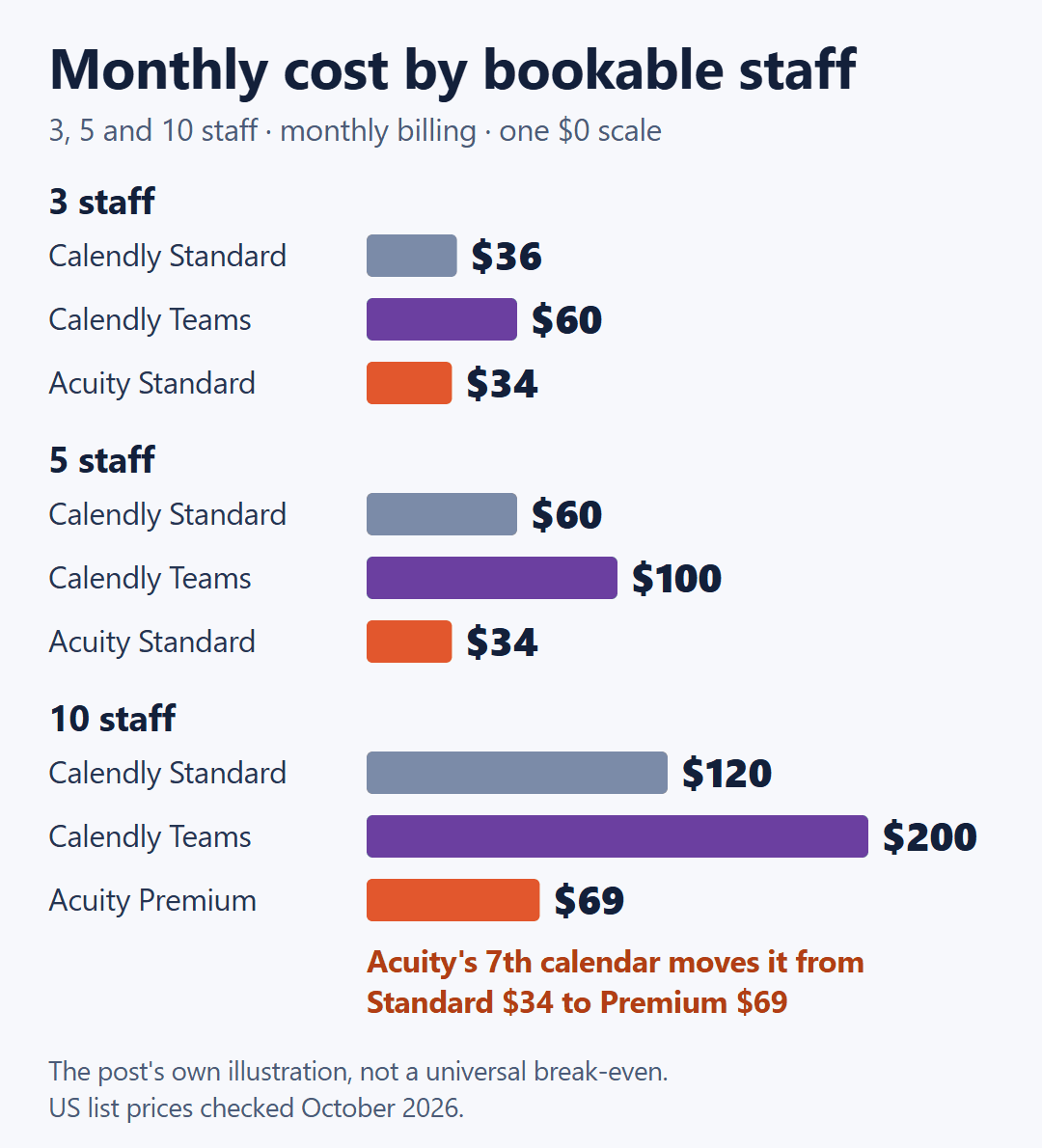
Calendly is the seat price times the number of people; Acuity is one account price that doesn’t multiply. On annual billing the same rows read $30, $48 and $27 at three people, $50, $80 and $27 at five, and $100, $160 and $55 at ten.
The lines cross in the same places on both billing cycles:
- Against Calendly Teams, from two people. Two Teams seats are $40 a month against Acuity Standard’s $34 ($32 against $27 on annual billing). Two people already need Standard on Acuity, because Starter holds one calendar.
- Against Calendly Standard, from three people. Two seats are $24, still under $34; three seats are $36 ($20 and then $30 against $27 on annual billing).
- At one person, Calendly. Free is $0, and one Standard seat is $12 ($10 annual) against Acuity Starter’s $20 ($16).
The step to watch is Acuity’s seventh calendar, which moves you from Standard to Premium: $34 to $69 a month on monthly billing, a $35 jump in one go. It doesn’t hand the advantage back. Seven Calendly seats are $84 a month on Standard and $140 on Teams.
How rooms change the count: a hypothetical salon
Take a hypothetical salon with four stylists and three treatment rooms, on monthly billing. If the rooms are only there to stop two facials landing in the same room at once, they run as resources: four calendars, Acuity Standard, $34 a month. If clients choose a room when they book, each room becomes a calendar too: seven calendars, Acuity Premium, $69. Calendly’s bill counts the four stylists who host meetings either way: 4 × $12 = $48 on Standard, or 4 × $20 = $80 on Teams.
That’s an illustration, not a rule. Count what clients choose between, not the rooms you own, before you assume you’re near Acuity’s six-calendar ceiling.
Does the way clients book change the plan you need?
Here are four booking styles a small service business might want, with the conditions each company’s documentation states.
| What you want | Calendly | Acuity |
|---|---|---|
| Client picks a named person | Yes. Each seat has its own link; a team page gathers them, from Standard | Yes. Clients pick a calendar by default, or a link per staff member |
| Booking goes to whoever is free | Round Robin, Teams and Enterprise only | Calendar pooling (“Any available”), switched on in settings; needs two or more calendars |
| Two staff in one appointment | Collective, Standard and up | Not described in Acuity’s help docs |
| One person, several clients at once | Group, Standard and up | Group classes, capped by “Max number of people” |
Three of the four work on both products. Acuity’s help center states no plan requirement for pooling or group classes; pooling needs two calendars, so in practice it starts at Standard. The one gap runs the opposite way from the split in the opening: Acuity’s documentation describes pooling, group classes and resources but no event type that puts two staff in a single appointment. That’s a gap in what’s documented, not a confirmed limit.
Both companies use the name Round Robin, and it means different things. Calendly rotates meetings “between multiple hosts based on availability.” In Acuity, round-robin is one of two ways a pooled booking gets assigned, and it goes to “the calendar with the fewest appointments that day”; the other, priority, works down your calendar list in order. If evening out the work between stylists is the point, read that difference before the label.
On Calendly, the real constraint is billing, not booking: “each host must be a Calendly user with their own paid seat,” and “Invitees don’t need Calendly accounts or seats.” Your clients never need an account, but your staff each need a seat whichever style you choose. Calendly’s documentation doesn’t say whether a client can pick a specific host from inside a Round Robin event; team pages and per-seat links are the documented way to let clients choose a person.
Prepaid packages, text reminders and payments
Prepaid selling. Acuity sells three separate things from Standard up: packages (prepaid sets of appointments that don’t auto-renew), subscriptions (recurring memberships, which need Stripe or Square) and gift certificates. Starter has none of them. Calendly has a meeting-packages feature, but its two help pages describe access differently. The page on selling with packages lists “Standard, Standard Plus, Teams, Teams Plus, and Enterprise” and asks only that Stripe be connected; the Stripe page says the feature is “currently in private beta and available to select users with Stripe connected.” The one condition both agree on is Stripe. If packages are a reason to choose Calendly, confirm the feature is switched on in your account before you pay.
Text reminders. Calendly’s paid plans include 250 SMS credits per seat per month, and its credit table puts “The United States of America” in “Tier 0 (0 credit per message),” so reminders to US numbers don’t spend credits. International texts cost 1, 3 or 9 credits depending on the country, and once a seat hits its limit, texts stop and Calendly sends email instead. Acuity lists text reminders from Standard without publishing a message count, so don’t compare the two by number of texts.
Payments. Acuity connects Stripe, Square, PayPal and Venmo from Starter. Calendly connects Stripe and PayPal from Standard. If your front desk already runs Square, that can settle the decision before price does. Neither subscription price includes what the processor takes per payment; if Square or Stripe will collect your deposits, Square vs. Stripe invoice fees on $300, $1,200 and $3,000 jobs works through that second bill.
One smaller line on Acuity: hiding the Acuity logo on your scheduling page is a Premium feature, so Starter and Standard pages keep it.
Before you pay for a year, or hand a manager the keys
Neither trial asks for a card. Calendly gives new accounts “a free two-week trial of the Teams Plus plan” and moves you to Free automatically when it ends. Acuity offers a “7-day trial, no credit card needed,” which is a short week to build staff calendars, connect payments and test a booking, so start it on a day you can work in it.
The refund terms are where the two split:
- Acuity: “Annual Acuity subscriptions canceled within 14 days of purchase are automatically fully refunded.” That covers your first annual payment, not renewals, monthly plans or legacy accounts. Annual accounts get an email 15 days before renewal.
- Calendly: you can cancel anytime by switching to Free, but “Calendly payments are generally non-refundable.” Paid features stay on until the current cycle ends.
My practical reading: the annual rate is real money ($20 per Teams seat drops to $16, $34 for Acuity Standard drops to $27), and so is the fact that a Calendly year paid up front generally doesn’t come back. A cycle or two on monthly billing costs you the discount for those months and buys an exit that doesn’t depend on a refund request.
Moving history over is uneven too. Acuity documents a CSV import for appointments and clients, but you have to split files into “groups of 500 rows,” importing only adds appointments rather than updating them, and “it’s not possible to import packages, gift certificates, or subscriptions.” Prepaid balances your clients already bought get rebuilt by hand. On Calendly, the documented import covers contacts only and is “in limited availability and available to select users.” That’s a difference in what each company documents, not proof one move is easy and the other impossible.
Last, check which kind of account you’re on before you make a manager an admin, because Acuity’s own access-level page says the limits “vary slightly depending on which platform you used to sign up for Acuity.” On an Acuity account, Admin users “can do almost everything the account owner can do, including adding or removing other users, managing subscriptions,” so the person running your schedule can also change what you pay. On a Squarespace account, the Scheduling Administrator can’t “add or remove contributors, or change access levels” and can’t “change or cancel Squarespace subscriptions, such as Acuity.” Acuity attached to a Squarespace website also follows that website plan’s contributor limit; if the website is part of the same decision, Wix vs. Squarespace pricing for a service business that takes bookings prices that side.
If your account doesn’t answer these, they’re worth sending to support during the trial:
To Calendly: Are meeting packages available on my account and plan? Can a client choose a specific host inside a Round Robin event? To Acuity: Is there a way to book two staff members into the same appointment? Is my account an Acuity login or a Squarespace login, and what can an admin change on it?
So the number to take to both pricing pages isn’t your payroll headcount. It’s how many people clients book by name, plus any location or room they choose between, and whether you’d have to buy Calendly Teams to hand bookings out automatically. Price that number on both pages, start on monthly billing, and let the first month’s invoice confirm the arithmetic before you commit to a year.
Official pages to recheck: Calendly pricing · Acuity Scheduling pricing · Calendly SMS credit limits · Acuity calendar pooling · Acuity access levels · Acuity Scheduling refund policy