Picture the job you want your website to bring in. A homeowner finds you on a Tuesday night, picks a Thursday morning slot and pays $500 up front by card. That’s a hypothetical, but it’s the job this whole decision turns on, because Wix and Squarespace put that booking in very different places.
On Wix, the booking and the card payment both sit inside the site plan, starting with Core at $29 a month on annual billing. The $500 runs through Wix Payments at 2.9% + $0.30, so $14.80 comes off. On Squarespace, no website plan includes booking. The appointment runs on Acuity Scheduling, a separate subscription from $16 a month on annual billing, and the card is charged by whichever processor you connect to Acuity (Stripe, Square, PayPal or Venmo) at that company’s rate.
If customers will book on your site, budget Wix Core at $29 a month on annual billing, or Squarespace Basic plus Acuity Starter at $19 + $16 = $35. On monthly billing it’s $36 against $45, using the monthly rates Wix listed in July 2026. If the site only collects quote requests, Wix Light at $17 and Squarespace Basic at $19 do the same job ($24 and $25 monthly). Squarespace Core adds $10 a month on annual billing, and it’s worth it mainly if you sell through the site, want a free first-year Google Workspace inbox, or need more than two people editing.
Prices are in US dollars from Wix’s and Squarespace’s pricing pages and help centers and Acuity’s pricing page, checked October 17, 2026. Wix’s monthly rates come from a Wix blog post dated July 26, 2026, the only one of the official Wix pages checked for this comparison that lists them, and Wix notes its pricing is subject to change. These are standard rates, not promotions, and the jobs in this post are illustrations.
Which plan takes bookings on each platform
| The site needs | Wix | Squarespace |
|---|---|---|
| A lead form only | Light, $17 | Basic, $19 |
| Online booking | Core, $29 | Basic + Acuity Starter, $35 |
| Booking, plus Squarespace Core features | Core, $29 | Core + Acuity Starter, $45 |
| The site needs | Wix | Squarespace |
|---|---|---|
| A lead form only | Light, $24 | Basic, $25 |
| Online booking | Core, $36 | Basic + Acuity Starter, $45 |
| Booking, plus Squarespace Core features | Core, $36 | Core + Acuity Starter, $59 |
Wix. The booking app itself is free to add, and that’s the part that’s easy to misread. Wix’s help center: “You can add Wix Bookings to your site for free, but you must upgrade your site to accept bookings,” and “You must upgrade your site in order to accept online payments.” That article doesn’t name a tier, but both of Wix’s plan pages list “Accept payments” and “Scheduling and services” starting in the Core column, not in Light. Core is the budget line; if you hope Light will do, ask Wix before you pay.
Squarespace. Its help center describes Acuity Scheduling as “a separate Squarespace service” with “its own subscriptions,” and the website tier doesn’t change whether booking is available. That’s why Basic is the cheaper base in both tables. Acuity Starter includes one calendar and Standard up to six, at $27 a month on annual billing or $34 monthly. Acuity’s pricing page doesn’t define what one calendar covers, so don’t convert it into a headcount from the pricing page alone; if several people take bookings, Calendly vs. Acuity Scheduling for a team of 3, 5 or 10 bookable staff works through what counts as a calendar and when Standard becomes the floor.
Squarespace sells four self-serve website plans: Basic, Core, Plus and Advanced, at $19, $29, $49 and $99 a month on annual billing, or $25, $39, $65 and $139 monthly. A “Premium plans” tier for growing service businesses goes through its sales team with no published price. Older names such as Personal and Business are legacy plans, still common in comparison articles that haven’t been refreshed.
The third row is the same pair of subscriptions as the second with Squarespace’s website plan moved up to Core. Use it only if one of these applies: you’ll take payments through the Squarespace site and want its 2% commerce fee gone, you want the free first-year Google Workspace inbox, three or more people need to edit the site (Basic stops at “Up to 2 contributors”), or you need custom CSS and JavaScript. Otherwise the Basic row is the fair comparison. On the Wix side, Light allows two site collaborators and Core five.
The gap widens on monthly billing, from $6 to $9 at the booking level, for a structural reason: the Squarespace route is two subscriptions, so it takes two monthly-billing increases ($6 on Basic, $4 on Acuity Starter) while Wix Core takes one ($7).
The two fees on a card payment
“Wix charges 0%, Squarespace charges a percentage” mixes up two separate charges.
Processing is charged on every card payment on both platforms. Wix Payments in the US takes 2.9% + $0.30 on cards other than American Express, 3.7% + $0.30 on American Express, and an extra 1.5% on cross-border payments. Squarespace Payments takes 2.9% + $0.30 on US domestic cards on Basic and Core, 2.7% + $0.30 on Plus and 2.5% + $0.30 on Advanced; premium cards are 3.2% + $0.30, international cards add 1.5%, and ACH is 1.5% on Basic against 1% with a $10 maximum fee on Core and up. Connect Stripe or PayPal instead, and their rates apply rather than these.
The commerce transaction fee is Squarespace’s own charge on top of processing: 2% on Basic, none on Core, Plus or Advanced. Wix’s published rate documentation lists no separate per-plan transaction fee, and that’s all “Wix is 0%” means. Card payments on Wix still cost the processing rate.
A $500 sale, worked out
Take a hypothetical $500 sale at the standard 2.9% + $0.30 US card rate: processing is $500 × 0.029 + $0.30 = $14.80 on either platform. If that sale goes through a Squarespace store on Basic, the 2% commerce fee adds $10. Moving from Basic ($19) to Core ($29) on annual billing costs $10 a month and removes that fee, so in this example one such sale a month breaks even and ten such sales cost $100 a month in that second layer alone. That’s one sale size on one billing cycle, not a rule; run it with your own monthly site sales.
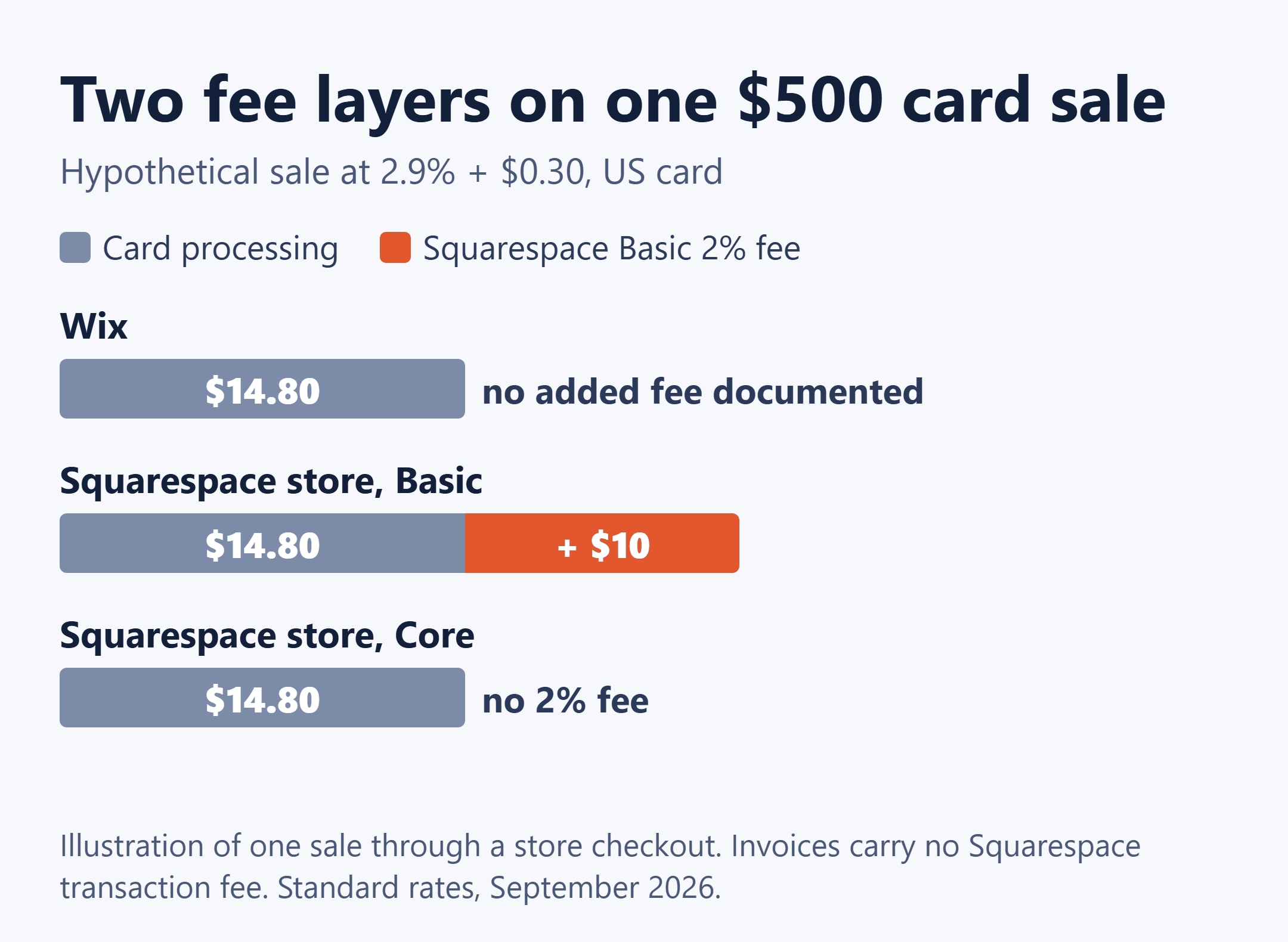
Two things narrow the 2% for service work. Squarespace’s help center says there are no transaction fees for invoices, so if you bill after the job rather than through a store checkout, the commerce fee doesn’t come into it. And Squarespace’s fee documentation covers store and digital-product sales on the website; neither company’s pages say whether the Squarespace Payments rates or Basic’s 2% apply to a deposit collected through Acuity, which runs on Stripe, Square, PayPal or Venmo. Don’t add 2% to booking deposits on that assumption. Ask Squarespace, and price your processor directly; if you’re choosing between Square and Stripe for that, Square vs. Stripe invoice fees on $300, $1,200 and $3,000 jobs shows what each takes.
Business email: included on one side, extra on the other
Wix is plain about it: “Wix Premium or Studio plans do not include a business email account. Business emails must be purchased separately.” It resells Google Workspace Business Starter, Business Standard and Business Plus, but the help center doesn’t print the prices; you see them on the Business Email page inside your Wix account. So no public Wix page gives you a complete monthly total for a site with company email.
Squarespace includes one free Google Workspace Business Starter user and inbox for the first year on Core, Plus and Advanced, not Basic. After that year it lists Business Starter at $84 per user per year, Standard at $168 and Plus at $264. Workspace subscriptions renew automatically by default; Squarespace charges 15 days before the renewal date and emails 30 days ahead.
For a one-person shop with a single hello@ address, the difference is one free year on Squarespace Core. If three people each need their own address, both platforms bill for the extra seats, but only Squarespace publishes the per-user rate before you sign up.
Paying monthly costs more than the higher rate
On the monthly rates Wix listed in July 2026, monthly billing adds $7 a month on Wix Light, Core and Business ($13 on Business Elite). On Squarespace’s pricing page it adds $6 on Basic, $10 on Core, $16 on Plus and $40 on Advanced. Those are subtractions between listed prices, not savings either company quotes.
It also costs you the free domain on both platforms. Wix says “Monthly plans do not include Wix vouchers or premium apps,” and its plan pages show “Free domain for 1 year” on paid tiers. Squarespace includes one free custom domain for a year with eligible annual plans, excluding monthly billing and its Mobile Start plan. From year two the domain is a cost on either cycle. Wix’s blog says only that the domain renews at its standard yearly rate, and Squarespace says a domain renews at “the annual TLD price”; neither publishes the figure, so look up your exact extension on each domain search rather than comparing year-two costs from an article.
Squarespace’s promotions apply only to the first payment of a new subscription, not renewals, so budget with the standard rate. Wix notes that prices and currency vary by location and that its annual prices are before tax; the monthly-billing sentence in its blog post doesn’t mention tax, and Squarespace’s pricing page doesn’t say how tax is handled. Acuity’s page states its prices exclude applicable taxes.
Trials, renewals and more than one location
Trying it first. Wix’s free plan runs indefinitely, but on a siteprefix.wixsite.com address with Wix branding, sometimes ads, up to 500 MB of storage and no way to take payments, so it’s a preview rather than a business site. Squarespace offers a 14-day trial with no card, extendable by seven days, but during the trial you can’t accept payments, receive form submission emails, or verify the site with Google Search Console or Bing Webmaster Tools. For a lead-form site, the form email is exactly what you’d want to test, so expect to subscribe before you know whether inquiries arrive.
The Wix auto-renew trap. Wix plans renew automatically, and its help center warns you to switch auto-renewal off only “after the first 14-day money back period, otherwise your plan is cancelled immediately.” If you want the site to stay up, wait until day 15. This comparison doesn’t cover Squarespace’s refund and cancellation terms, so read them on Squarespace’s site before you pay.
More than one location. Wix adds Local Business structured data to your homepage once your business name and location are in your account, but “Wix creates Local Business markup for your primary location only. If you have multiple business locations, we don’t create markups for each additional location.” Additional locations need structured data added by hand. Squarespace’s SEO documentation lists local business among the schema types it generates automatically and doesn’t address multiple locations. That’s a difference in what each company has published, not proof that one handles several locations better.
If any of these matter to your setup, get the answer in writing before you build:
To Wix: Can a Light plan accept bookings through Wix Bookings, or do I need Core? What monthly price will I be charged at checkout? To Squarespace: Do the Squarespace Payments rates or the 2% Basic commerce fee apply to deposits collected through Acuity Scheduling? How is local business markup handled for a second location? What are the refund terms if I cancel an annual plan?
The thing to settle before comparing templates is where your bookings will live: inside a site plan you’re paying for anyway, or in a second subscription with its own price and renewal date. Decide how customers will book and pay, then price the plan that does it on the billing cycle you’ll actually use.
Official pages to recheck: Wix plans · Wix blog: Is Wix really free? · Wix Bookings · Squarespace pricing · Squarespace transaction fees and payment processing rates · Acuity Scheduling pricing