Search “is Invoice Simple free” and you can land on a deal listing that calls the cheapest plan a “free plan.” Invoice Simple’s own pricing page doesn’t have one. It lists three paid plans, and the only free part is a 14-day trial with full Premium access.
So when the trial ends and the app asks you to pick a plan, the useful question is narrower: how many invoices do you send in a month, and how many in your busiest one?
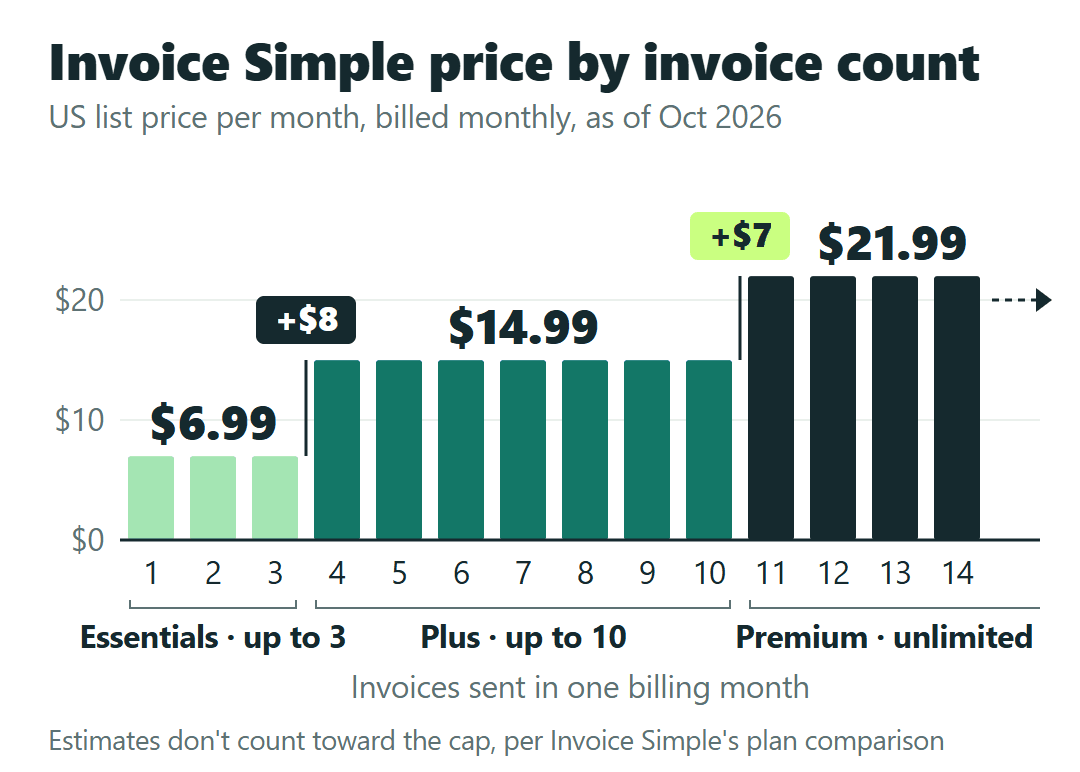
After the trial, Essentials is $6.99 a month for up to 3 invoices, Plus is $14.99 for up to 10, and Premium is $21.99 for unlimited invoices. Billed yearly, they’re $69.99, $149.99 and $219.99, which is about ten months’ price charged up front. Fees are non-refundable, which matters most if you pay for the year.
The number I’d look at twice: going from 3 invoices to 10 costs $8 more a month, but going from 10 to unlimited costs only $7 more.
Prices in this post are Invoice Simple’s published US list prices in USD as of October 2026, taken from its pricing page, plan comparison, Help Center and Terms of Service. They’re before any sales tax, they don’t come from an Invoice Simple account, and every business below is a hypothetical illustration.
What counts toward the 3- or 10-invoice limit
The limit is on invoices, counted per billing month: from the day your billing month starts to the day it ends, not the 1st to the 31st of the calendar.
Estimates are treated differently. On Invoice Simple’s current plan comparison (as of October 2026), estimates are unlimited on all three plans. An older Help article words the Essentials limit as “estimates and invoices,” so if you send far more estimates than invoices, confirm how the app counts them while you’re still in the trial.
Count from your busiest month, not your average. You can change plans any time, but Invoice Simple says changes to feature limits apply to your next billing cycle, so an upgrade made in the middle of a busy month may not lift that month’s limit.
Example A: a house cleaner with six monthly clients
Take a hypothetical house cleaner who bills six recurring clients once a month and picks up one or two one-off jobs in spring. That’s 6 invoices in a normal month and 8 in a busy one. Essentials (3) is too small; Plus (10) covers both, at $14.99 a month or $149.99 a year up front.
Example B: a handyman who sends 8 to 12 invoices
Now a hypothetical handyman who sends one invoice per job and does 8 to 12 jobs a month. Plus covers the slow months, but a 12-job month runs past its 10-invoice limit. Premium is $21.99, $7 more than Plus, and at 12 invoices that’s $21.99 ÷ 12 = about $1.83 an invoice.
The cap rule is the same for everyone. The plan it points to depends on your own busiest month. If you’re also weighing bookkeeping software that sends invoices, our breakdown of what counts toward Xero Early’s 20 invoices a month works through the same counting question for a different tool.
The $8 step and the $7 step: what each plan costs
| Plan | Invoices per billing month | Monthly / annual (up front) | Annual saving |
|---|---|---|---|
| Essentials | Up to 3 | $6.99/mo $69.99/yr |
$13.89 |
| Plus | Up to 10 | $14.99/mo $149.99/yr |
$29.89 |
| Premium | Unlimited | $21.99/mo $219.99/yr |
$43.89 |
Invoice Simple advertises annual billing as “2 months free.” The math holds up: 10 × $6.99 = $69.90, and Essentials is $69.99 a year. The saving column is 12 × the monthly price minus the annual price, for example 12 × $14.99 = $179.88, minus $149.99 = $29.89 on Plus.
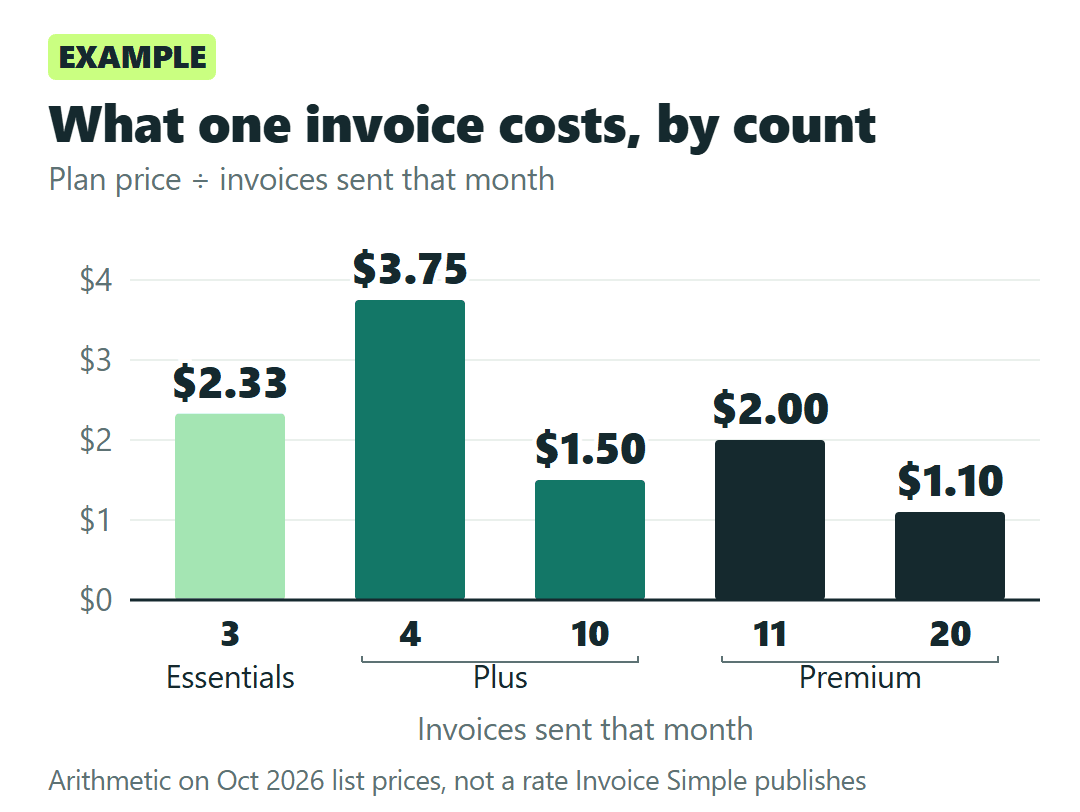
Divide each price by the invoices you actually send and the ladder looks different. This is plain arithmetic, not a rate Invoice Simple publishes:
- Essentials at 3 invoices: $6.99 ÷ 3 = $2.33 an invoice
- Plus at 4 invoices: $14.99 ÷ 4 = $3.75; at 10: $1.50
- Premium at 11 invoices: $21.99 ÷ 11 = $2.00; at 20: $1.10
At 11 invoices, Premium costs less per invoice than Plus does at 4. If your busy months land right around 10, staying on Plus saves $7 a month but leaves no room for an 11th invoice.
Example C: a lawn crew billing 25 customers a month
A hypothetical lawn crew that bills 25 customers once a month has one plan that fits: Premium, at $21.99 a month (about $0.88 an invoice) or $219.99 a year up front.
What else changes between Essentials, Plus and Premium
The invoice count does most of the deciding. Four other differences are worth holding up against how you work:
- Photos on invoices and estimates start on Plus.
- Due-date reminders start on Plus.
- Client signatures are Premium only.
- Premium templates are Premium only, along with priority support.
Online payments are available on every plan. Card fees on those payments are separate from the plan price and aren’t covered in this post.
Deposits are the one to check yourself, because Invoice Simple’s own pages don’t agree on which plans include them. If you take deposits before a job, try it during the trial and get the answer in writing. These are the two questions I’d send support:
Which plans let me request a deposit on an invoice? And does anything other than a sent invoice, such as a draft or an estimate, count toward my plan’s monthly invoice limit?
Monthly or annual, and who handles a refund
Annual saves $13.89 a year on Essentials, $29.89 on Plus and $43.89 on Premium. In exchange, you pay the year in advance, and under Invoice Simple’s Terms, fees are non-refundable: no refunds or credits for partial use, for upgrades or downgrades, or for unused months. Renewals keep coming until you cancel.
Invoice Simple says you can email support if you believe you’re eligible for a refund. It doesn’t promise one.
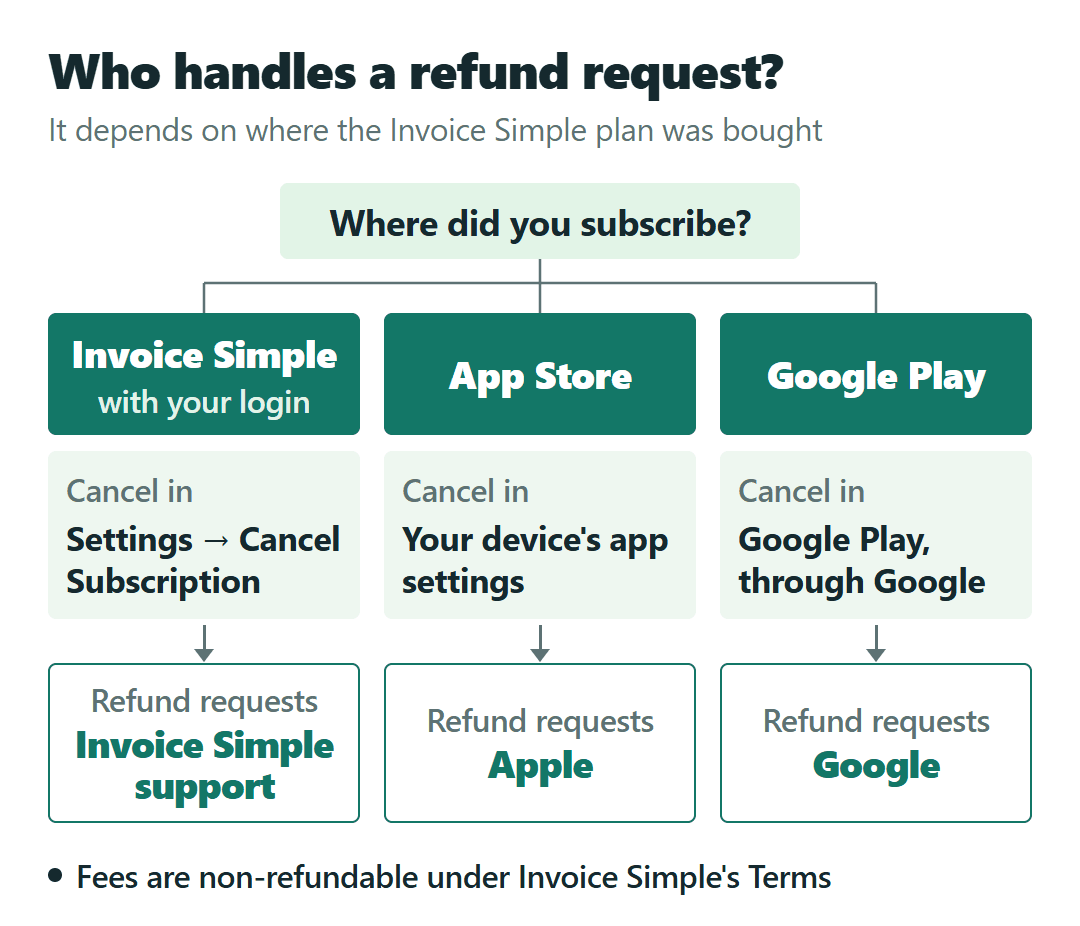
Where you subscribed decides how you cancel and who you ask:
- Through Invoice Simple (with your Invoice Simple login): cancel in Settings → Cancel Subscription; refund requests go to Invoice Simple support.
- Through the App Store: cancel in your device’s app settings; refund requests go to Apple.
- Through Google Play: cancel and request refunds through Google.
Depending on where your business is, sales tax may be added to the subscription price, and Invoice Simple asks you to keep a business address on the account.
My practical reading: start monthly, through the channel you’ll actually manage, and move to annual only once your invoice count has settled. Two months free is a fair deal on a number you’re sure of and a poor one on a guess.
Picking the plan from your own invoice history
- Count the invoices you sent in your busiest billing month, or the one you expect this season. Estimates don’t belong in that count on the current plan comparison.
- Pick the cheapest plan whose limit covers it: 3, 10 or unlimited.
- If your busy month lands near 10, look at the $7 step to Premium before settling on Plus.
- Decide whether you need client signatures or premium templates. Both come only with Premium.
- If you take deposits, test them in the trial and confirm the plan with support.
- Pay monthly at first. Switch to annual when the count is steady, knowing the money won’t come back.
Already on a subscription from an earlier sign-up? Check the renewal price in your account, since it may not match the prices above.
And if the decision in front of you is which app rather than which plan, our Joist pricing guide on picking a plan when the free trial ends walks through the same moment with another estimating and invoicing app.
Fourteen days is plenty of time to find your number. The plan is simply the first limit above it.
Sources: Invoice Simple Pricing · Invoice Simple plan comparison (Essentials package page) · Help Center: free trial · Help Center: subscription refund policy · Help Center: how to cancel · Invoice Simple Terms of Service