Your 14-day Joist trial is over, and the app wants you to pick a plan. There’s no free plan to fall back to anymore. Basics is the minimum to keep using the app.
That’s what makes the choice harder than it looks. Joist says the trial gives you Run’s features, plus anything in Elite. So for two weeks you may have put your logo on estimates, attached job photos, synced to QuickBooks Online and scheduled visits. The plan you pay for now decides which of those you keep.
Basics is $10 a month billed monthly and covers 5 documents a month, estimates and invoices combined. Pro is $17 a month billed monthly, removes that limit, and is where your logo, job photos and QuickBooks Online sync start. Elite, at $32 a month billed monthly, adds change orders and business reports. Run adds jobs and scheduling, and joist.com shows it as an introductory offer at $70 a month billed monthly against a $100 list price. Paying annually costs about 10 months’ worth, up front, and every plan is one user per account.
Prices are in USD as listed on joist.com in September 2026, except the figures attributed to Joist’s App Store listing. They’re Joist’s published prices, not charges from an account. They don’t include Joist Payments processing fees, the AI Receptionist add-on (starting at $49, billed monthly) or sales tax.
What each plan keeps from the trial
Joist’s comparison table runs long, but only a handful of rows move a contractor from one plan to the next. Each plan below includes everything in the plan above it.
| Plan | Per month | What it adds |
|---|---|---|
| Basics | $10 | 5 estimates and invoices a month, combined. Online payments, deposits, e-signatures and homeowner financing, which every plan includes |
| Pro | $17 | Unlimited documents, logo and branding, job photos and attachments, QuickBooks Online sync |
| Elite | $32 | Change orders, business and sales reports |
| Run | $70 intro offer (list $100) | Jobs and scheduling visits |
On annual billing, joist.com shows the same plans at $8.34, $14.17 and $26.67 a month, with Run at $58.33 on its introductory offer. Joist prices a year as “2 months free,” and you pay it all up front: about $100 for Basics, $170 for Pro, $320 for Elite, and about $700 for Run at the introductory rate.
Five documents a month, counted the way Joist counts them
The Basics limit is 5 documents a month, and Joist counts estimates and invoices together. It isn’t 5 invoices, and it isn’t 5 jobs. Four rules decide how fast you use them:
- Converting an estimate makes a new invoice. Joist says the conversion gives you a brand-new invoice and the original estimate stays put. So a job that gets both an estimate and an invoice can use two of your five.
- Bids you don’t win count too. Every estimate you create is in the total, whether or not the job goes ahead.
- Deleting doesn’t give a slot back. Once the 5 are used, you can’t create another document until the next month, even if you delete one.
- Your month starts on your sign-up day, not the 1st. The count renews every month on the same day of the month you signed up.
Two hypothetical months on Basics
Contractor A and Contractor B are illustrations, not real accounts. Contractor A writes 4 estimates in a month, wins 2 of those jobs and invoices both: 4 + 2 = 6 documents, one more than Basics allows. Contractor B writes 2 estimates, wins both and invoices both: 2 + 2 = 4 documents, inside the limit.
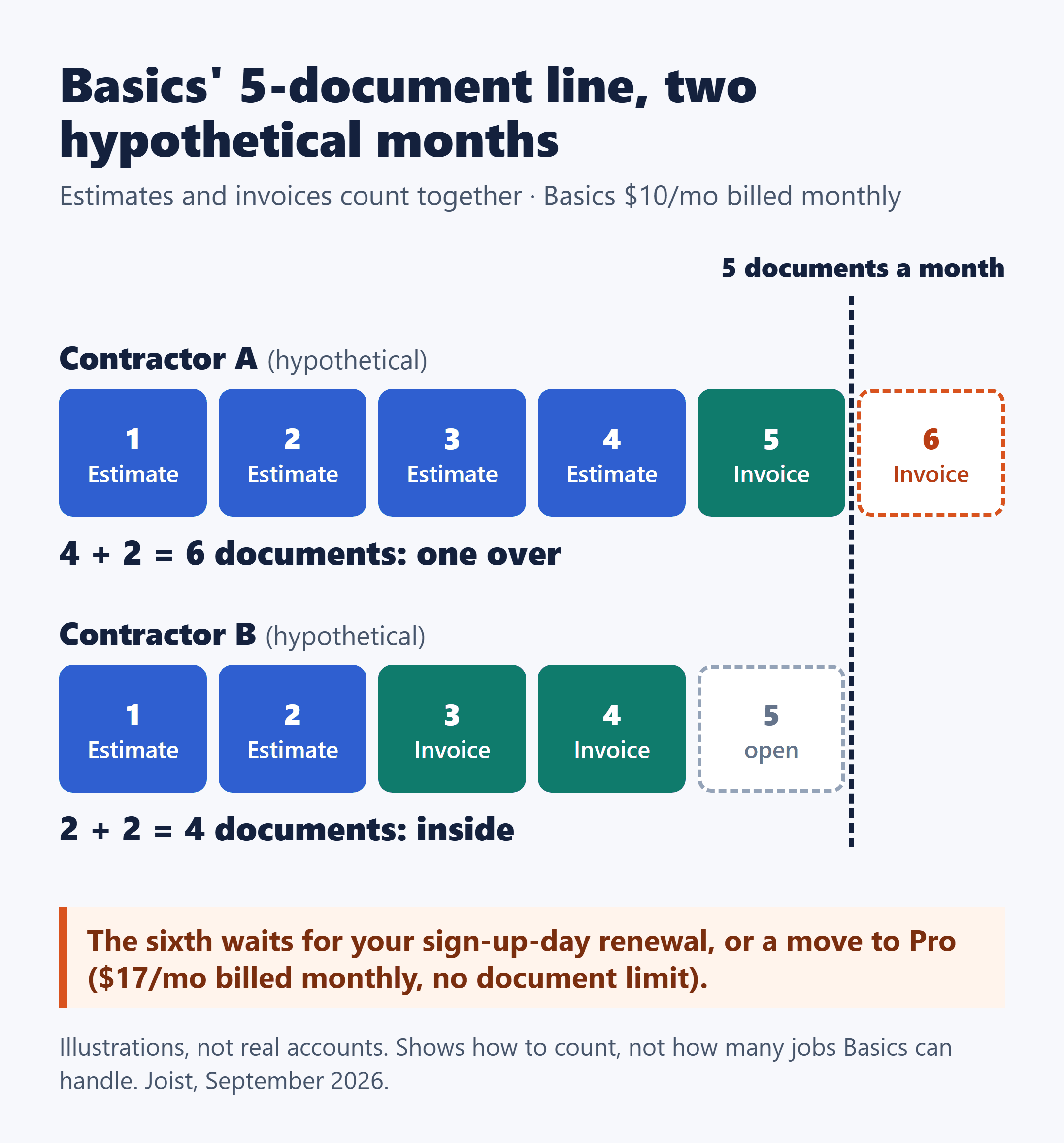
Contractor A’s sixth document has to wait for the sign-up-day renewal, or for a move to Pro, which has no document limit. Neither month says how many jobs Basics can handle. They show what to count: estimates plus invoices, including the bids that don’t land. Run that count for a typical month and for your busiest one.
When a feature, not volume, sets your plan
A quiet month doesn’t keep you on Basics if you need one of these:
- Pro or higher: your logo and branding, job photos and attachments, or QuickBooks Online sync.
- Elite or higher: change orders, or business and sales reports.
- Run: jobs and scheduling visits.
QuickBooks sync is the one I’d check first if you keep your books there. It starts at Pro and works with QuickBooks Online only, not QuickBooks Desktop or Self-Employed. Joist includes it in the plan at no extra cost, and anything already synced stays synced if you cancel.
Say, as a hypothetical, you create 3 documents a month but want Joist to sync with QuickBooks Online. Your volume fits Basics; the sync doesn’t. Pro is the lowest plan that covers you, at $17 a month billed monthly or about $170 a year billed annually. If the bookkeeping side is still undecided, when paying for bookkeeping software starts to make sense for a small contractor is the earlier decision to settle before you weigh sync.
If anyone else in the shop needs to log in
Joist accounts are set up for a single user, with one login email and password. There’s no way to add a second login on any plan, including Run, which Joist describes as designed for solo contractors.
If an office helper or a second tech needs their own access, that means a separate Joist account, and Joist says each account needs its own paid subscription.
Monthly or annual, web or app: settle both before you pay
Joist’s terms make both choices hard to undo once you’ve paid:
- Subscription fees are non-refundable, and plans auto-renew for the same term you started with.
- You can’t switch between monthly and annual while a plan is active. You cancel, let the term end and subscribe again. Downgrading works the same way.
- Canceling keeps access until the term ends. After that, you lose access to the app until you subscribe again.
- You manage the plan where you bought it, whether that’s the iPhone App Store, Google Play or joist.com. Refunds for App Store or Google Play purchases go only through Apple or Google.
- Upgrading mid-term credits your unused time, though Joist handles that differently on iPhone, Android and the web.
| Plan | Monthly billing, 12 months | Annual billing, paid up front |
|---|---|---|
| Basics | $120 | about $100 |
| Pro | $204 | about $170 |
| Elite | $384 | about $320 |
| Run (intro offer; list $100/mo) | $840 | about $700 |
The math is the monthly price × 12 on monthly billing, and about 10 × the monthly price on annual billing. On Pro, that’s $17 × 12 = $204 a year against about $170 paid once. The annual figure is lower; the trade is that it’s paid up front, it can’t be switched to monthly mid-plan, and fees aren’t refunded.
Where you subscribe can change what Run costs. Joist’s App Store listing shows Run at $99.99 a month and $999.99 a year, while joist.com shows the $70 introductory offer. For Basics, Pro and Elite, the App Store’s monthly prices ($9.99, $16.99 and $31.99) are within a cent of the web. If you’re buying Run in the app, check the price on the purchase screen first. Sales tax on app-store purchases is charged by Apple or Google, not by Joist.
One more cost sits outside every plan: if a client pays you online through Joist Payments, standard processing fees apply, and every plan lets you pass that fee to the client. This post doesn’t quote Joist’s rates. For a feel for how per-invoice payment fees add up on job-sized amounts, a side-by-side of invoice fees on $300, $1,200 and $3,000 jobs works through two processors’ published rates.
Pick the plan, then pick the screen you’ll buy it on
Start with the count. Add up estimates plus invoices for a typical month and your busiest one. More than 5 in either, or a need for your logo, job photos or QuickBooks Online sync, puts your floor at Pro. Change orders or reports put it at Elite, and jobs and scheduling put it at Run.
Then choose where to pay, because that’s where you’ll have to go back to upgrade, cancel or ask for a refund, and it’s where Run’s price can differ. Right now, with the trial over and nothing paid, is the one point where neither choice is locked in. I’d make both on purpose rather than tapping whatever the app puts in front of you first.
Prices were as listed in September 2026; check today’s prices and the Run offer at joist.com/pricing before you subscribe.