Ask what DocuSign Standard costs and there are three correct answers: $25, $30 or $45 per user per month. It’s the same plan with the same features. What changes is how you agree to pay.
When this post was checked, DocuSign’s US pricing page opened on the $30 option, labeled “Annual | Billed monthly.” It reads like a monthly price. It’s actually 12 installments of a $360 commitment, and if you cancel after the first 30 days, the rest of that $360 is still due.
Personal is $10, $11 or $15 a month for one user and 5 envelopes a month, with no way to pay for extras. Standard gives each user 100 envelopes a year on the two annual options, or 10 a month on Monthly, and charges per envelope beyond that. An envelope counts as soon as you send it, signed or not.
So for a small service business: if you never send more than 5 contracts a month, Personal covers it. If you send more, or your sends come in a seasonal rush, Standard on an annual option comes out cheaper than Monthly in every example below, and paying the year upfront costs $60 less per user than the $30 installments.
Prices here are DocuSign’s published US list prices as of October 2026, before tax, for plans bought on docusign.com. The rules come from DocuSign’s pricing page, Support Center and Terms & Conditions, not from a DocuSign account, and every business below is a hypothetical example.
Same plan, three ways to pay
Here’s what the Subscription Type dropdown does to each plan. DocuSign may show you a different option first, so check which one is selected before you compare.
| Plan | Annual, billed upfront | Annual, billed monthly (12-month commitment) | Monthly (cancel any time) |
|---|---|---|---|
| Personal | $10 ($120 a year) | $11 ($132 for the year) | $15 |
| Standard | $25 ($300 a year) | $30 ($360 for the year) | $45 |
| Business Pro | $40 ($480 a year) | $45 ($540 for the year) | $65 |
The two annual columns are the same 12-month commitment. Paying it in monthly installments costs $60 more per user per year on Standard and Business Pro ($360 vs. $300, $540 vs. $480), and $12 more on Personal. Only the Monthly column lets you stop without owing the rest of a year.
The price isn’t the only thing the dropdown changes. It also changes how your envelopes are counted, and for a busy office that can matter more.
What counts as an envelope, and why Personal’s 5 is a hard ceiling
DocuSign charges by the envelope, not the document. One envelope can hold several documents and several signers, say an estimate and a contract for two homeowners, and it still counts once.
The catch is when it counts: the moment you send it, whether or not anyone signs. A quote the customer ignores still uses an envelope. So do envelopes sent through web forms (PowerForms) or Bulk Send.
Your customers don’t need a DocuSign account to sign. Only the sender’s plan counts.
Personal gives one user 5 envelopes a month, and there’s no pay-per-envelope overage on Personal. For more than five a month, DocuSign points you to Standard or Business Pro.
Example: a solo handyman
Take a hypothetical handyman who sends about 4 estimates or contracts for signature a month, never more than 5. Personal fits: $120 a year paid upfront, $132 over the year billed monthly, or $15 a month with no commitment.
A month with a 6th send doesn’t fit, because Personal can’t buy one more envelope. If a 6th send becomes a regular thing, the next step is Standard, which you can buy for a single user: $300 a year upfront, $180 more than Personal upfront.
Standard also adds shared templates, your own branding, comments and in-person signing, which Personal doesn’t include. My reading: for a one-person shop, the envelope count is the reason to move, not those extras.
If your estimates come out of an estimating app, our Joist pricing guide for contractors covers picking that plan when the free trial ends. It’s the bill that sits just before this one in the estimate-to-signature workflow.
Standard’s envelopes: 100 a year or 10 a month, depending on how you pay
On either annual option, Standard and Business Pro give 100 envelopes per user per year, to use whenever you need them. On Monthly, it’s 10 per user per month.
100 a year averages a little over 8 a month, so it looks smaller than 10. But a yearly allowance can absorb a busy month, and a monthly cap can’t.
Every example below has one person doing the sending. If two or three people send, run the count for each sender, and ask DocuSign whether one user can send against another user’s allowance before you rely on it.
What going over costs
Past the allowance, Standard and Business Pro bill per envelope, monthly in arrears. Pre-buying extras (“Subscribe and Save”) from the Plans & Billing page before your next billing date costs less than paying as you go.
| Plan and billing | Pre-bought, per envelope | Pay-as-you-go, per envelope |
|---|---|---|
| Standard, annual plans | $3.00 | $3.60 |
| Standard, Monthly | $4.50 | $5.40 |
| Business Pro, annual plans | $4.80 | $5.80 |
| Business Pro, Monthly | $6.50 | $7.80 |
DocuSign’s table has “Annual” and “Monthly” rows only. It doesn’t say which rate applies to Annual | Billed monthly, so the examples below price overage on the upfront option and on Monthly.
Example: a remodeling office that sends 15 a month
Picture a hypothetical 3-person remodeling office where the office manager sends everything: about 15 envelopes a month, 180 a year, on 1 Standard seat.
On Standard paid upfront, the 100 run out in month 7 (15 × 7 = 105). The other 80 envelopes cost 80 × $3.60 = $288 as you go, for $588 for the year, or 80 × $3.00 = $240 pre-bought, for $540.
On Monthly, every month is 5 over the 10-envelope cap. That’s 12 × $45 = $540 for the plan plus 5 × $5.40 × 12 = $324 as you go, or $864 ($810 if you pre-buy at $4.50).
On the $30 billed-monthly option, the plan alone is $360, $60 more than upfront, before overage at a rate DocuSign doesn’t list separately.
Example: a lawn-care company with a busy March
Now a hypothetical lawn-care company with one sender: 40 renewal agreements go out in March, and about 5 a month the rest of the year, 95 in total.
On Standard paid upfront, 95 fits inside 100, so the year costs $300 with no overage, even though March alone is 40. On Monthly, March is 30 over the cap: 30 × $5.40 = $162 on top of $540, or $702. Personal doesn’t work at all, because March is 35 past its 5.
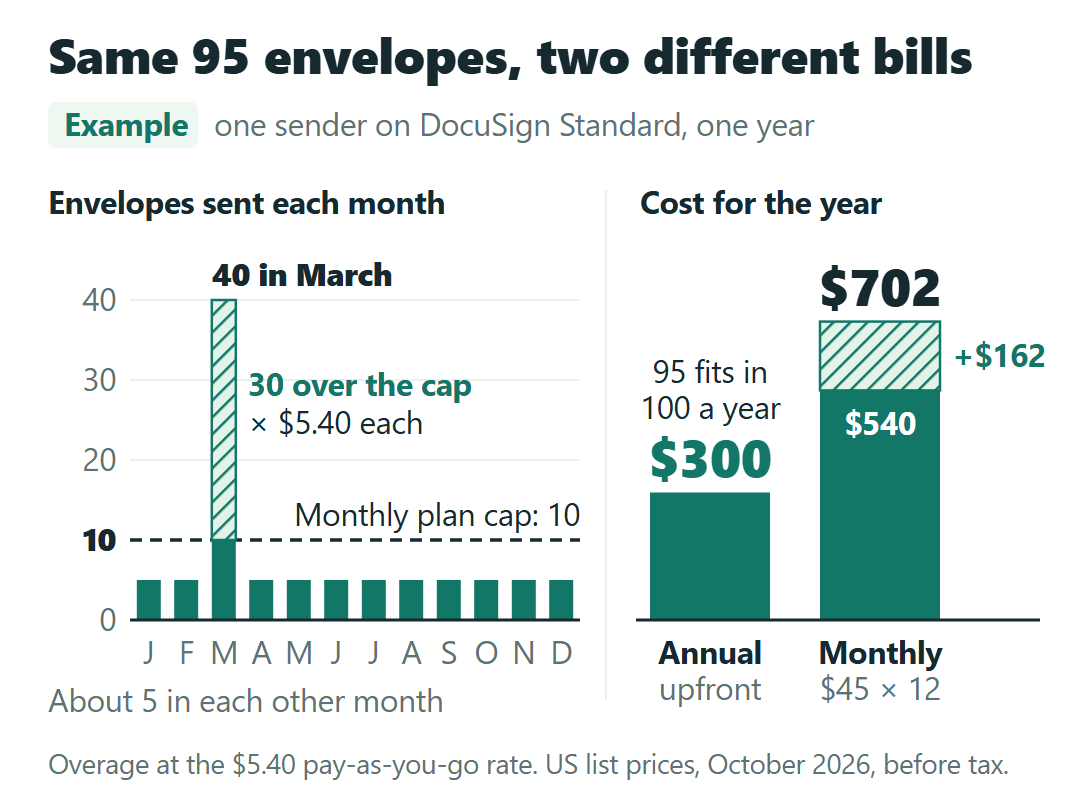
Same sender, same 95 envelopes, $402 apart. When your sends happen matters as much as how many there are.
Before buying a second seat or the billed-monthly option, these are the two questions I’d put to DocuSign support:
I’m looking at Standard on Annual | Billed monthly. Which per-envelope overage rate applies to that option? And if we have two users, can one of them send against the other user’s 100-envelope yearly allowance?
The $30 option is a year you’ve agreed to pay
“Annual | Billed monthly” means you enroll in a full year and pay for it in monthly installments. The Standard card under the $30 price says so in plain words: “This is an annual commitment of $360.”
You can cancel within 30 days of purchase without penalty. After 30 days, canceling leaves the remaining balance of the year due, plus any taxes or overage.
Here’s a hypothetical case on 1 Standard seat: two $30 installments paid, then a cancellation after the 30-day window. The remaining balance is $360 − $60 = $300.
That number shows up in real life too. In a DocuSign Community forum post dated October 12, 2026, one user wrote that they signed up for Standard believing it was $30 a month billed monthly. They canceled in mid-September and were charged $300 on October 10 as the remaining annual balance. A moderator passed it to billing, and no outcome had been posted.
Put the three ways to pay for one Standard seat side by side over 12 months and the trade-off is easy to see.
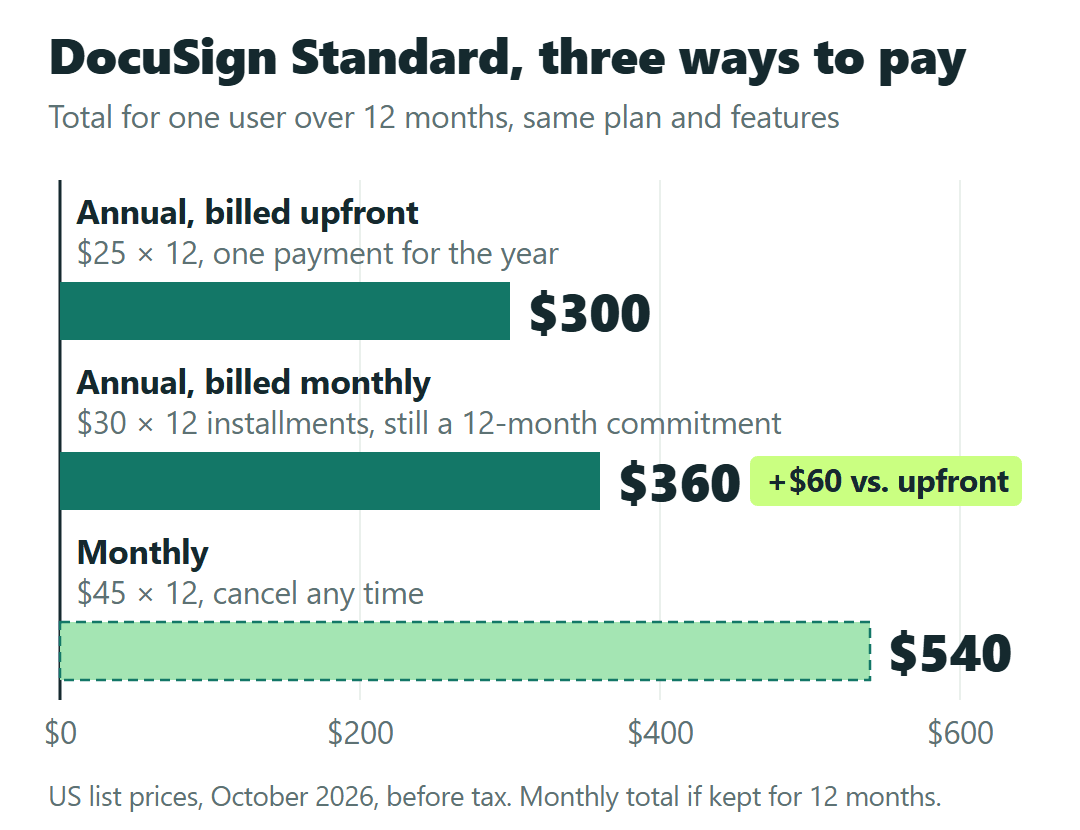
Upfront is the lowest number. Billed monthly costs $60 more and still locks in the year. Monthly costs the most, but it’s the only option you can drop next month, with a 10-a-month cap and higher overage rates attached.
Refunds: one 30-day window, used once
Annual plans bought on docusign.com can be refunded within 30 days, and that risk-free window can be used only once per customer, meaning once per person or business. Don’t plan on a second buy-and-refund.
US monthly plans get no refund. You can cancel any time, and you won’t be charged for the next month. Plans bought through a DocuSign sales rep follow their own contract instead.
When the year ends
Plans renew automatically, monthly plans each month and annual plans each year, at the then-current fee. To stop an annual renewal, cancel at least five business days before the term ends.
DocuSign gives at least 30 days’ notice before changing fees, and the prices on its page “may be valid for new customers only.” If you already subscribe, your renewal price can differ from today’s list, so look at your own account, not the pricing page.
If you do cancel, download your signed documents first, because closing an account can remove access to them. Plans bought through the App Store or Google Play are canceled through Apple or Google.
The same pay-for-the-year question comes up with bigger numbers in field-service software. Our Service Fusion pricing guide on whether to prepay the year works through it for a plan billed as one annual payment.
Is Business Pro worth $40 to $65 per user?
Business Pro has the same envelope allowance as Standard: 100 per user per year on the annual options, 10 per user per month on Monthly. The extra $15 to $20 per user per month buys tools, not more sending.
The step up makes sense if you need one of these: collecting payment during signing (DocuSign Payments, through a supported payment gateway), web forms (PowerForms), bulk send, or drop-down and radio-button fields and signer attachments.
For a remodeler or roofer, a deposit collected at signing is the one I’d weigh. If you go that way, check what the payment gateway charges to process a payment; DocuSign’s plan prices don’t include a processing rate.
Which plan and which way to pay, by how you send
- Never more than 5 sends a month: Personal. Pay upfront ($120) if you’ll keep it a year; take Monthly ($15) if you might not.
- More than 5 in a regular month, or a busy season: Standard on an annual option. Upfront ($300 per user) if the cash is there; the $30 option costs $60 more and still commits you to the year.
- Not sure you’ll keep it past a few months: Standard Monthly at $45 per user, knowing the cap is 10 per user per month and extras run $4.50 to $5.40 per envelope.
- Taking deposits at signing, or using web forms or bulk send: price Business Pro. Otherwise Standard covers the sending.
- Already subscribed: put your renewal date minus five business days on the calendar, and check your renewal price in your account.
One thing this math doesn’t answer is whether a particular contract holds up once it’s e-signed. That’s a question for an attorney, not a pricing page.
Whichever plan you land on, look at the Subscription Type line once more before you click Buy. That one dropdown decides whether you’re paying for a month or promising a year.
Sources: DocuSign eSignature plans and pricing (US) · DocuSign Support: Managing Your eSignature Envelopes · DocuSign Refund Policy · DocuSign Support: Cancel, downgrade, or close your account · DocuSign Terms & Conditions