Housecall Pro’s pricing page sums itself up in three words: “From $59/mo.” The number is real. It’s also the price of one login, and you only get it by paying for the whole year in advance.
Add a second person to the app and $59 becomes $149, because Basic includes a single user and Housecall Pro’s billing help lists extra logins as available only on MAX. Add a sixth person and it becomes $299. On monthly billing, the same three steps read $79, $189 and $329.
Basic costs $79 a month, or $59 a month billed annually, and includes 1 user. Essentials costs $189, or $149 billed annually, with 5 users. MAX costs $329, or $299 billed annually, with 8 users, and it’s the only plan that lets you add logins, at $35 a month for each additional user. So the number of people who need the app sets your lowest possible plan: one person, Basic; two to five, Essentials; six to eight, MAX; nine or more, MAX plus $35 a month per extra login.
These are US list prices before tax, as shown on Housecall Pro’s pricing page in archived copies from September 12 to October 15, 2026, which all show the same plan prices. The billed-annually figures are the monthly equivalent of a charge for the full year. Billing terms come from Housecall Pro’s help center and Terms of Service. Nothing here comes from using a Housecall Pro account, and every business below is a hypothetical example.
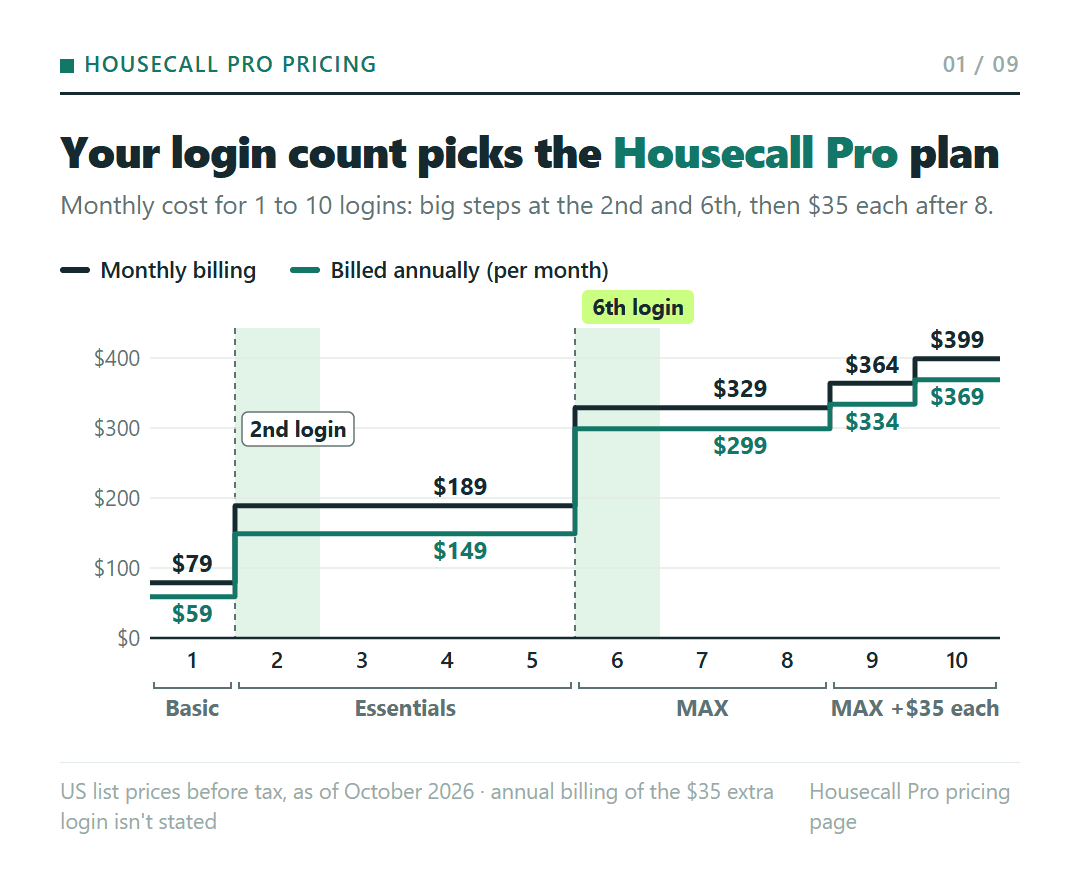
Count everyone who’ll open the app, then find your row
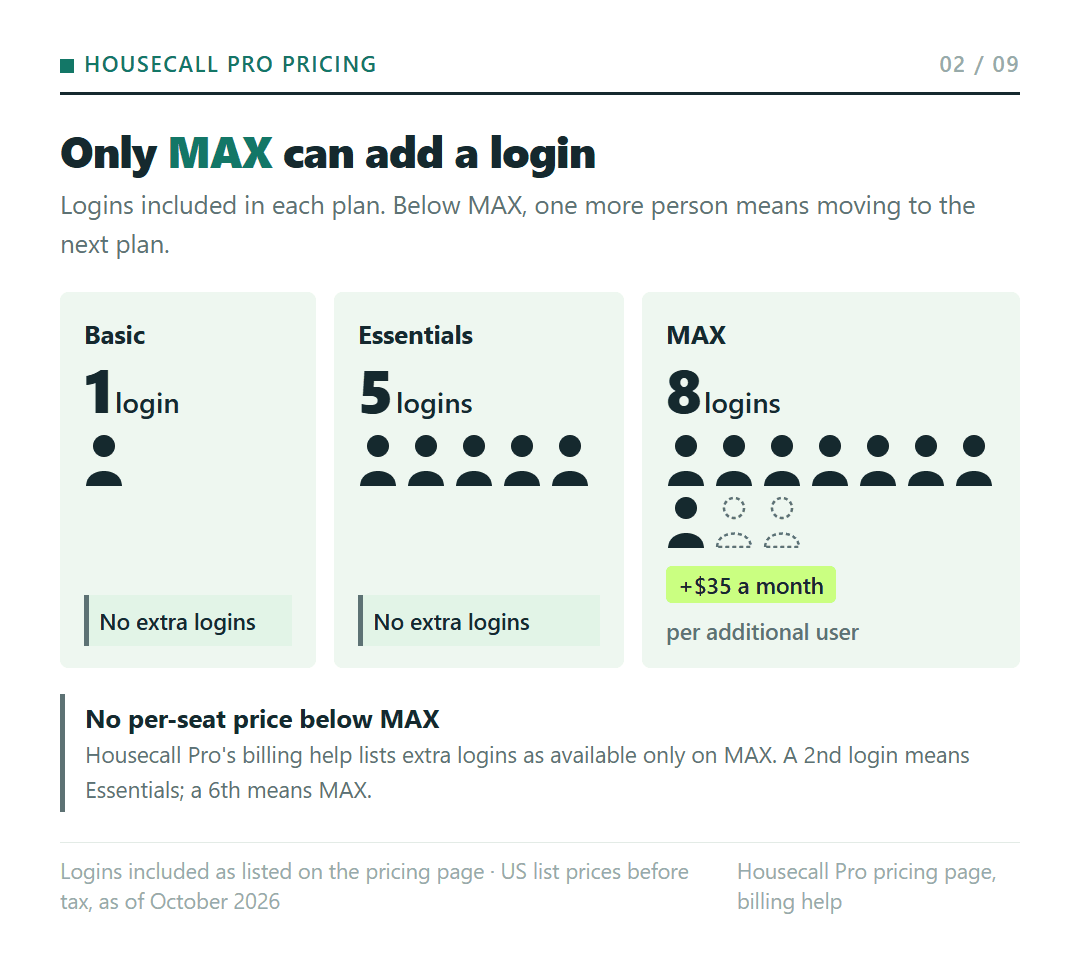
Each Housecall Pro plan includes a set number of users: 1 on Basic, 5 on Essentials, 8 on MAX. The pricing page doesn’t describe a separate or cheaper login for field techs, so count every office person and every tech who will sign in, including you.
Then comes the rule that does the deciding. Housecall Pro’s billing and account help article lists “Additional logins (available only for MAX plans)” among plan add-ons, and the $35-a-month line for each additional user appears only on the MAX card. There’s no published per-seat price for Basic or Essentials. A second login therefore means moving from Basic to Essentials, and a sixth means moving from Essentials to MAX.
| People who need a login | Lowest plan | Price a month, monthly billing (billed annually) |
|---|---|---|
| 1 | Basic | $79 ($59) |
| 2 to 5 | Essentials | $189 ($149) |
| 6 to 8 | MAX | $329 ($299) |
| 9 | MAX + 1 extra login | $364 ($334) |
| 10 | MAX + 2 extra logins | $399 ($369) |
That’s the floor set by logins alone. QuickBooks Online sync and the tools MAX bundles can push you up a tier before your headcount does; both come up below.
For nine or ten people, the table adds $35 a month per extra login to either MAX price. Housecall Pro doesn’t say how that $35 is billed on an annual plan, so read it as a monthly amount on top of the plan.
Where the bill jumps: the 2nd login and the 6th
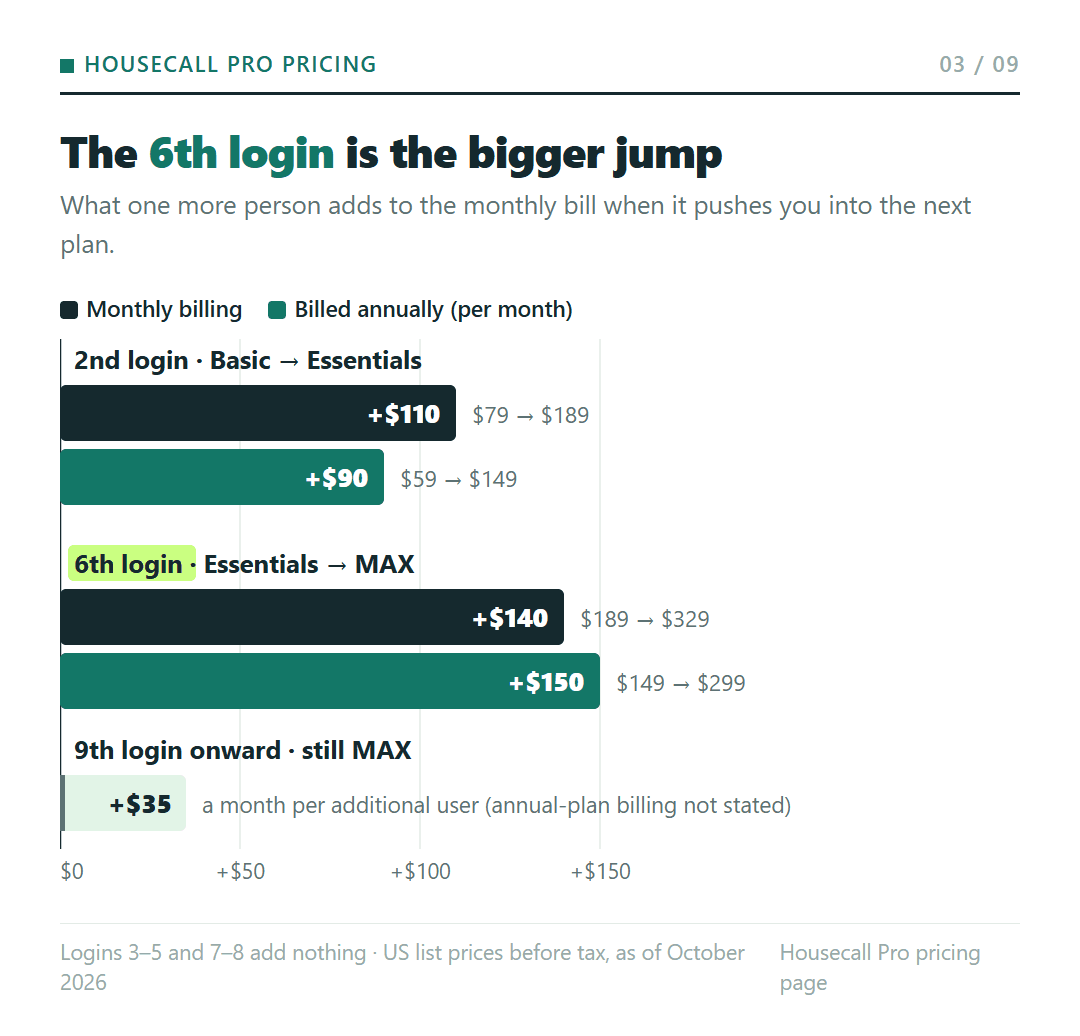
Because seats can’t be bought one at a time below MAX, what one more person costs depends on where your count sits. At most counts it’s nothing. At two, it’s the whole gap between Basic and Essentials: $110 a month more on monthly billing ($79 to $189), or $90 a month more billed annually ($59 to $149).
The sixth login is the bigger step: $140 a month more on monthly billing ($189 to $329), or $150 a month more billed annually ($149 to $299). From the ninth login on, each person adds $35 a month.
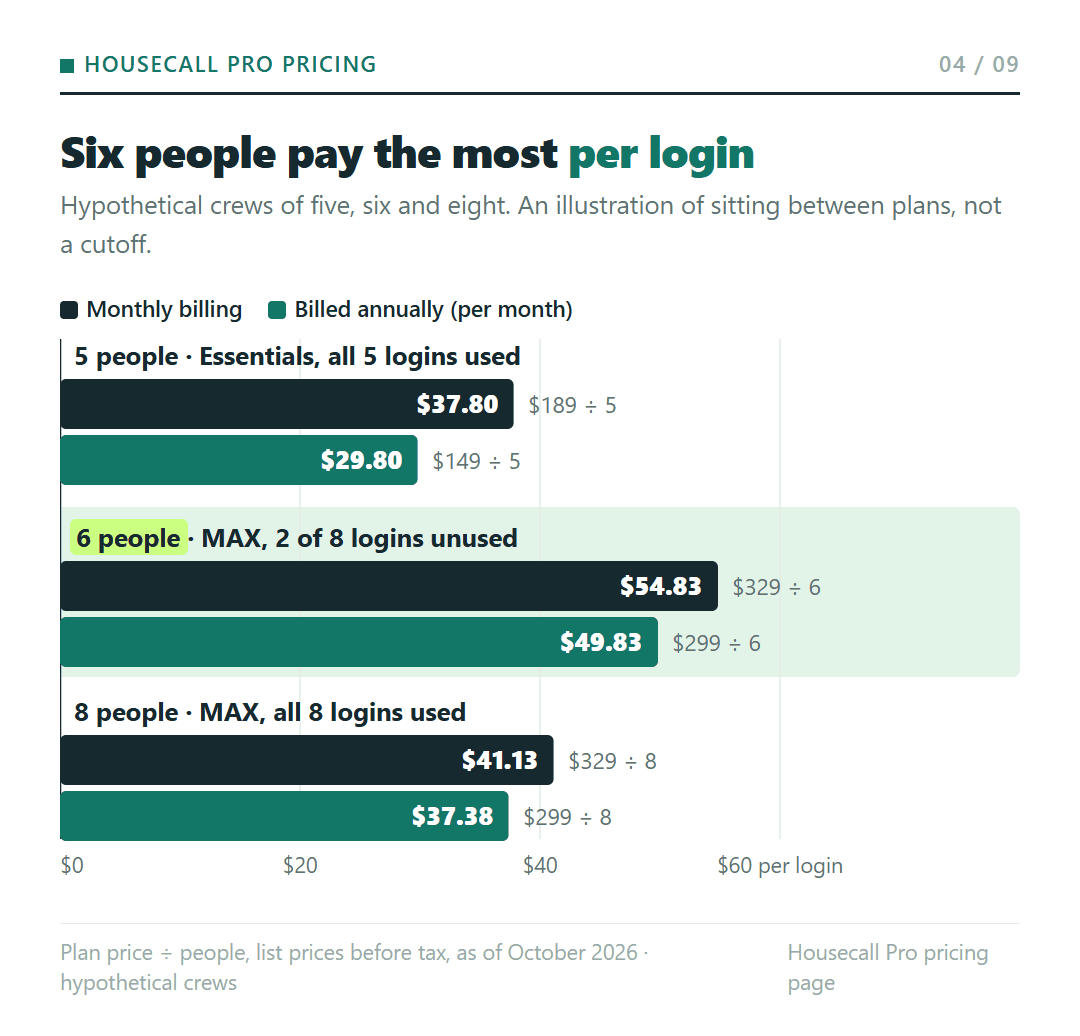
Price per login shows the same jump from another side. Billed annually, a full Essentials plan works out to $29.80 per login ($149 ÷ 5) and a full MAX plan to $37.38 ($299 ÷ 8). A crew of six on MAX pays $49.83 per login ($299 ÷ 6). On monthly billing those three figures are $37.80, $41.13 and $54.83. The six-person number is the cost of sitting between plans, an illustration rather than a cutoff to plan around.
Example A: a four-person cleaning crew
Take a hypothetical cleaning business where the owner, an office manager and two cleaners all need the app, so four logins. That’s Essentials, at $189 a month on monthly billing or $149 billed annually. Over a year that’s $2,268 versus $1,788, so annual billing saves $480. The crew can add one more person before the next price step.
Example B: an HVAC shop that hires a sixth person for spring
Now a hypothetical HVAC shop with five logins on Essentials, billed annually at $149 a month, adds a sixth tech for the spring rush. The sixth login means MAX at $299 a month on annual pricing, which is $150 a month more. On monthly billing the same move runs from $189 to $329, $140 more.
Housecall Pro’s pricing FAQ says you can upgrade at any time and that downgrades take effect at the end of the current monthly or annual billing period. So the move up happens right away, but if the shop drops back to five people after summer, the return to Essentials waits for the end of the billing period it’s in. On monthly billing, the help center says upgrades are prorated.
A one-person shop pays for Essentials if the books live in QuickBooks Online
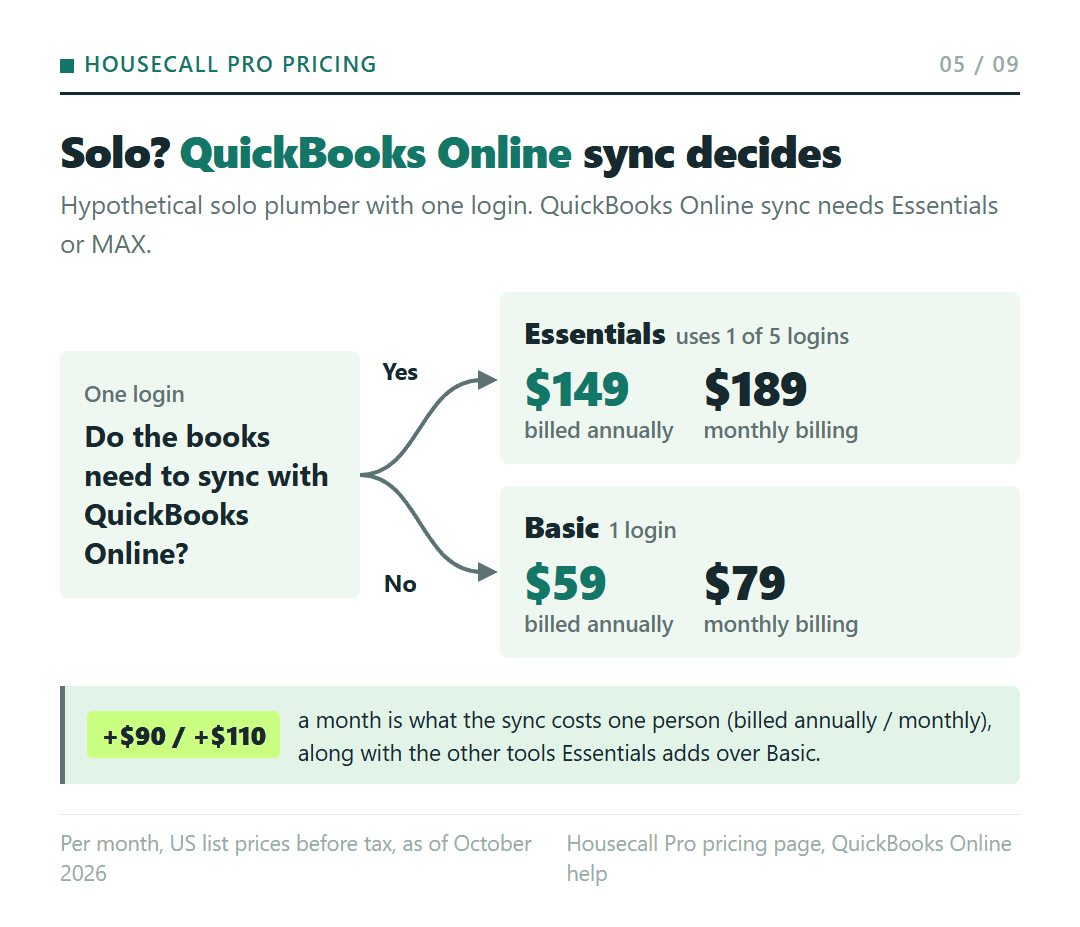
Working alone, Basic is the floor at $79 a month, or $59 billed annually. One feature changes that: QuickBooks Online sync. Housecall Pro’s QuickBooks Online onboarding guide says you must be on either the Essentials or MAX plan to connect it.
Picture a hypothetical solo plumber who keeps the books in QuickBooks Online. To sync, that plumber pays for Essentials, $149 a month billed annually or $189 on monthly billing, and uses one of its five logins. Without the sync, Basic at $59 or $79 covers the single login. The difference, $90 a month billed annually or $110 on monthly billing, is what the sync costs a one-person shop, along with the other tools Essentials adds over Basic: routes, flat-rate pricing, checklists, photo reports, employee GPS and commissions.
That requirement is for QuickBooks Online. If you use QuickBooks Desktop or other accounting software, ask Housecall Pro which plan it needs. And if you’re still weighing Housecall Pro against Jobber on this same question, the Jobber vs. Housecall Pro breakdown for a small HVAC team walks through which plan each one requires for QuickBooks Online.
When MAX costs less than Essentials plus add-ons
Below six people, MAX can still come out ahead, and two tools are the reason. MAX includes the Sales proposal tool, which the pricing page calls a “$40/mo value,” and Recurring Service Plans. Housecall Pro’s billing help lists Service Plan and Sales Proposal as add-ons when you configure a plan, so on Essentials you’d buy them separately.
Housecall Pro doesn’t publish those add-on prices, so there’s no single number to compare. The comparison is a quote against a gap. MAX costs $150 a month more than Essentials billed annually ($299 vs. $149), or $140 more on monthly billing ($329 vs. $189). If the monthly quote for the add-ons you’d actually buy on Essentials reaches that gap, MAX costs the same or less, and it also brings route optimization, open API and Zapier access, a dedicated onboarding specialist and escalated phone support.
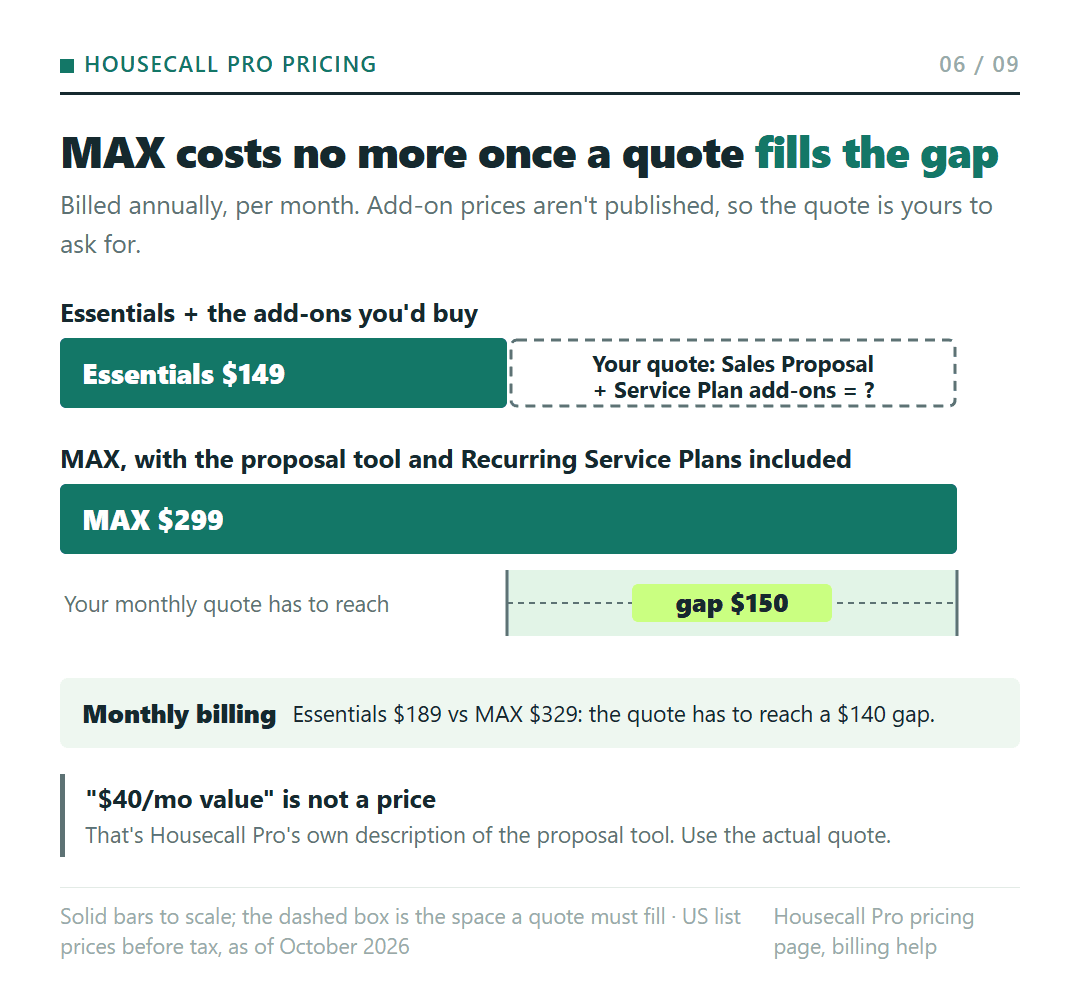
The “$40/mo value” is Housecall Pro’s own description, not a price on your bill, so don’t plug it in as the add-on cost. Ask for the actual quote:
We’d be on Essentials. What would the Sales Proposal and Service Plan add-ons cost per month, on monthly billing and on annual billing? With both added, is our total more or less than MAX?
The free trial deserves the same reading. Housecall Pro’s FAQ says the 14-day trial gives full access to all features on the MAX plan, with no credit card needed. If you build proposals, set up service plans or plan routes with route optimization during those two weeks, you’re using MAX features, so decide whether you need them before you pick Basic or Essentials.
Nine or ten people
Past eight logins, MAX is the only plan with room, and each extra person adds $35 a month. A hypothetical ten-person crew pays MAX plus two extra logins: $369 a month on annual pricing ($299 + $70) or $399 on monthly billing ($329 + $70), with the same caveat about how the $35 is billed on an annual plan.
Paying a year ahead: $240 to $480 saved, and the terms that come with it
Over twelve months, at list prices before tax, annual billing costs less on every plan:
| Plan | Monthly billing, per year | Billed annually, per year (saving) |
|---|---|---|
| Basic | $948 | $708 ($240) |
| Essentials | $2,268 | $1,788 ($480) |
| MAX | $3,948 | $3,588 ($360) |
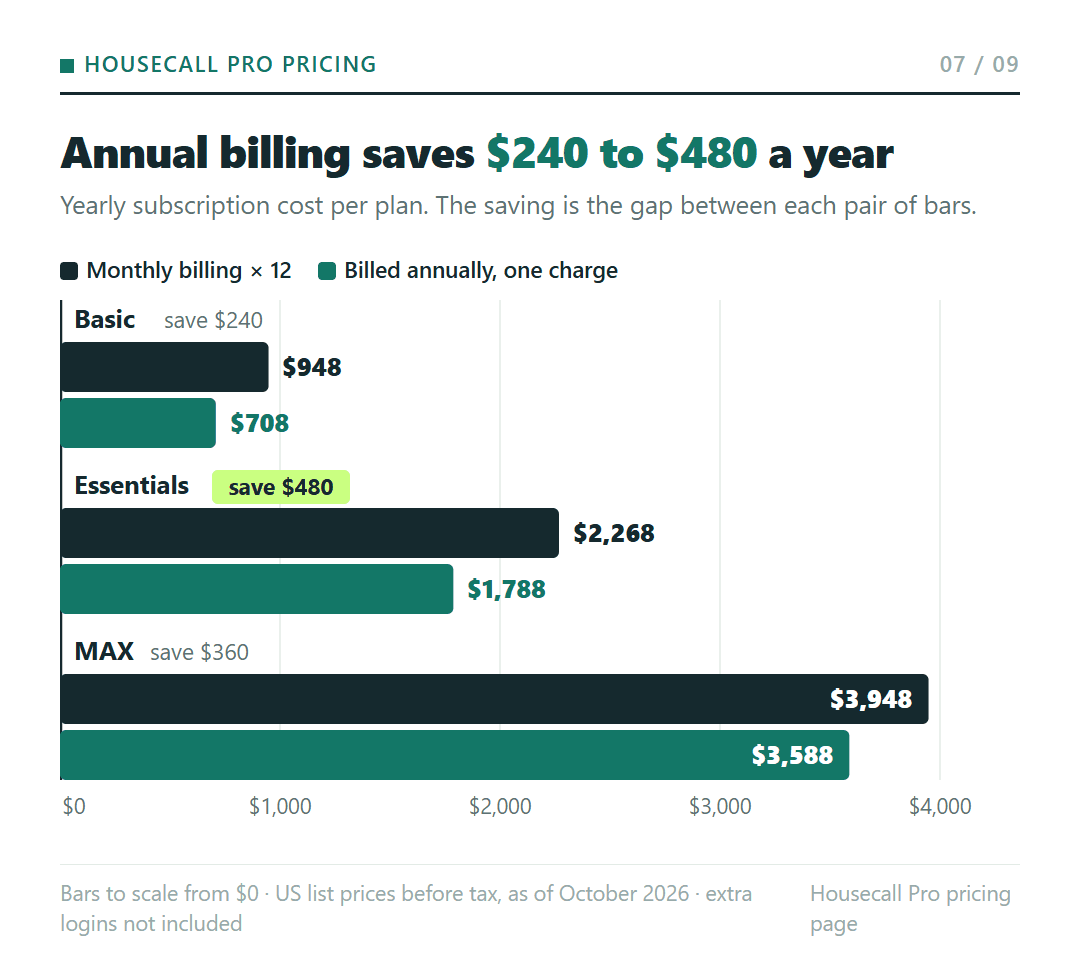
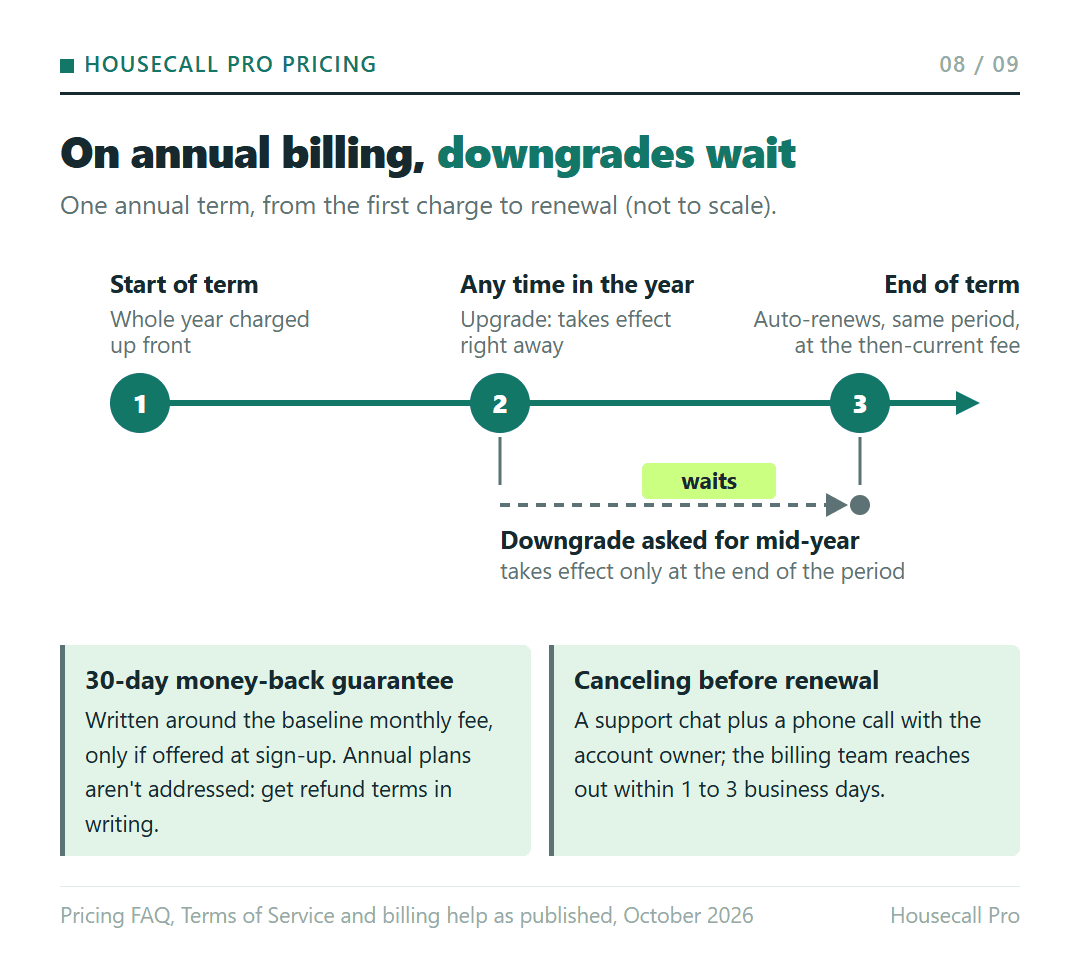
The saving comes with a commitment. Under Housecall Pro’s Terms of Service, fees are charged in advance for the term, subscriptions renew automatically for the same period at the then-current fee, and subscription fees “will not be prorated or refunded, except as expressly set forth.” The pricing FAQ says there are no long-term contracts. Annual billing is still a year paid up front: a downgrade takes effect at the end of that period, and the plan renews for another one unless you cancel.
The refund promise is narrower than it sounds. The help center describes a 30-day money-back guarantee that refunds the baseline monthly subscription fee, and only if you were offered the guarantee when you signed up; add-ons and setup fees aren’t included. It’s written around the monthly fee and doesn’t address annual plans, so get the refund terms for an annual plan in writing before you pay for one.
Leaving takes effort too. According to the same help article, canceling requires a support chat and a phone call with the account owner, and the billing team reaches out within 1 to 3 business days. Note the renewal date with that lead time in mind.
The pricing page has also shown first-month promotional prices. The list prices above are what you pay after any promotion.
Before the trial’s last day
Work through the choice in this order before you enter a card:
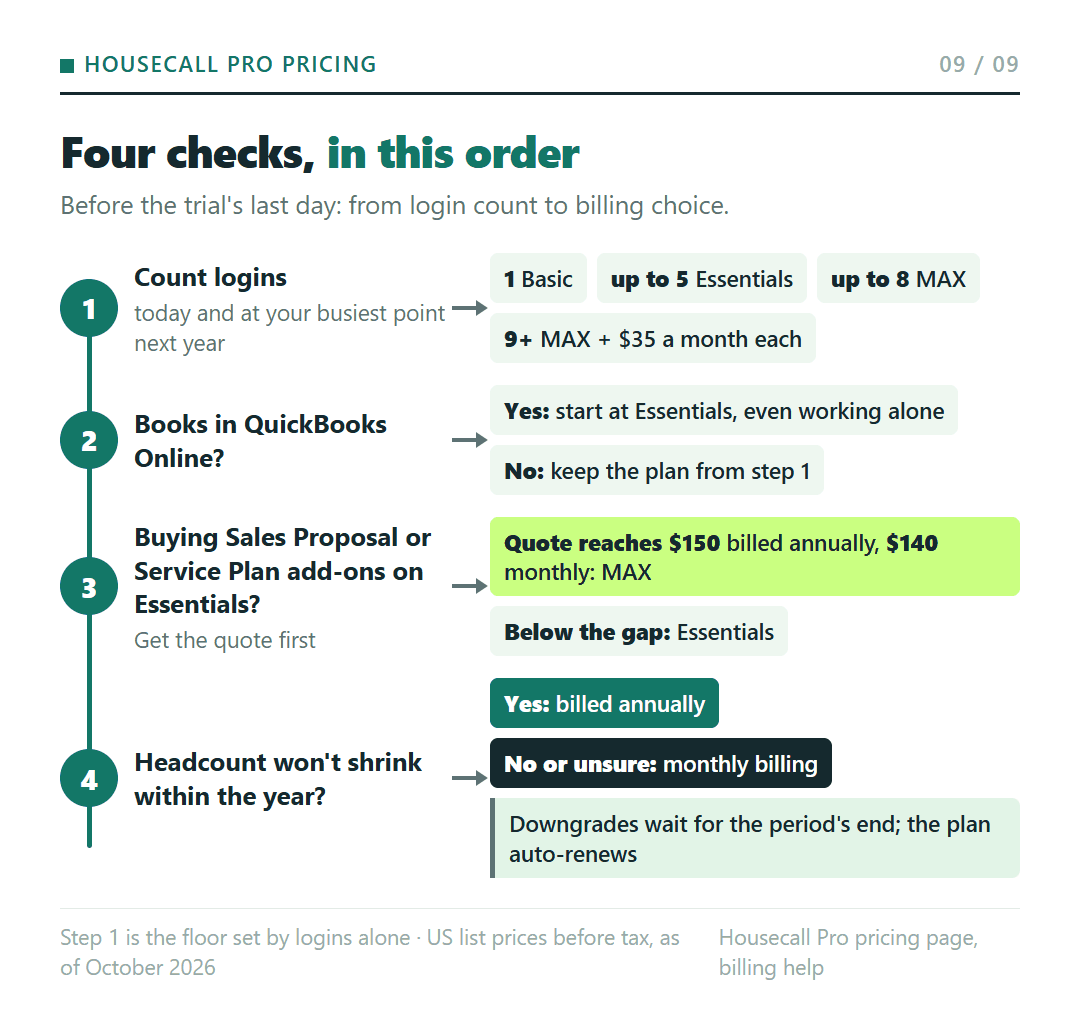
- Count the logins you need today and the ones you expect at your busiest point in the next year. That count sets the lowest plan: 1 for Basic, up to 5 for Essentials, up to 8 for MAX, then $35 a month for each one after that.
- If your books are in QuickBooks Online, start at Essentials even if you work alone.
- If you’d buy the Sales Proposal or Service Plan add-ons on Essentials, get the quote and compare it with the gap to MAX: $150 a month billed annually, $140 a month on monthly billing.
- Choose annual billing only for a headcount you don’t expect to shrink within the year, since downgrades wait for the end of the period and the plan renews automatically.
The subscription isn’t the whole bill, either. Card processing runs “as low as 2.59%,” bank payments carry a 1% fee, and other add-ons are sold separately.
Read together, these terms make annual billing a trade that rewards you for being sure about your crew size and leaves you carrying the cost if the crew shrinks, because the year is prepaid, the downgrade waits and the written guarantee speaks to the monthly fee. Without the annual refund terms in writing from support, monthly billing keeps your options open for an extra $20 to $40 a month.