If you bid with Max per lead in Local Services Ads, there’s one number in your account that answers a simple question: what’s the most I’ll pay for a single lead?
When Google moves your account into Google Ads, that number has nowhere to go. Google’s migration page says manual bidding, including setting a maximum cost per lead, is no longer supported in Google Ads. The weekly budget changes shape too.
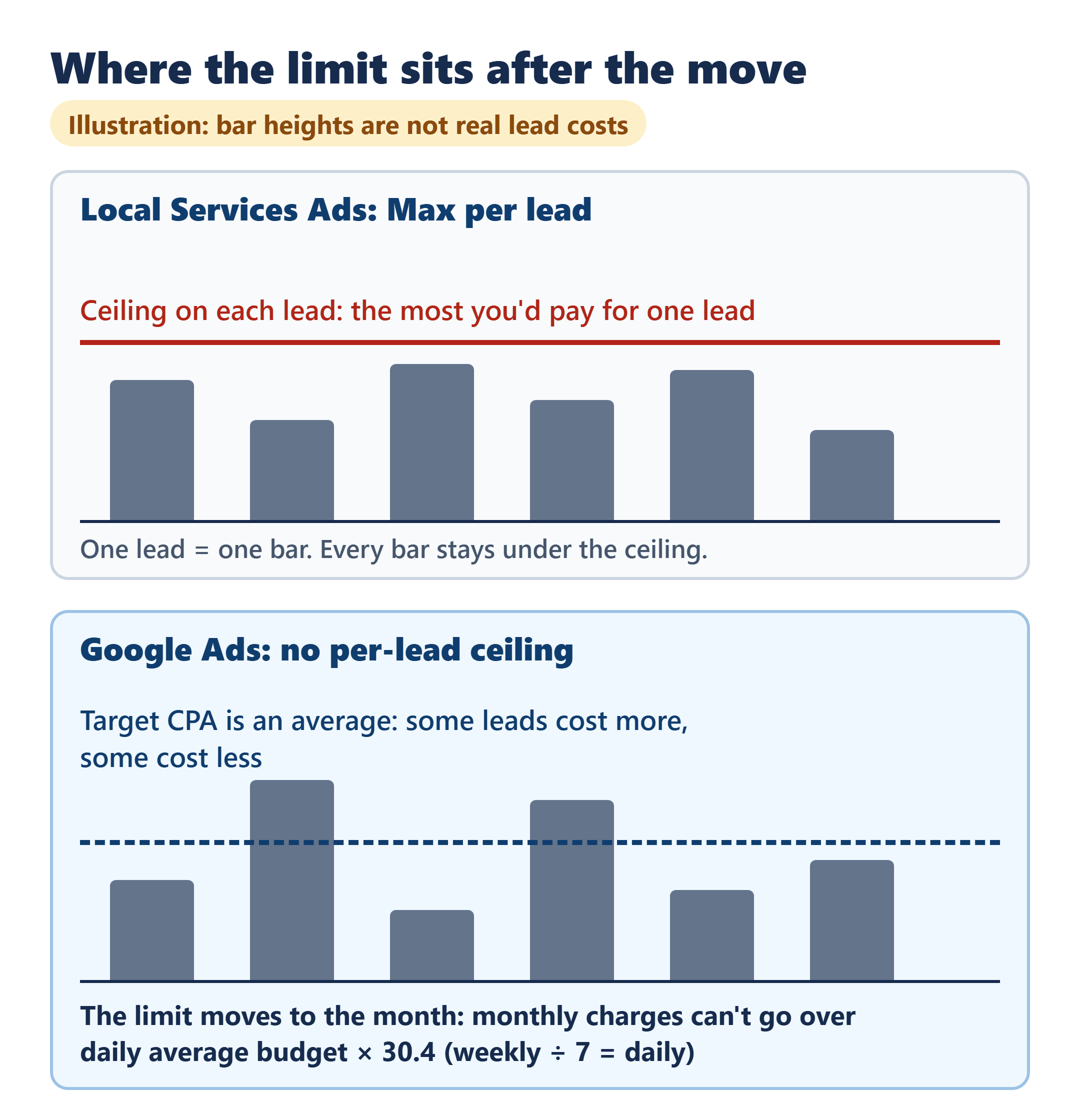
What you pay for stays the same: valid leads such as calls, messages and bookings, not clicks, on Google Search and Maps. What controls your spend changes. Google divides your historical average weekly budget by 7 to set a daily average budget, and your monthly charges can’t go over that daily figure × 30.4. There’s no per-lead ceiling after the move, and a target cost per lead is an average, so a single lead can cost more or less than it.
Google emails you 14 days before your migration date. Use that window to save your performance reports, because they don’t carry over. Your lead history does.
All of this comes from Google’s Local Services Ads migration help page and related Google Ads help pages, checked October 17, 2026 (Pacific time). It isn’t drawn from a migrated account. It covers budget and bidding for a US home-service business running its own ads, not lead prices, which vary by market and trade.
What replaces your per-lead ceiling? Nothing that works per lead
In Local Services Ads, Max per lead was the most you’d pay for a lead. In Google Ads there’s no equivalent setting, so no setting caps what a single lead can cost.
Google also hasn’t said which bid strategy or target a Max per lead campaign is given after migration. Don’t assume. Open Settings once you’ve moved and see what your campaign actually shows.
The setting you’ll work with is a target cost per lead, called Target CPA in Google Ads. Google aims for that figure as an average across your leads. In the words of its Target CPA help page, some conversions may cost more than your target and some may cost less.
My reading: the protection moves from the lead to the month. The one hard limit Google describes after the move is the monthly cap on total charges, and it doesn’t apply to any single lead. If you used Max per lead to protect the margin on each job, the decision that replaces it is how much you’re willing to spend in a month.
Your weekly number becomes a daily one
Google builds the new budget from your own history. Here’s the arithmetic it describes:
Daily average budget = historical average weekly budget ÷ 7
Monthly cap = daily average budget × 30.4 (about 4.34 × the weekly figure)
As an illustration, say your weekly budget has averaged $350. That gives a daily average budget of $350 ÷ 7 = $50 and a monthly cap of $50 × 30.4 = $1,520. Two more example weekly budgets run the same way:
| Example weekly budget | Daily average (÷ 7) | Monthly cap (× 30.4) |
|---|---|---|
| $210 | $30 | $912 |
| $350 | $50 | $1,520 |
| $700 | $100 | $3,040 |
These rows convert a budget. They don’t tell you how many leads it buys, and they aren’t a suggested amount.
A busy day can run over the daily figure, but the month can’t go over the cap. Google says daily spend may fluctuate on high-demand days while monthly billing won’t exceed daily × 30.4. It also says the change doesn’t affect your monthly spend.
Check the starting figure. Google starts from your historical average weekly budget, which isn’t necessarily the number set today. If you changed your weekly budget recently, the daily budget after the move may not match it. Look at it in Settings once you’ve migrated and adjust it there if needed.
If one campaign covers more than one trade
This part only matters if you advertise several service categories in one campaign with different targets for each. After the move, Google calculates one campaign-level target and applies it to all of them.
To keep separate bidding for each trade, Google says you can set up separate campaigns per category in Local Services, such as one for plumbing and one for HVAC. There’s a limit to plan around: Google says you can’t create new pay-per-lead campaigns inside Google Ads at this time. For new campaigns it points you to g.co/localservices, and says campaign creation in Google Ads will come later.
Two moments to act: before your date and after the move
The move is automatic, and you don’t rebuild the campaign. Google’s plan begins in August 2026 with select US home and storefront service advertisers, including plumbing, HVAC, electrical, appliance repair, house cleaning, lawn care, roofing, pest control and moving. It expands in late 2026 to service-area businesses without storefronts and accounts with custom bidding or booking setups, then in 2027 to non-US advertisers and the remaining categories. Your exact date is in the email.
Before your date
- Watch for the email. The account administrator on your profile gets it 14 days before your migration date, along with a banner in the dashboard. A final reminder comes 7 days later, and a confirmation after the move.
- Save your performance reports. Past impressions, clicks, weekly spend and ad-level reports don’t move to Google Ads, and the old dashboard can’t be opened afterward. Google says a download for historical reports will be available soon on the redirection page. If you need them now, take screenshots before you migrate.
- Write down what you run today. You’ll want it to compare against what Google Ads shows after the move:
Weekly budget: ____ · Bid setting and amount: ____ · Target for each trade, if different: ____ · Service areas and ad schedule: ____
After the move
- Budget and bid: Campaigns → Settings → your pay-per-lead campaign. Review the daily budget and the bidding target.
- Setup: on the same Settings tab, confirm service areas, ad schedule and business categories. Google says these settings transfer automatically, along with budget limits and photos.
- Leads: Goals → Conversions → Leads. This page shows each lead’s charged status and lead type, has a lead feedback form, and lets you download your leads. If you’re weighing a separate system to follow up those leads, what an all-in-one CRM and marketing subscription does and doesn’t cover for a small service business is a useful next read.
- Pause if you need to: switch the campaign status to Paused in Settings.
- Give it two weeks. Google says to allow up to two weeks for the migration to finish and for performance to settle before you judge results.
You’ll still be paying per valid lead, and phone calls are one of the lead types, so who answers the phone is part of what each lead is worth to you. If that’s the next thing on your list, how an AI receptionist is priced when your call count sets the bill works through that cost.
Google lists a support line for migrating Local Services Ads advertisers: +1-844-205-0011, Monday to Friday, 9:00 AM to 8:00 PM EST.
When the email arrives, the number to settle first isn’t a bid. It’s the monthly amount you’re comfortable spending, because after the move that’s the limit Google describes, and the daily budget in Settings is where you set it.