Before you send your next big invoice from QuickBooks, find the last customer payment over $1,500 that came in by ACH bank transfer and look at the fee QuickBooks took. If it’s $15, your account has a cap. If it’s 1% of the payment, $30 on a $3,000 invoice for example, it doesn’t, and every larger invoice costs you more.
That one fee line is worth a look because QuickBooks doesn’t charge every account the same way. In replies on its community forum, the QuickBooks team has said that Payments accounts opened since September 2023 follow a no-cap plan, while older accounts were moved to a $15 cap per payment. The rates page itself lists no maximum.
QuickBooks Payments charges you 1% of each ACH payment, with a $1 minimum, and 2.99% when the same invoice is paid by card or digital wallet. On an account with no cap, a $20,000 ACH payment costs you $200. Large invoices have another route: send the invoice with every online payment method turned off and “Your customer pays the fee” checked. Your customer can still pay online by ACH for a flat $25, and you receive the full invoice amount. That route has limits. The invoice must be more than $125 and less than $100,000, it must be paid in full, and the customer can’t pay that invoice by card online.
Rates are QuickBooks’ US list rates per transaction, accurate as of September 18, 2026, from the QuickBooks payment rates page and QuickBooks help articles, checked October 17, 2026. They aren’t figures from a Payments account. QuickBooks says businesses processing over $2,500 a month could qualify for up to 25% off transaction costs; every number here uses list rates.
What that fee line tells you
| Fee QuickBooks took | What it points to | Your fee on a $20,000 ACH payment |
|---|---|---|
| $15 | An account with the $15 cap | $15 |
| 1% of the payment | An account with no cap | $200 |
The $15 cap comes from QuickBooks’ own forum replies rather than its rates table, which is why the fee you were actually charged is a better guide than the date you signed up. Use a recent payment; an old one may predate the current rules.
If your account turns out to have the cap, most of this post matters less: your ACH cost on any big invoice tops out at $15. If it has no cap, or you can’t find a payment to check, the rest of the numbers here are the ones to plan with.
Payments itself has no separate monthly fee listed, but it runs on a QuickBooks Online subscription. If you’re still weighing that subscription, QuickBooks Online vs. Wave for small contractors looks at when paying for bookkeeping starts to make sense.
What one large invoice costs, and who pays it
For an invoice paid in full online, the arithmetic is short:
- ACH, account with no cap: you pay 1% × invoice amount ($1 minimum).
- ACH, account with a $15 cap: you pay 1% × invoice amount, up to $15.
- Card or digital wallet (including Apple Pay, PayPal and Venmo): you pay 2.99% × invoice amount.
- The $25 option: you pay $0 in ACH fees, and your customer pays $25 on top of the invoice.
| Invoice | ACH, no cap | ACH, $15 cap | Card, 2.99% |
|---|---|---|---|
| $800 | $8.00 | $8.00 | $23.92 |
| $2,500 | $25.00 | $15.00 | $74.75 |
| $10,000 | $100.00 | $15.00 | $299.00 |
| $40,000 | $400.00 | $15.00 | $1,196.00 |
On every row, the $25 option would cost you $0 in ACH fees and cost your customer $25.
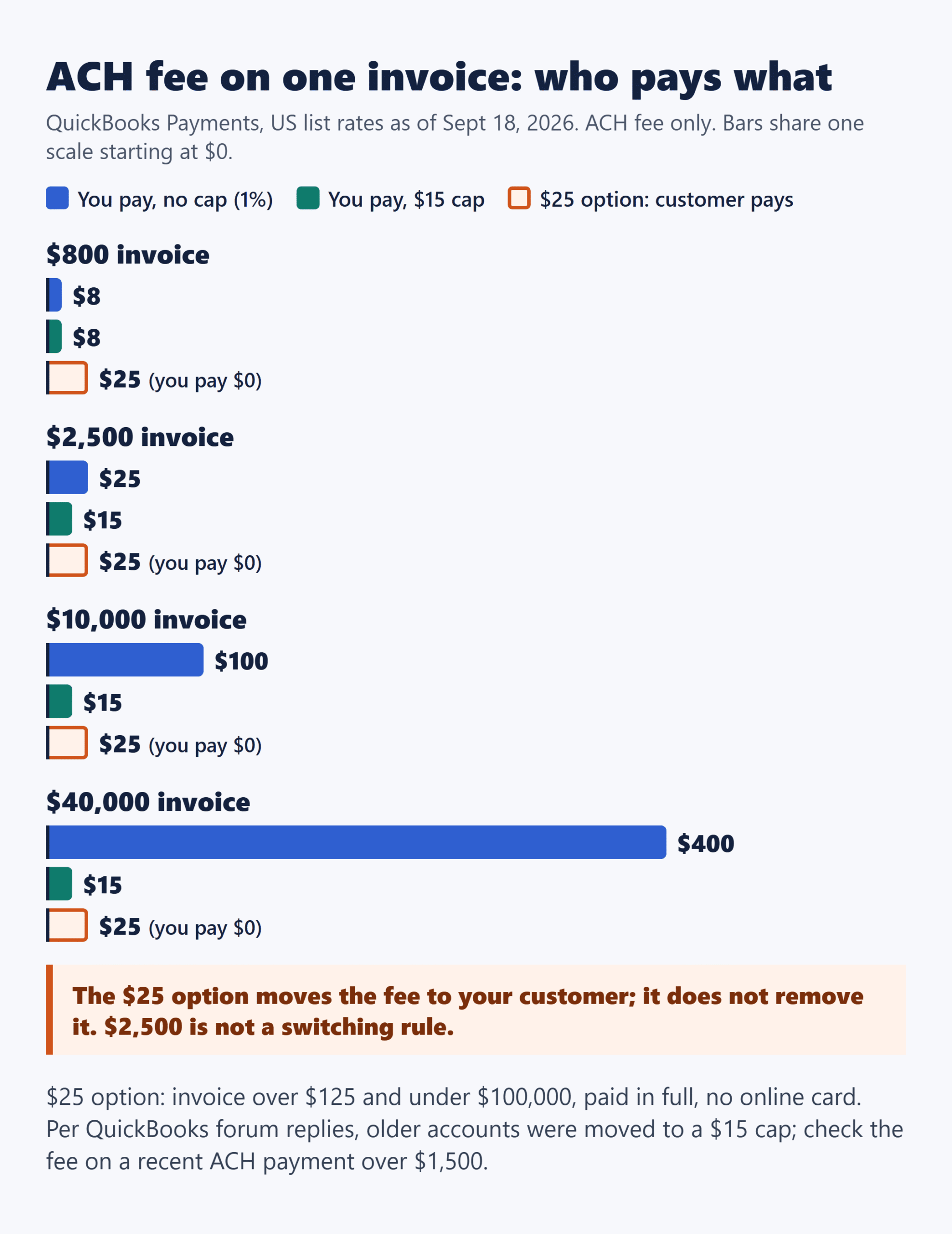
That’s the part worth being clear about: the $25 option doesn’t remove the fee. It moves it to your customer as a flat amount instead of a percentage. On a no-cap account, your 1% and the customer’s $25 are equal at a $2,500 invoice, but that sets a fee you pay against a fee your customer pays, so it isn’t a rule for when to switch. On a capped account, the most the option saves you on any invoice is $15, while your customer still pays $25.
A hypothetical year of $10,000 invoices
Picture a contractor, as an illustration, who sends 12 invoices of $10,000 in a year, each paid by ACH, on an account with no cap. QuickBooks takes 12 × $100 = $1,200 over the year. If every one of those customers used the $25 option instead, the contractor pays $0 in ACH fees and the customers pay $300 between them. Whether a customer will accept that $25 is a conversation, not something the rates page settles.
Turning the $25 option on for one invoice
QuickBooks’ help article on the ACH convenience fee lists the settings:
- Go to Settings → Account and settings → Sales → Invoice payments.
- Check “Your customer pays the fee.”
- Uncheck the other payment methods there: credit card, ACH bank payment, PayPal and Venmo. Or leave them on and turn them all off on each invoice where you want the $25 option (Manage → Payment options).
The per-invoice route is what keeps the rest of your billing as it is. QuickBooks says changing the payment methods on one invoice affects only that invoice, not your company settings, so small jobs can keep card and ACH on while one large invoice goes out with the $25 option. The steps are in QuickBooks’ receive and process payments guide.
Before you switch an invoice, check it against the three limits:
- Invoice size: more than $125 and less than $100,000.
- Full payment only: the customer can’t pay part of the invoice this way.
- No card online: with every other online method off on that invoice, the customer can’t pay it by card online.
One qualifier from the same help article: if you’ve scheduled Instant Deposit, its 1.75% fee also applies to ACH payments where the customer paid the convenience fee.
Decide on the invoice screen, before it goes out
Who pays the fee is settled by the payment options on each invoice, so the choice belongs to the moment you send it. For each large one:
- Does this customer need to pay by card, or in parts? Then the $25 option doesn’t fit. Keep card and ACH on; your ACH fee is 1%, or up to $15 on a capped account.
- Will they accept a flat $25 to pay by bank transfer? Turn off the online payment methods on that invoice with “Your customer pays the fee” checked, and you receive the full amount.
- Neither fits? You can turn every online method off, leave “Your customer pays the fee” unchecked, and put check mailing details or your bank details in the payment instructions. There’s no QuickBooks processing fee, but there’s no pay-now button and no automatic matching.
If you do one thing this week, check that fee line. It tells you whether your real choice on a large invoice is between $15 and $25 or between a growing percentage and $25, and those lead to very different conversations with a customer. Confirm current rates on the QuickBooks payment rates page before you send it.