When a tech leaves, deleting their Google Workspace account feels like the end of paying for them. On the Flexible plan, it is: the bill drops right away. On the Annual plan, Google says your payment “remains the same until it’s time to renew,” whether anyone is using that seat or not.
The same commitment decides what canceling costs. The pricing page shows the Annual price under “All plans billed monthly,” but the toggle above it reads “Save 16% with 1 year commitment.” Annual commits you for a year to every license you bought, even when it shows up as a monthly charge, and canceling partway through doesn’t end that commitment.
On the Flexible plan, canceling stops new charges: you pay for the days you used that month and nothing after. On the Annual plan, canceling before the renewal date charges the remaining balance of your contract, and Google issues no refund.
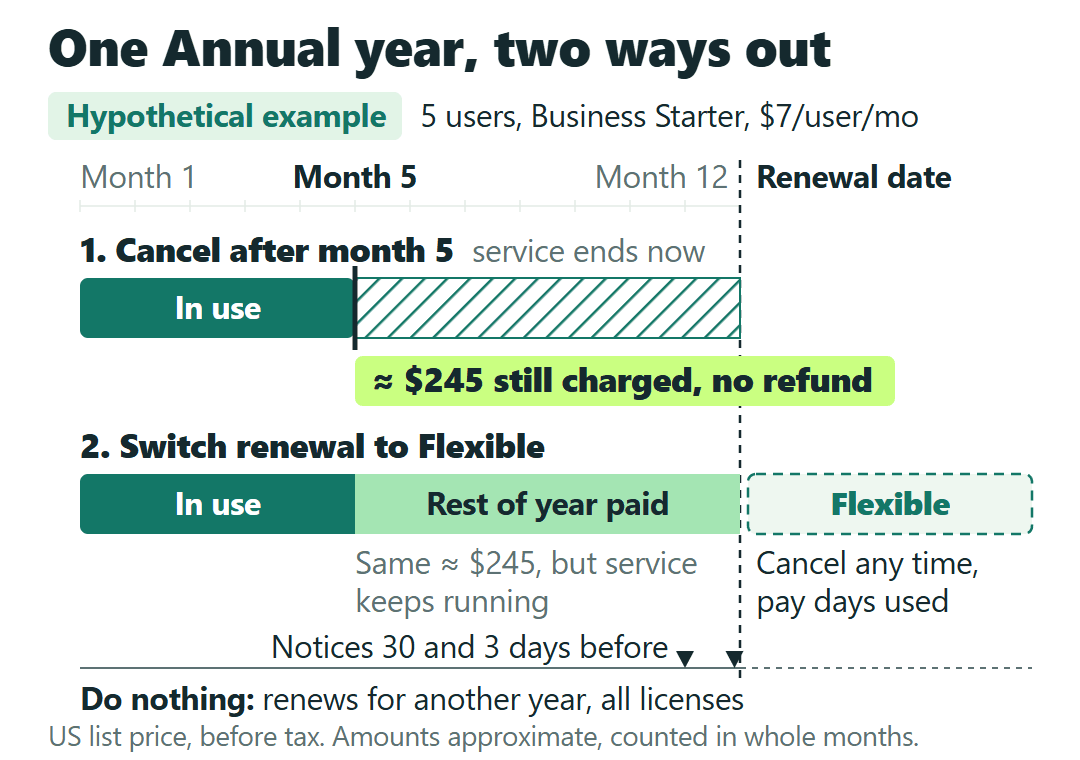
Take a hypothetical five-person shop on Business Starter Annual at $7 per user per month that cancels with seven months left. That’s about 5 × $7 × 7 = $245 still charged. The same shop on Flexible at $8.40, canceling on the 15th, would owe about 5 × $8.40 × ½ = $21, then nothing.
If you’re on Annual, the cleaner way out is the renewal date. Set the renewal to switch to the Flexible plan, finish the current year, then cancel on Flexible when you’re ready. Do nothing, and the contract renews for another year.
Prices are Google’s US list prices per user per month, before tax, for Workspace bought directly from Google and managed in the Admin console on your own domain. They come from Google’s Flexible vs. Annual comparison and related Workspace Admin Help pages (updated October 13, 2026) and the Workspace pricing page, checked October 18, 2026. If you bought through a reseller, its terms apply, so ask them. Nothing here comes from using a Workspace account, and every business below is a hypothetical example.
Flexible or Annual: which one is on your bill?
Check this before anything else. In the Admin console, go to Billing, then Subscriptions. Each subscription shows its payment plan: Flexible or Annual/Fixed-Term.
For the two editions most small crews run, Business Starter is $8.40 on Flexible and $7 on Annual, per user per month. Business Standard is $16.80 and $14. A year on Annual works out to $84 per user on Starter and $168 on Standard. If you signed up recently, your invoice may show an intro price instead; the examples here use list prices.
Annual commits you for a year to the number of licenses you bought at the start of the contract. You pay it monthly or up front, depending on what you chose at checkout, and the committed total is the same either way. Flexible has no commitment: you can remove users at any time and cancel at any time without a penalty.
What canceling costs on each plan
Cancel on Flexible and new charges stop right away. Google’s own example: cancel on the 15th of the month and you’re billed for half a month. That last charge arrives at the start of the next month.
Cancel on Annual before the renewal date and Google charges “the remaining balance of your contract and no refunds are issued.” There’s no separately named early-termination fee. The cost is the part of the commitment you haven’t paid yet, and if you paid the year up front, nothing comes back.
Here’s how that works out for three hypothetical crews on Business Starter.
| Situation | Annual ($7/user) | Flexible ($8.40/user) |
|---|---|---|
| 5 users, cancel with 7 months left | About $245 still charged (5 × $7 × 7); $0 back if the year was paid up front | About $21 if canceled on the 15th (5 × $8.40 × ½), then $0 |
| 6 users, 2 leave after month 4 | $504 for the year (6 × $84), $112 of it for the 2 empty seats | $470.40 (6 × $8.40 × 4 + 4 × $8.40 × 8) |
| 5 users all year, no changes | $420 (5 × $84) | $504 (5 × $8.40 × 12) |
The last row is the reason Annual exists: a crew that stays the same size all year saves $84 on it. The first two rows are what that saving costs once the crew shrinks or you leave early.
Leaving Annual on the renewal date instead of before it
Google gives Annual customers a way to stop the commitment from rolling over. In the Admin console, go to Billing, then Subscriptions, open your Workspace subscription, click Change renewal settings and select Switch to the flexible payment plan. The full steps are on Google’s payment plan and renewal page.
The switch takes effect on the renewal date, not the day you make it, and you still pay the rest of the current year. From the renewal date on, you’re on Flexible, so canceling costs only the days you’ve used.
Say a hypothetical five-person Starter shop decides to leave with three months left on its contract. Switching the renewal now means paying the remaining three months, about 5 × $7 × 3 = $105, which it would owe whether it canceled today or not. After the renewal date, it can cancel on Flexible whenever its new email is ready, paying $8.40 per user only for the days used.
If the same shop does nothing, the contract renews for another year for all licenses: another 5 × $84 = $420 committed. Google sends a notice 30 days and 3 days before the renewal date.
The renewal settings also offer not renewing at all. That isn’t a clean cancel: Google suspends the service when the term ends.
If you’re keeping Workspace and only want to pay for fewer people, choose Auto-renew my contract with fewer licenses and delete or move the extra users before the renewal date. Google renews the commitment for the number of user accounts you have that day.
Two narrower cases. During the 14-day free trial, you can cancel without being charged, and an Annual choice can still be switched to Flexible before paid service starts. Flexible accounts can also pause instead of cancel: users lose access, the data stays, and Google charges a reduced price it doesn’t publish. Annual accounts can’t pause.
Deleting a tech’s account doesn’t shrink an Annual bill
On Flexible, removing a user lowers the bill right away, prorated for the month. On Annual, you can delete the user, but as Google’s line in the opening says, the payment stays the same until renewal. You keep paying for every license you bought, though the freed one can go to a new hire at no extra cost.
In the six-person example above, the two techs who left after month four still cost 2 × $7 × 8 = $112 on Annual. On Flexible, the same year comes to $470.40, which is $33.60 less than Annual’s $504.
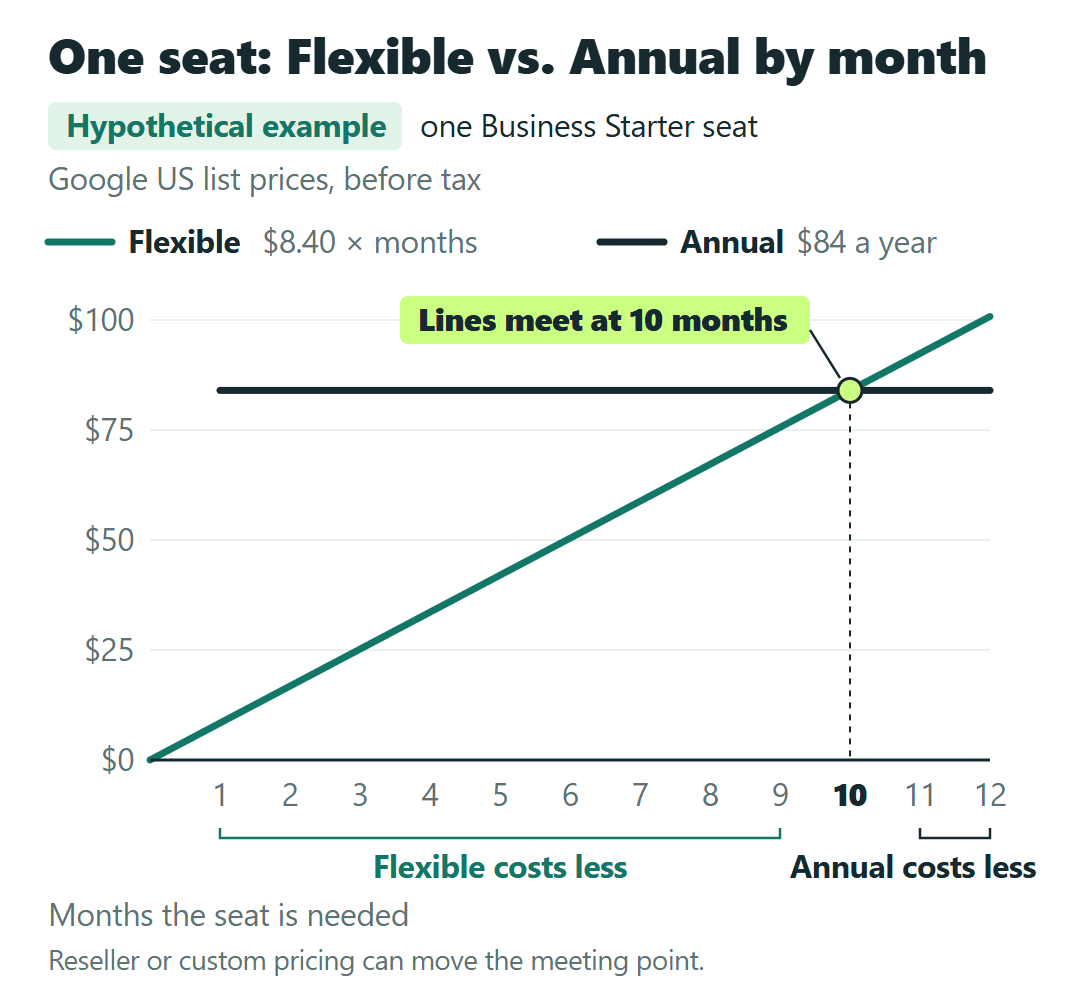
For a single seat, the comparison at list prices is short: $8.40 times the months you need it on Flexible, against $84 locked in for an Annual year. The two meet at 10 months ($84 ÷ $8.40 = 10). Need a seat for fewer months and Flexible costs less; for 11 or 12 months, Annual does.
Standard lands on the same 10 months ($168 against $16.80 a month), because Flexible is 1.2 times the Annual rate on both. The intro discount takes 10% off both prices, so it doesn’t move the line, but reseller or custom pricing can. Run it with the price on your own invoice.
The same timing rule covers dropping from Business Standard to Starter. On Annual, you can’t downgrade mid-contract. You have to switch to Flexible first, so the downgrade takes effect on the renewal date. Per user, that means $14 on Standard Annual until the renewal date, then $8.40 on Starter Flexible. Upgrades can happen at any time.
Export first: canceling deletes the data
Once you cancel, your users lose Gmail, Calendar, Meet and the other core services, and Google deletes their Workspace data. It can’t be restored. Google points to its Data Export tool as the easiest way to download users’ mail, calendar, chat and Drive files beforehand.
Check where your domain came from, too. If you bought it when you signed up for Workspace, keep the organization’s Google account or move domain management to Squarespace before you delete the account. Otherwise you lose access to the domain your email runs on. Google’s Cancel Google Workspace page has the export and domain steps.
If your crew also uses Google Voice on top of Workspace, that add-on is billed separately, month to month. Our Google Voice for Business pricing breakdown for small crews covers how it’s charged, which helps if the phone line is part of what you’re moving.
Three situations, three ways out
On Flexible, the order is export, then cancel. You pay for the days used this month and nothing after.
On Annual with months left, you’re choosing between paying the remaining balance now and leaving today, or switching the renewal to Flexible and leaving after the renewal date. The money owed for this contract year is about the same either way. What changes is whether you keep the service you’re paying for until then.
If your crew grows and shrinks with the seasons, run the per-seat comparison above with the rate on your invoice before the next renewal. Google’s own comparison page points Flexible at a variable workforce and Annual at a constant or growing one.
If I ran a five-person crew on Annual, I’d look up the renewal date today and put a reminder on the calendar well before the 30-day notice. Do nothing and the commitment rolls into a full new year, with a 30-day and a 3-day notice as the only warnings. When does yours renew?