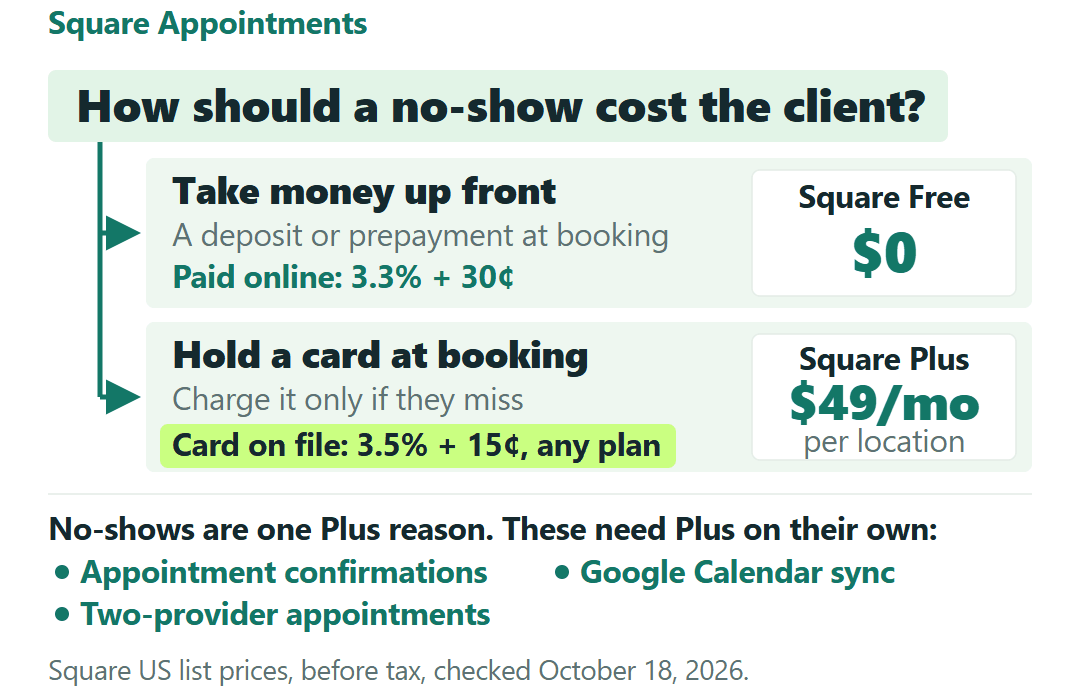
Square Appointments gives you two ways to make a no-show cost the client instead of you, and it puts them on different plans. You can take money up front, a deposit or full prepayment when the client books. Or you can hold the client’s card at booking and charge it only if they cancel late or never show.
The first way is on Square Free. The second, Square’s cancellation policy with no-show fees, needs Square Plus, at $49 a month per location. Which of the two fits how you run your book is the first plan question to settle, though not the only one.
Square Free already runs online booking with a calendar for every provider, text and email reminders, deposits and full prepayment. Plus is the plan to pay for when you need a specific tool it adds: no-show fees charged to a held card, appointment confirmations, Google Calendar sync, or one appointment split between two providers.
Plus also lowers your card rates, but only by a little. In both hypothetical examples further down, the fee savings take part of the $49 back and Plus still costs money every month. It’s month to month with a 30-day free trial, so you can try the feature you need before you pay for it.
Prices and rates are Square’s US list prices for its current plans (Square Free, Square Plus and Square Premium), before tax, from Square’s Appointments pricing page and Help Center, checked October 18, 2026. If your Dashboard shows an older Square Appointments subscription instead, your price and rates aren’t the ones here. Nothing in this post comes from using a Square account, and every business below is a hypothetical example.
The booking tools you already have on Square Free
Square’s plan table puts these on Free: an online booking site with Instagram, Facebook and Google booking integrations, unlimited staff calendars, automatic text and email reminders, appointment deposits, full prepayment with automatic contracts, and custom scheduling.
The Free card on the pricing page says “For solo professionals.” That’s how Square pitches it, not a cap. The calendar row says “There is no employee limit,” so a hypothetical shop with four groomers can give each of them a bookable calendar without leaving Free.
Keep two words apart while you read the table. Reminders are on Free. Confirmations are on Plus: text and email messages, with confirmed appointments showing as confirmed on your calendar. Free’s custom notifications are emails only; custom texts need Plus.
The booking tools that sit behind the $49
Here is how Square’s plan table splits the booking features a small appointment business tends to weigh.
| If you need… | Square Free | Square Plus |
|---|---|---|
| Online booking and a calendar for every provider | Yes | Yes |
| Text and email reminders | Yes | Yes |
| A deposit or full prepayment at booking | Yes | Yes |
| No-show and late-cancel fees on a card held at booking | No | Yes |
| Appointment confirmations | No | Yes |
| Google Calendar sync | No | Yes |
| One appointment with services by different staff | No | Yes |
| A waitlist, or booking into a service’s processing time | No | Yes |
The no-show row is the fork from the top of this post. On Plus you set the time frames for cancellations, the client gives a card when they book, and Square lets you charge that card on file for a late cancel or a no-show.
The other Plus rows each match one way of running the book. Google Calendar sync matters if your day already lives in Google Calendar. Multi-staff booking lets a client book one appointment with services assigned to different staff, such as a bath from one groomer and a trim from another. Processing time lets you book into a service’s downtime.
If you have employees, Plus also adds shift scheduling, clock-in and timecards with breaks and overtime, tip pooling and commission tracking, and custom permission sets. Payroll isn’t part of it; Square Payroll is a separate paid add-on.
Square Premium, at $149 a month per location, adds resource booking for rooms, chairs or equipment, future-bookings and team-performance reports, service-cost tracking, 24/7 phone support and the lowest in-person rate. At one location it’s for a shop that books rooms or equipment, or needs those reports.
A no-show charge costs the same 3.5% + 15¢ on every plan
Plus makes the held-card no-show fee possible. It doesn’t make charging it cheaper. Square’s plan table describes the fee as a charge to “the card on file,” and Square prices card-on-file charges at 3.5% + 15¢ on Free, Plus and Premium alike.
Say a hypothetical client misses an appointment with a $40 no-show fee. The charge costs $1.40 + $0.15 = $1.55, and you keep $38.45, whatever plan you’re on.
Square’s cancellation and prepayment help page sets the rest of the rules. The fee can be a flat amount per appointment, a flat amount per service, or a percentage of the service price. You can charge it up to 14 days after the appointment, and the card is held for that one appointment, not saved for later charges unless the client chooses to save it. If the card is declined, you contact the client yourself.
Square’s own policy template page frames these fees as depending on applicable law and your business circumstances, so check the rules for your type of business where you work.
The Free route works the other way round. Square’s plan table lists deposits and prepayments on Free, and that money arrives as an online payment at 3.3% + 30¢. A hypothetical $25 deposit costs about $1.13 in fees on Free, or about $1.03 on Plus. Confirm the option in your booking settings before you rely on it.
The trade-off is who carries the hassle. With a deposit, every client pays before they arrive and you handle any refunds. Full prepayment works only for fixed-price services, and clients can’t cancel a prepaid appointment on their own. With a held card, nobody pays anything unless they miss.
How much of the $49 the lower card rates give back
Square’s plan prices come with different card rates. Here are Free and Plus side by side.
| Payment type | Square Free | Square Plus |
|---|---|---|
| Tap, dip or swipe | 2.6% + 15¢ | 2.5% + 15¢ |
| Online or invoice, including booking deposits and prepayments | 3.3% + 30¢ | 2.9% + 30¢ |
| Manual entry or card on file | 3.5% + 15¢ | 3.5% + 15¢ |
Premium drops the in-person rate to 2.4% + 15¢; its online and card-on-file rates are the same as Plus. The full list of payment types is on Square’s fees help page.
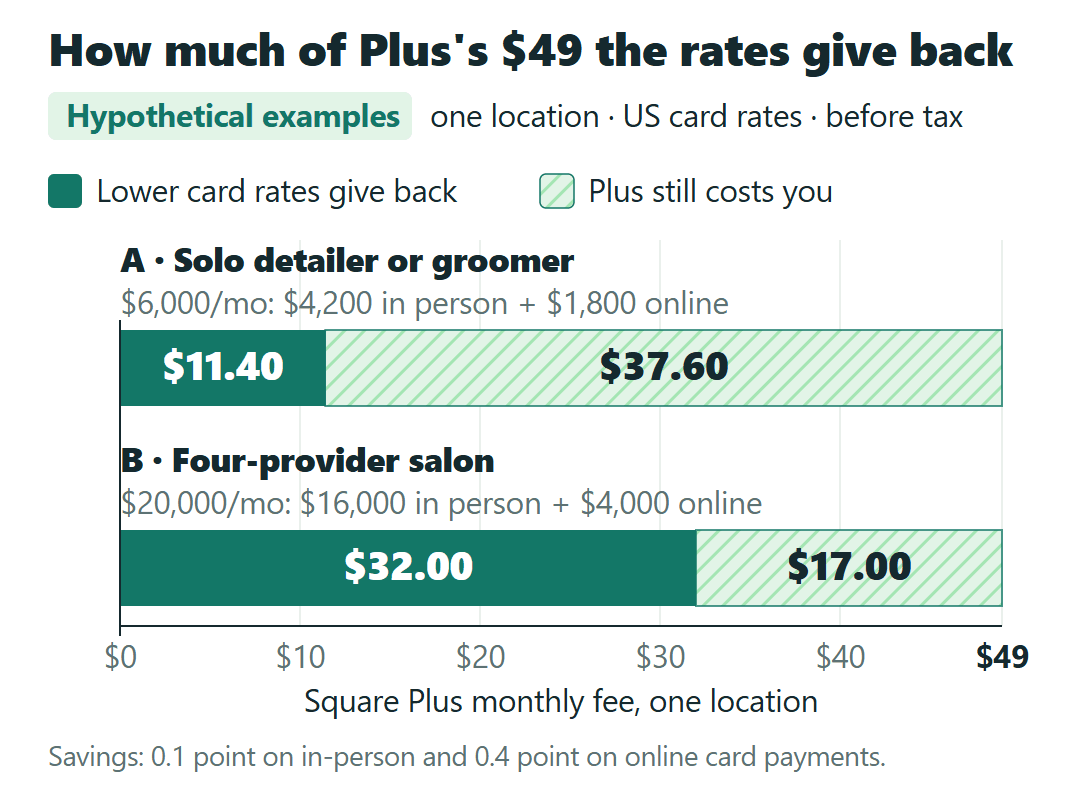
The cents per payment don’t change between Free and Plus, so only the percentage matters: 0.1 point on in-person card payments and 0.4 point on online and invoice payments. Card-on-file payments save nothing.
That gives a formula you can run on your own month. Monthly savings on Plus = 0.001 × your in-person card volume + 0.004 × your online and invoice card volume. Net monthly cost of Plus = $49 − those savings, per location. Your own in-person and online split decides the answer.
Example A: a solo detailer or groomer, $6,000 a month
Take a hypothetical one-person mobile detailer or groomer at one location with $6,000 a month in card payments: $4,200 tapped in person and $1,800 paid online as booking deposits and prepayments. Plus saves 0.001 × $4,200 + 0.004 × $1,800 = $4.20 + $7.20 = $11.40 a month.
Plus still costs $49 − $11.40 = $37.60 a month, about $451 a year. If this business upgrades, it’s buying the no-show fee or the calendar sync, not a lower fee bill.
Example B: a four-provider salon, $20,000 a month
Now a hypothetical four-provider salon or grooming shop at one location with $20,000 a month in card payments: $16,000 in person and $4,000 online. Plus saves $16.00 + $16.00 = $32.00 a month, so Plus costs a net $17.00 a month, about $204 a year.
These figures leave out tax, chargebacks and the extra charge on international cards. If you also send invoices for larger jobs, our Square vs. Stripe invoice fee breakdown on $300, $1,200 and $3,000 jobs works through what a single invoice costs on Square and on Stripe.
Trying Plus without a lock-in
Plus and Premium each come with a 30-day free trial, and Square’s pricing FAQ says you can cancel or switch plans anytime. The US pricing page shows Plus only as a monthly price, with no annual price or discount and no published 12-month term behind it.
Square’s subscriptions help page covers the timing. A downgrade from Plus to Free takes effect at the start of your next billing cycle, and you keep the Plus features until then. If you upgrade after you’ve already used the trial, Square charges a prorated amount for the rest of the month.
Square’s help also describes the advanced booking tools as capabilities you add in the Square Dashboard after subscribing, so check that the tool you upgraded for has been added. And because the fee is per location, a second location on Plus is another $49, or $98 a month for two.
Pick the no-show policy first, then the plan
Stay on Free if a deposit or prepayment handles your no-shows and you don’t need confirmations, Google Calendar sync or split appointments. Adding a provider doesn’t by itself push you up, because Free’s calendars are unlimited.
Start the Plus trial if a held-card no-show policy, confirmations, Google Calendar sync or two-provider appointments is the reason. Judge the month by whether you used that tool, not by the fee line. In both examples above, the lower rates left $37.60 or $17 a month still to pay.
Look at Premium only if you book rooms, chairs or equipment as resources, or need its booking and team reports.
In both examples, I see the lower card rates as a partial discount on Plus rather than a reason to buy it; your own in-person and online split decides whether that holds for you. The no-show policy is the first question to settle: a deposit on Free covers clients who are fine paying ahead, and the held card is what the $49 buys where asking everyone to pay up front would cost you bookings.
It isn’t the only question. Confirmations, Google Calendar sync and two-provider appointments are each a reason for Plus on their own. Whichever way your clients lean on no-shows, those three tools still each get their own yes or no.