Before you compare FreshBooks’ plan prices, open your customer list and scroll past the people you bill today. The household that moved away, last summer’s one-time cleanup, the account you archived so it would stop cluttering the screen: FreshBooks counts every one of them toward your plan’s limit.
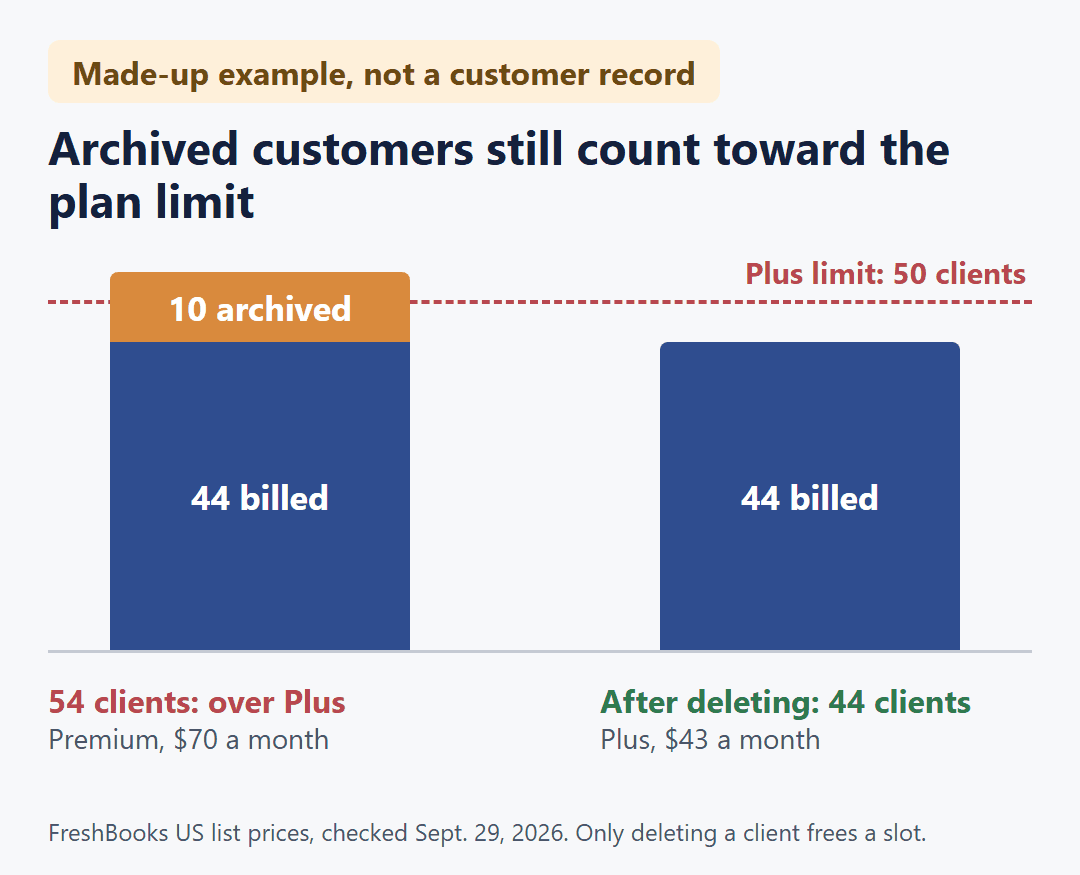
A made-up example shows what that does. A residential cleaning company bills 44 customers now and has 10 past customers archived. FreshBooks sees 54 clients. Plus covers 50, so that company is over Plus and into Premium, $70 a month instead of $43, unless it deletes the 10 past customers it no longer bills. This is an illustration, not a customer record.
FreshBooks limits each plan by clients, meaning the customers you bill, not by invoices: Lite covers 5, Plus 50 and Premium unlimited, and archived clients count. The US list prices are $23, $43 and $70 a month, or $248.40, $464.40 and $756.00 a year paid up front, which is 10% off the plan price. Each extra person who logs in adds $11 a month. Customers can opt in to AutoPay with no monthly add-on; charging their saved cards yourself takes a $20-a-month add-on, and card payments carry a per-payment fee either way.
Those are FreshBooks’ US list prices and rules from freshbooks.com and its support site, checked on October 17, 2026, for a business that buys on the FreshBooks website in USD. None of it comes from using an account. FreshBooks raised its list prices in 2026, so older pages may show lower numbers; the current ones are on the FreshBooks pricing page and in its 2026 price change FAQ. Nothing here is tax or accounting advice.
What counts toward 5, 50 or unlimited
For a cleaning, lawn, pool or pest business, each household or property owner you bill is one client. How often you invoice them doesn’t change the count, because invoices and estimates are unlimited on every plan.
- Active and archived clients both count. Archiving a customer you’ve stopped serving, or one you expect back next season, doesn’t free a slot.
- Deleted clients don’t count. Deleting one frees a slot. Their past invoices and payments stay in your account, and you can undelete them later, but you can’t invoice a client while they’re deleted.
This is FreshBooks’ own rule, not a workaround: its pricing FAQ says that if you’re no longer billing a client, you can delete them to free up a spot. In the example above, deleting the 10 past customers brings the count back to 44, inside Plus. That’s one way to count, not a customer number that fits every business.
When you’re at your plan’s limit and need to add another customer, you’ll need to upgrade or delete a client you no longer bill.
Before choosing a plan, I’d split the archived list in two: customers you expect to bill again, and ones you won’t. Only the second group is safe to delete, since anyone in the first would need undeleting before their next invoice.
Not every bookkeeping plan draws its line at customers. How a 20-invoices-a-month cap counts per-visit billing for a cleaning company shows what changes when the limit counts invoices instead.
Lite, Plus and Premium at list price
| Plan | Clients, archived included | Per month | Per year, paid up front |
|---|---|---|---|
| Lite | 5 | $23 | $248.40 |
| Plus | 50 | $43 | $464.40 |
| Premium | Unlimited | $70 | $756.00 |
The yearly price is 12 months of the plan price minus 10%, billed when you buy. It covers the plan only, not the add-ons below. Against 12 monthly payments, it saves $27.60 on Lite, $51.60 on Plus and $84.00 on Premium. A fourth plan, Select, is custom-priced through FreshBooks sales.
Each step up costs more per month at list price: Lite to Plus adds $20, and Plus to Premium adds $27. That $27 is the monthly cost of the 10 archived customers in the example at the top.
Two things sit outside these prices. FreshBooks Payroll is an optional add-on at $40 a month plus $6 per person, not part of any plan. And the pricing page may show an intro offer for new customers; once it ends, you pay the list price in the table.
Moving up with only a few customers
Your customer count sets the lowest plan you can use. Of the features that change the plan for a service business, a few can push you higher even with 5 customers or fewer:
- Plus and up: accountant access, e-signatures on estimates, and proposals and client retainers.
- Premium and up: project profitability (job costing) and accounts payable (entering and tracking bills).
Recurring invoices, scheduled late fees, payment reminders, deposits, and time and mileage tracking are on every plan, Lite included, so none of them is a reason to upgrade.
The $11 line follows logins, not crew size
Your plan covers your own login. Each additional person you invite with a role, whether admin, manager, employee or contractor, costs $11 a month on Lite, Plus or Premium.
Two kinds of people don’t add to it:
- Unassigned team members. You can keep someone’s details in FreshBooks as an Unassigned profile at no extra cost. They have no access until you assign a role, which uses a paid invitation.
- Accountants on Plus and Premium. Up to 10 per business log in free. Lite has no accountant access.
So a crew member who never logs in needs no paid seat, and anyone who does log in adds $11 a month, unless they’re an accountant on Plus or Premium.
Recurring customers: a $20 add-on and a fee on every payment
Automated recurring invoices are on every plan, and customers can opt in to AutoPay on invoices from a recurring template with no monthly add-on. You need Advanced Payments at $20 a month on Lite, Plus or Premium to key in a customer’s card yourself (by phone or in person), save a card and charge it yourself, or require customers to use AutoPay on a recurring template.
That covers the monthly side only. Each card payment through FreshBooks Payments also has a fee taken out before payout, and the rate depends on how the payment is made:
| How the payment is made | Monthly add-on | Fee per payment |
|---|---|---|
| Customer pays by standard card when invoiced | $0 | 2.9% + $0.30 |
| Customer opts in to card AutoPay | $0 | 3.5% + $0.30 |
| You key in or charge a saved card | $20 | 3.5% + $0.30 |
| Customer opts in to AutoPay by bank transfer (ACH) | $0 | 1% |
The point to take from the middle rows: opt-in card AutoPay saves you the $20 add-on, not the higher card rate. Card AutoPay and cards you charge yourself are both listed at 3.5% + $0.30, the same as commercial, business and American Express cards. Advanced Payments works only with card payments through FreshBooks Payments or Stripe Standard. These are the US rates FreshBooks listed in September 2026; check its transaction fee page on the support site before you rely on one.
Three hypothetical setups, month by month
Your monthly number comes from four inputs, all at list price with monthly billing:
Plan price (from your client count, archived included, or a feature that needs Plus or Premium) + $11 × each person besides you who logs in (not accountants on Plus or Premium) + $20 if you key in or charge customers’ cards yourself, or require AutoPay
Three made-up businesses, each with its inputs, and none of them a real customer:
- A solo house cleaner with 30 recurring households, no one else logging in, and customers who opt in to AutoPay themselves: Plus at $43 a month. Thirty is over Lite’s 5 and inside Plus’s 50, and opt-in AutoPay needs no add-on. Each card AutoPay payment still has its 3.5% + $0.30 fee, which isn’t in the $43.
- The same cleaner, adding an office helper who logs in, with the owner keying in customers’ cards by phone: $43 + $11 + $20 = $74 a month, before the fee on each card payment.
- A lawn care owner billing 60 households, with 2 office staff who log in, an outside bookkeeper, and saved-card charging: Premium $70 + 2 × $11 + $20 = $112 a month, before card fees. The bookkeeper logs in free as an accountant, and field crew who never log in need no seat.
These totals leave out payment-processing fees, payroll and intro offers. They show what each set of assumptions costs, not which plan is right for you.
If your customer list shrinks, or you want out
You can upgrade at any time and pay only the prorated rest of the billing period. If you pay monthly, you can switch to yearly for 10% off.
Downgrading is also allowed at any time, with a prorated credit on your next FreshBooks bill if you do it mid-cycle. But you first have to fit the smaller plan: delete enough clients, active and archived, and remove any team members or retainers it can’t hold. The archived list from the top of this post comes back here, too.
A new purchase has a 30-day money-back guarantee. If you cancel after that, the account stays active until the end of the billing period you’ve paid for.
If you’re still deciding whether to pay for bookkeeping software at all, when paying for bookkeeping software starts to make sense for a small contractor covers that earlier choice. It doesn’t compare anything with FreshBooks.
What decides your FreshBooks bill is two lists you can pull today: every client in the account, archived ones included, and every person who needs to sign in. Settle the first by deciding who you’ll bill again, price the second at $11 each, and add $20 only if you’ll be the one charging cards. Then confirm the current list price on freshbooks.com/pricing before you buy.