Most people assume that once they click “cancel,” the billing stops that day. The companies’ own help pages don’t say that.
Netflix’s help page says, “If you cancel with time left in your billing period, you can use Netflix until the end of the billing period.” Google Play says, “When you cancel a subscription you’ll still be able to use your subscription for the time you’ve already paid.” Canceling usually stops the next renewal. It doesn’t usually refund the period you were already billed for. Those are two companies’ rules, not everyone’s, but they explain why a charge after canceling isn’t always a mistake.
So when a subscription you canceled charges you again, the first job is to work out which kind of charge it is. That decides everything after it.
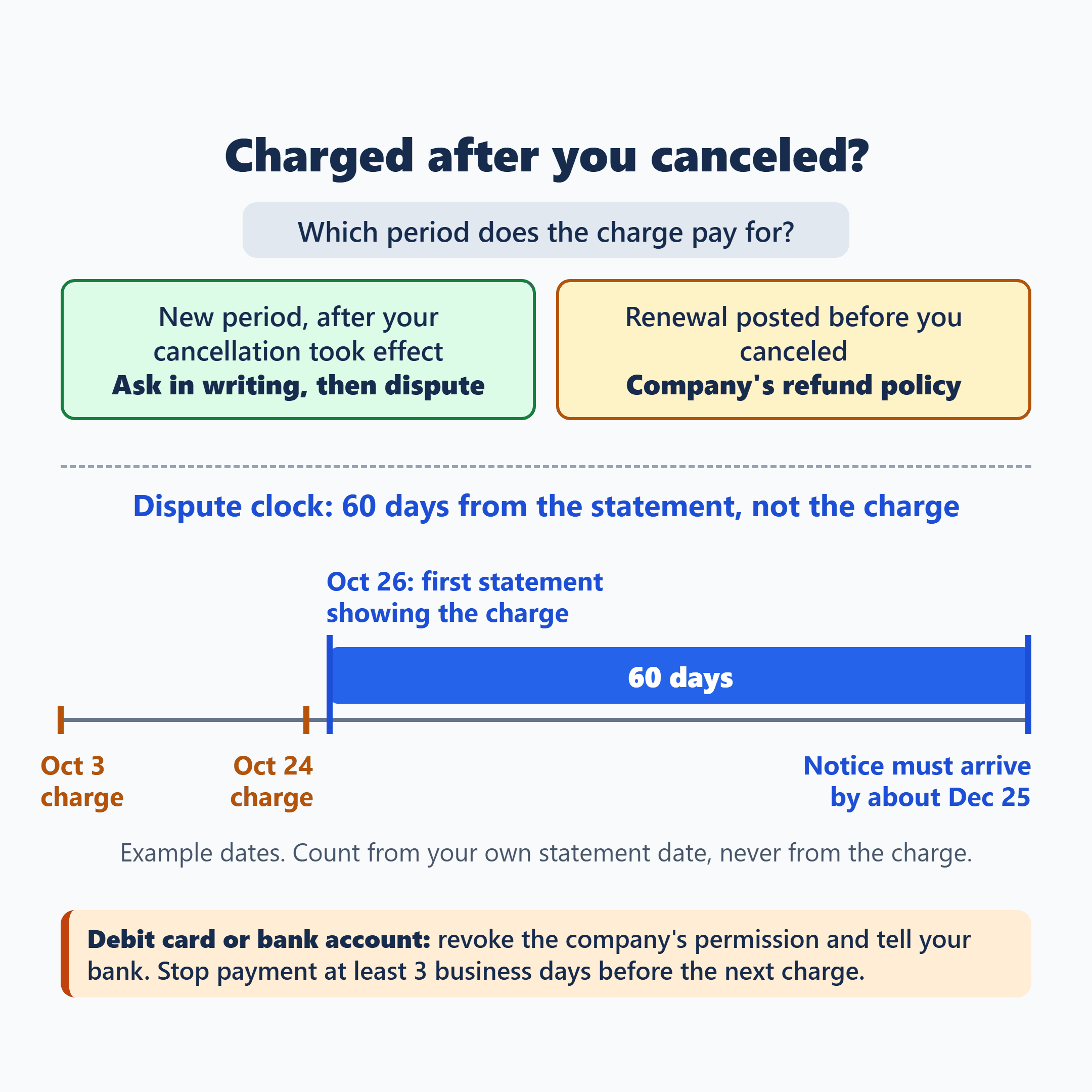
If the charge is for a new period that starts after your cancellation took effect, it’s a charge you didn’t agree to. Ask whoever billed you for the money back, in writing. If that doesn’t fix it, dispute it with your card issuer or bank. They must receive your notice within 60 days after the statement that first shows the charge was sent, not 60 days from the charge itself.
If the renewal went through before you canceled, or the charge is for a period you’d already been billed for, it isn’t a charge after cancellation. Getting it back depends on the company’s or platform’s refund policy, so ask them.
Paying by debit card or bank account? You can also revoke the company’s permission to charge you and tell your bank you did, and the bank must then block that company’s future debits. If the next charge is close, a stop-payment order at least 3 business days before it covers that one. Neither step cancels the subscription, so cancel with the company too.
This covers subscriptions paid with a personal credit card, debit card or bank account in the US. Prepaid and payroll cards, business cards and buy-now-pay-later plans aren’t covered here.
Which Charge Are You Looking At?
Pull these from your email, your account with the company, and your card or bank statements:
- Your cancellation confirmation (email, screenshot or chat), with the date you canceled and the date your service ends.
- The charge: its date and the period it pays for.
- The name on your statement: the company itself, or Apple, Google Play or PayPal.
- How you paid: credit card, debit card or bank account.
- The first statement that shows the charge, and the date it was sent.
- Debit card or bank account: the date of the next scheduled charge.
Now line up the service end date on your confirmation with the period the charge covers. Go by your own confirmation, not by the Netflix or Google Play examples above; other companies set their own terms.
- A new period, dated after your cancellation took effect: that’s the charge you didn’t agree to. Ask for it back, and dispute it if you have to.
- A renewal or free-trial conversion that posted before you canceled, or a period you’d already been billed for: that’s a refund request under the company’s or platform’s policy, not a post-cancellation charge. For trials, Apple tells you to cancel “at least 24 hours before the trial ends.”
The Name on Your Statement Decides Where You Ask
Asking in the wrong place can leave the subscription running, so read the charge name first.
- Apple: request a refund at reportaproblem.apple.com. Apple’s steps: “Tap or click ‘I’d like to,’ then choose ‘Request a refund,'” then “Choose the app, subscription, or other item.” Apple says to “wait 24 to 48 hours for an update on your request” (Apple: Request a refund · Apple: Cancel a subscription).
- Google Play: cancel the subscription in Google Play and ask for a refund under Google Play’s refund policies (Google Play: Cancel a subscription).
- PayPal automatic payment: PayPal is where you stop future payments, under Settings, then Payments, then “Subscriptions and saved businesses” (PayPal Help). It isn’t where you get back a payment that already went through. PayPal says, “To request a refund for a completed payment, you’ll need to contact the seller,” and “Contact information for your merchant can be found in the automatic payment” (PayPal: automatic payments with a seller). If the seller doesn’t refund you, PayPal’s own dispute process is on its refund help page.
- Any other name: the company itself. Cancel with it and ask it for the refund in writing.
Put the request in writing and attach your cancellation confirmation, the charge and the statement that shows it. Something like this works:
I canceled my subscription on [date], and your confirmation (attached) shows my service ending on [date]. On [date] you charged my [card / account] for a period after that. My statement showing the charge is attached. Please refund this charge and confirm in writing that no further charges will be made.
If the company won’t fix it, the FTC’s advice is direct: “If a company won’t stop charging your account after you’ve tried to cancel a subscription, file a dispute (also called a ‘chargeback’) with your credit or debit card” (FTC).
Asking the company first is fine. Just know the dispute clock below keeps running while you wait, including while Apple, Google Play or a seller reviews your request. With a credit card, the federal billing-error rules don’t require you to contact the seller before you dispute.
Your Dispute Deadline Starts at the Statement, Not the Charge
Find the first statement that shows the charge and the date it was sent (your issuer or bank may call it the statement date or closing date). Count 60 days from that date. Your notice has to arrive by then, so send it well before day 60. The deadline doesn’t count from the charge date or from the day you canceled.
For example, suppose a charge posted on Oct 3, or on Oct 24, and either way it first appears on a statement sent Oct 26. In both cases your notice has to arrive by about Dec 25, 60 days after Oct 26, whichever day the charge posted. Your own dates will differ; the statement date is the one to count from.
| You paid by | Your notice | The next charge |
|---|---|---|
| Credit card | In writing to your card issuer, which must receive it within 60 days after the statement that first shows the charge | Ask your issuer; there’s no federal stop-payment right for credit cards |
| Debit card or bank account | To your bank, which must receive it within 60 days after that statement; put it in writing | Revoke with the company and tell your bank; stop payment at least 3 business days before it |
Billed through Apple, Google Play or PayPal? The card or bank deadline above still runs for the card or account behind the charge while that request is pending, so keep an eye on it.
If you paid by credit card
Start the dispute however your issuer offers it, online or by phone, and also make sure a written notice reaches the billing-error address on your statement (or the electronic method your billing-rights statement says the issuer accepts) within the 60 days. I wouldn’t rely on a call alone.
Under Regulation Z, the notice must let the issuer identify you and give “the type, date, and amount of the error.” The issuer must acknowledge it “within 30 days” and resolve it “within 2 complete billing cycles (but in no event later than 90 days).” Those are limits on the issuer’s response, not a promise of a refund. While the dispute is open, you don’t have to pay the disputed amount, but pay the rest of your bill. The FTC’s guide includes a sample dispute letter (FTC: Using Credit Cards and Disputing Charges · 12 CFR 1026.13).
If the other charge you’re fighting is for a package marked delivered that never showed up, that case is walked through in package says delivered but never arrived: who refunds you, and which deadline applies.
If you paid by debit card or bank account
In your dispute notice, tell your bank the company was no longer authorized to charge you after your cancellation took effect. Under Regulation E, the bank must receive your notice within 60 days after it sent the statement that first shows the charge. You can call, but the bank “may require written confirmation … within 10 business days of an oral notice,” so put it in writing, or send that confirmation quickly if the bank asks.
The bank must investigate and decide “within 10 business days,” or it can take longer if it provisionally credits your account for the amount within 10 business days. If it asked for written confirmation and didn’t get it within 10 business days, it doesn’t have to give that provisional credit. These are the bank’s timelines, not a promise of a refund.
Debit Card or Bank Account: You Can Make the Bank Block the Next One
This is the part people tend to miss. With a debit card or bank account, you have two separate bank tools. They do different things, and you can use both.
- Revoke the company’s authorization (all future charges). Tell the company in writing that you’re taking away its permission to charge your account, and keep a copy. Then tell your bank you’ve revoked it. Once the bank has been told the authorization is no longer valid, it “must block all future payments” from that company and “may not wait for the payee-originator to terminate the automatic debits.” The bank may ask for a copy of your revocation to the company within 14 days, so have it ready. This covers recurring debit card payments too.
- Stop payment (when the next charge is close). Give your bank a stop-payment order “orally or in writing at least three business days before the scheduled date” of the charge. It works even if you haven’t revoked with the company yet. If you call and the bank asks for written confirmation, send it: an oral order can stop applying after 14 days without it. Your bank may charge a fee for a stop-payment order, so ask.
The revocation to the company can be a single line:
I am revoking my authorization for [company] to take automatic payments from my [debit card / bank account] ending in [last four digits]. Do not charge this account again.
Neither tool cancels the subscription itself, so cancel with the company too (CFPB: automatic debit payments · 12 CFR Part 1005).
With a credit card, ask your issuer whether it can block future charges from that company. That isn’t the same federal right banks have to honor for debit cards and bank accounts.
Do This Before Your Next Statement Closes
If I found a charge like this, I’d do two things the same day: save the cancellation confirmation somewhere I can’t lose it, and look up the date of the first statement that shows the charge. Everything else, the refund request, the dispute, the bank block, hangs off those two pieces of paper.
Then send the written refund request, and put the 60-day date from that statement on your calendar with a few weeks of margin. If the refund hasn’t come by then, send the dispute. If you pay by debit card or bank account and the next charge is only days away, call the bank about a stop payment now rather than waiting on the company.
There’s no federal “click-to-cancel” rule in effect right now, and some states have their own auto-renewal laws. If a company keeps charging you, you can report it at ReportFraud.ftc.gov or to your state attorney general; problems with a bank account can go to the CFPB at consumerfinance.gov/complaint.
If another subscription on your list still has prepaid credits, the order you cancel in can matter there; canceling Audible with credits left: why the order matters shows how that works for one service.
Based on federal Regulation Z and Regulation E, FTC and CFPB consumer guidance, and Apple, Google Play, PayPal and Netflix help pages, checked October 16, 2026. Your own confirmation and statements show the dates that apply to you.