Type “Southwest flight credit expiration” into a search bar and one of the suggestions finishes the thought for you: fly by or book by? It’s the right question to ask, because the answer decides whether a credit you’re planning to use is still worth anything.
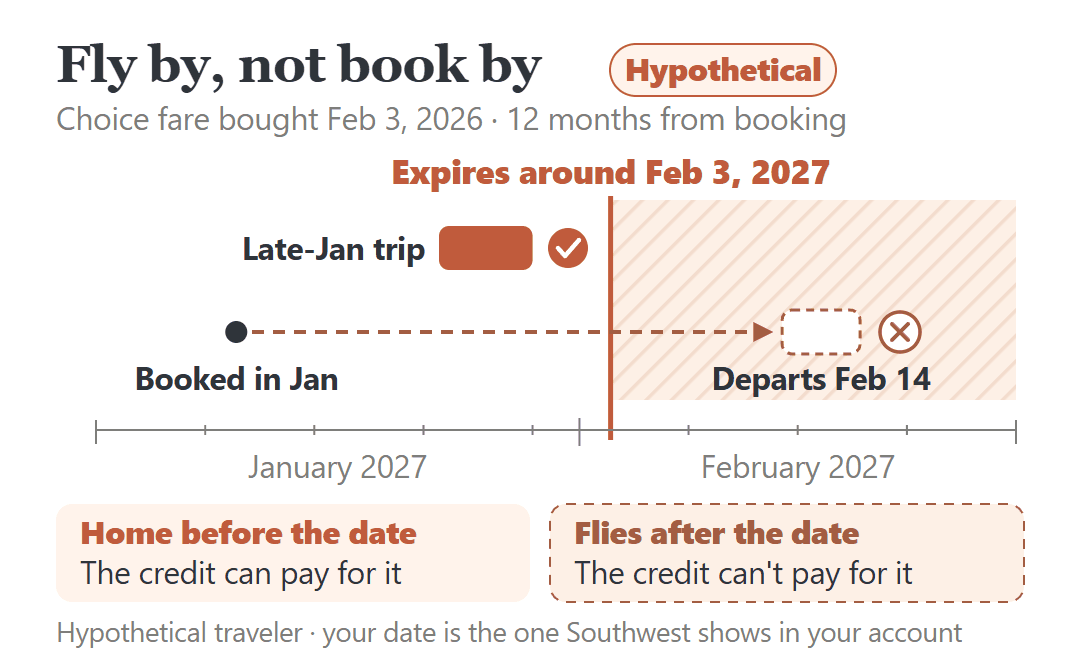
Southwest’s own answer is short: “All travel must be completed by the expiration date.” The date on your credit is a fly-by date. Booking before the date for a flight that leaves after it doesn’t work.
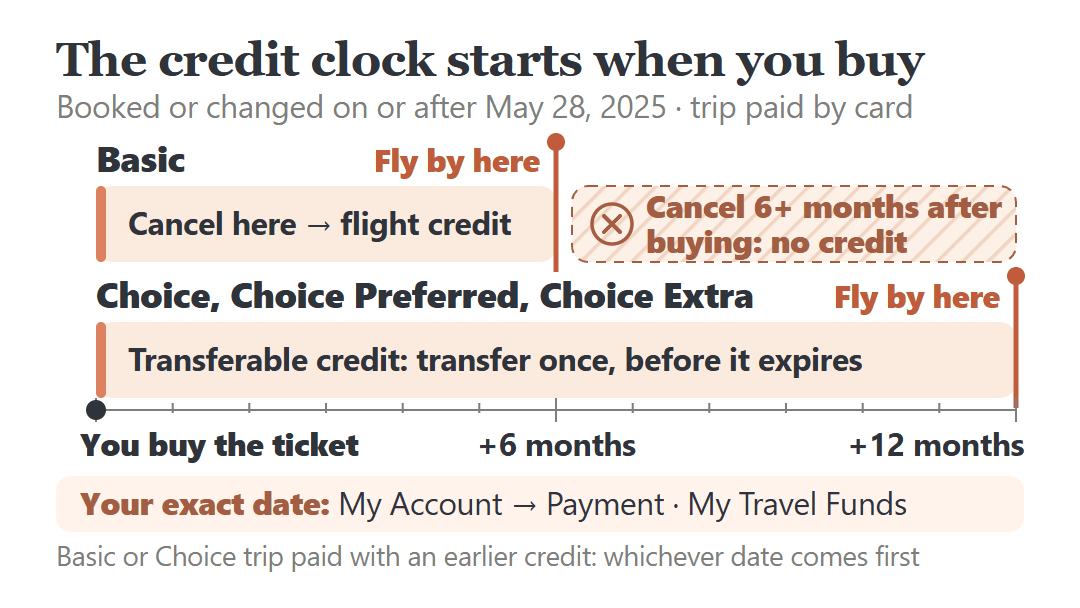
Which credits have a date at all? Credits created on or before May 27, 2025 don’t expire. Credits from a reservation booked, or voluntarily changed, on or after May 28, 2025 do. For a trip paid by card, a Basic fare’s credit expires 6 months from the date you originally booked, and a Choice, Choice Preferred or Choice Extra credit expires 12 months from the original booking date. The clock starts when you buy the ticket, not when you cancel.
Your exact date is in your account: My Account → Payment on southwest.com, or My Travel Funds in the app. And if you’re about to cancel a Basic fare you bought six months or more ago, read the Basic section below first. Canceling that late returns no credit at all.
Everything here is for trips booked directly with Southwest, on southwest.com or the app. Tickets from a travel agent or a company booking tool, and Getaways vacation packages, are handled differently.
Start With the Date Southwest Shows for Your Credit
Any calculation in this post is a way to understand your date, not a replacement for it. The date Southwest lists is the one that counts.
Log in and go to My Account → Payment on a computer, or My Travel Funds in the app or mobile site. Each flight credit or Transferable Flight Credit tied to your Rapid Rewards account is listed there with its expiration date.
If the credit isn’t attached to a Rapid Rewards account, use Southwest’s Check Travel Funds page with the confirmation number and the passenger’s name.
While you’re there, note four things for each credit: the expiration date, the fare it came from, how the original trip was paid, and when it was booked. Those four explain the date, and they decide what you can still do with it.
If a credit was created on or before May 27, 2025, it doesn’t expire. That’s still Southwest’s rule. The catch, covered below, is what happens if you spend it on a new trip and then cancel.
Why Your Date Is What It Is: Fare, Payment and the Day You Booked
For a trip paid by card (PayPal, Apple Pay, Flex Pay and Klarna count the same way), the fare you bought sets the length, and the original booking date sets the start.
| Fare you bought | What canceling gives you | Credit expires (trip paid by card) |
|---|---|---|
| Basic | Flight credit, for the passenger named on the ticket only | 6 months from the original booking date |
| Choice | Transferable Flight Credit (no cash refund) | 12 months from the original booking date |
| Choice Preferred, Choice Extra | A refund to your payment, or a Transferable Flight Credit if you’d rather keep it | 12 months from the original booking date, if you keep the credit |
Notice what’s missing from the table: the day you cancel. A Basic fare bought five months before you cancel leaves roughly a month of credit. A Choice fare bought eleven months before you cancel leaves roughly one.
One more rule changes the date for anyone who paid with an older credit. If you paid for a Basic or Choice trip with a flight credit, the new credit gets whichever date comes first: the old credit’s expiration date, or 6 months (Basic) or 12 months (Choice) from the new booking. For Choice Preferred and Choice Extra trips paid with a credit, Southwest says the new credit adopts the original credit’s expiration date.
Gift cards, LUV Vouchers and Rapid Rewards points follow their own rules, listed on Southwest’s expiration of flight credits page. Whatever you paid with, the date in your account is the one to plan around.
Fly By, Not Book By: What the Date Actually Requires
Southwest’s contract puts it plainly: the credit has an expiration date “by which travel must be booked and flown.” The whole trip you buy with the credit has to be finished by then.
Here’s a hypothetical traveler to show what that means on a calendar. They bought a Choice fare for $240 by card on February 3, 2026, then canceled the trip on October 16, 2026. Their Transferable Flight Credit is good until around February 3, 2027, 12 months from the day they booked, not from the day they canceled.
Now say they want to use it for a trip leaving February 14, 2027. Booking it in January doesn’t help. The trip flies after the expiration date, so the credit can’t pay for it. A late-January trip that’s back home before early February would work.
If no trip of yours fits before the date, the options narrow to the ones in the transfer section below. Planning next year’s trips with this year’s credit is where the fly-by rule is easiest to miss.
Before You Cancel a Trip: What Changes What You Get Back
If you haven’t canceled yet, you’re still choosing what kind of credit you end up with, or whether you get one. Four things are worth checking first.
A Basic fare bought far ahead can come back as nothing
Under Southwest’s contract, a canceled Basic fare comes back as a flight credit unless it’s been six months or more since you bought the ticket. In that case the whole fare is forfeited. No credit, no partial credit.
A hypothetical example: a $189 Basic fare bought by card on March 12, 2026 for a November 25 Thanksgiving flight. The credit window ran 6 months from booking, to around September 12, 2026. Canceled on September 1, it would have produced a credit with about 11 days left, and the trip it paid for would have had to be flown by then. Canceled on October 16, more than six months after buying, it returns nothing: the $189 is gone.
That’s why booking early on a Basic fare carries a risk people don’t expect. The earlier you bought, the less a late cancellation can give back.
Refundable fares can skip the credit question
Choice Preferred and Choice Extra are refundable. When you cancel, you can take the money back to your original payment instead of holding a credit. Basic and Choice are non-refundable: outside the 24-hour window and the Southwest-caused disruptions covered below, canceling them gets you at most a credit, not cash.
Spending an old credit can start a clock on it
A credit created on or before May 27, 2025 doesn’t expire. But if you use it to book a new trip and then cancel that trip, the value comes back as a new credit under today’s rules.
A hypothetical example: a $300 credit from 2024, no expiration date, pays on October 16, 2026 for a Basic ticket on December 18. If that trip is canceled, the new credit gets whichever date comes first. The old credit had none, so the new one expires about 6 months from the new booking, around April 16, 2027. Had the new ticket been Choice, it would run to around October 16, 2027.
So once an old credit pays for a Basic or Choice ticket you might cancel, I’d treat it like any newer credit.
Cancel in time, and know the 24-hour window
Cancel at least 10 minutes before scheduled departure. If you don’t cancel and don’t fly, Southwest treats you as a no-show: a Basic or Choice fare is forfeited, while Choice Preferred and Choice Extra still come back as a Transferable Flight Credit.
At the other end, Southwest’s refund policy says that if you cancel within 24 hours of booking, you can choose a refund to your payment method or keep the value as a credit. Details are on its refund policy page.
When Southwest Cancels or Significantly Delays Your Flight
This is the case where accepting a credit by default can cost you cash. If Southwest cancels your flight, or it’s significantly delayed or changed (generally 3 hours or more on a domestic trip), and you decide not to fly, you can get a refund to your original form of payment, even on a Basic or Choice fare. Unused extras such as bag fees are refunded too.
Take the hypothetical $189 Basic fare again, this time with Southwest canceling the flight on the morning of travel. If the traveler decides not to go, the $189 can go back to the card, and card refunds are typically processed within seven business days.
If you’d rather keep a credit in that situation, it lasts much longer than a normal one: generally five years, counted from the original booking date for Choice fares and from the cancellation date for Basic. The correct date can take up to 48 hours to show in your account.
If an agent or the app offers a credit first, this is what I’d say:
“My flight on [date], confirmation [number], was canceled by Southwest [or delayed by about X hours], and I’ve decided not to travel. I’d like a refund to my original form of payment instead of a flight credit. Can you confirm the amount and when it will post?”
The refund covers the unused fare, taxes and fees. Southwest’s contract doesn’t promise anything beyond that.
Can’t Fly Before the Date? What’s Actually Possible
A Transferable Flight Credit can be transferred once, to another Rapid Rewards member, before it expires. Those come from Choice, Choice Preferred and Choice Extra fares. If a relative or friend with a Rapid Rewards account can finish a trip before the date, that’s the option Southwest’s terms give you for keeping the value from lapsing.
Nothing in Southwest’s terms says a transfer resets the date, so I’d assume it doesn’t. And a Basic flight credit can’t be transferred. Only the passenger named on the original ticket can use it.
What about an extension? Southwest doesn’t publish an extension policy for expiring credits. I’d plan on the date as final and not count on getting more time.
Put the Date Where You’ll See It
- Look up every credit in My Account → Payment or My Travel Funds, or on the Check Travel Funds page.
- For each one, write down the expiration date, and remember it’s the day the trip has to be finished, not booked.
- If a trip fits before that date, book it. If none does and it’s a Transferable Flight Credit, decide whether to transfer it before it expires.
- Before canceling anything, check the fare type and when you bought it. A Basic fare bought six or more months ago returns nothing.
- If Southwest canceled or significantly delayed the flight, ask for the refund before accepting a credit.
It’s easy to think of a flight credit as money sitting in an account. Southwest’s terms treat it as a deadline to finish a trip, and on a Basic fare the clock started the day you bought the ticket. A calendar reminder a month before the date costs nothing.
A credit with a hard date isn’t the only household money that works this way. If you also carry a health FSA balance, here are the two FSA deadlines that decide whether you keep the money. And if the card you’d rebook on just posted its yearly charge, see how long you have to cancel for an annual fee refund, and which date starts that clock.
Sources: Southwest Airlines Contract of Carriage (effective September 24, 2026), and Southwest Help Center pages on expiration of flight credits, the Basic fare, the refund policy and Transferable Flight Credit. Checked October 2026. The travelers and dates in this post are hypothetical examples, not real customers’ accounts.