Xfinity’s autopay setup accepts three ways to pay: a checking account, a savings account, or a credit or debit card. Only the first two can earn the $10 monthly discount. A debit card draws on the same checking account, and Xfinity still counts it as a card.
Xfinity’s discount page says it plainly: Xfinity “no longer offers APPD for debit or credit cards.” APPD is its name for the automatic payments and paperless billing discount. So one checking account can produce two bills $10 apart, depending on whether autopay draws on the account itself or on the debit card attached to it.
Xfinity takes $10 a month off only when the account has Xfinity Internet, paperless billing is on, and autopay runs from a stored bank account. All three, on each account if you have more than one. Switch an enrolled account from the bank to a card, and the discount is gone.
The advertised price already counts on that $10. Xfinity’s Internet plans carry the line “Price includes $10/mo autopay and paperless discount,” and the offer terms say that without both, an “additional $10/mo charge applies,” including on the 5-Year Price Guarantee. A bill $10 above the advertised price is exactly what a missing discount looks like.
If you just enrolled, give it time: the discount starts within 45 days and may take up to two bills to show. If it’s been longer than that, the first thing to look at is the payment method on file, not the customer service number.
This covers home Xfinity Internet accounts, alone or bundled with TV or Voice. Xfinity Mobile autopay has its own settings, NOW prepaid Internet has its own terms, Comcast Business services aren’t eligible, and accounts with only TV or Voice aren’t offered this discount.
How Can You Tell Whether Your Account Qualifies Right Now?
Sign in at xfinity.com as the Primary user or a Manager. Only those users can manage autopay and paperless billing. Then look at two settings and one bill.
The payment method. The Billing page in your account shows the payment method on file for automatic payments. Billing & Pay, then Manage Auto Pay, is where you change it. A checking or savings account qualifies. A card, debit included, doesn’t.
Paperless billing. Go to Billing & Pay, then Manage Paperless Billing. If it isn’t on, choose Turn On there.
The bill itself. Xfinity’s guide to its bill says the discounts you’re getting appear in the “Your bill explained” section, and “My Xfinity services” lists your monthly charges along with any promotional discounts and when they end. Look for a $10 discount in those two places rather than a particular label.
If you have more than one Xfinity account, check each one. Each account needs its own Xfinity Internet and its own enrollment in both, with a bank account.
Why a Debit Card Doesn’t Get the Discount, and Why the Advertised Price Assumes It
In Xfinity’s autopay setup, a bank account and a debit card are two separate payment methods, even when they lead to the same money. The bank account is added as an account; the card is added with its card number and security code. Only the first one counts for the discount, so a debit card is a card here.
I think the debit card is the easiest detail in this setup to get wrong, because paying with it feels like paying from the bank.
Here’s a hypothetical household, not a real customer’s bill. Their plan is advertised at $55 a month with autopay and paperless, a made-up figure, since real prices depend on your address and offer. They turn on paperless and set up autopay with their debit card. No discount applies, so the plan bills at $65. They move autopay to the checking account behind that card, and once the discount shows, the plan is back to $55: $10 a month, or $120 a year.
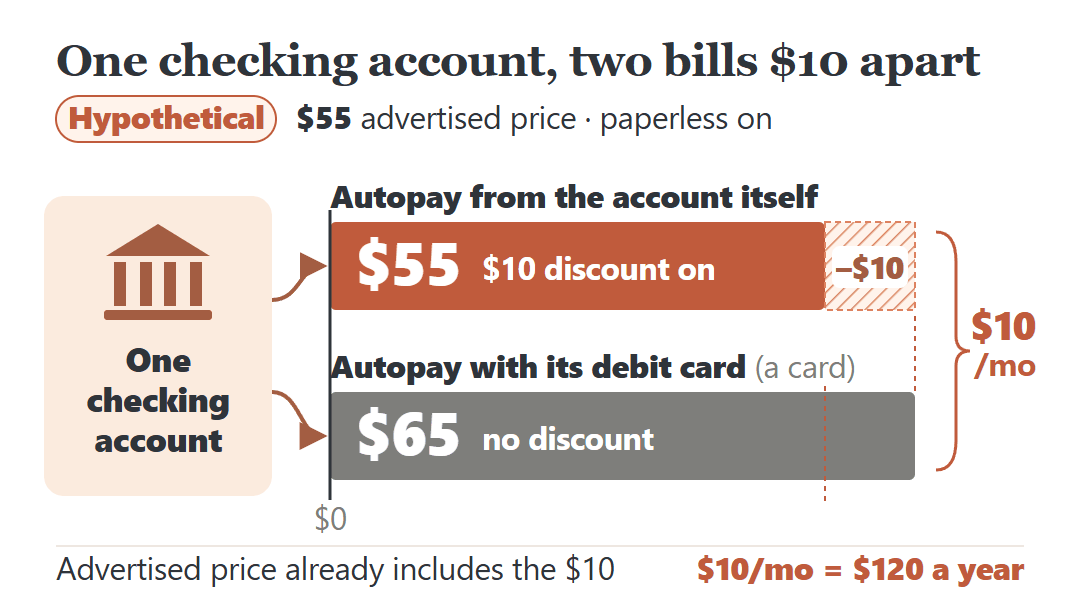
The fix is the payment method, not the plan. Xfinity says that after a change from a card to a stored bank account, it may take up to two bills for the discount to show.
The 45-Day Wait After You Enroll
Xfinity’s discount page gives two timing rules. The discount starts within 45 days after you sign up, and it may take up to two bills to appear on your bill. The same two-bill wait applies after moving autopay from a card to a bank account.
So a first bill without the $10, a few weeks after you enrolled, isn’t yet a sign that something went wrong. Xfinity doesn’t say which bill it lands on, only those two limits.
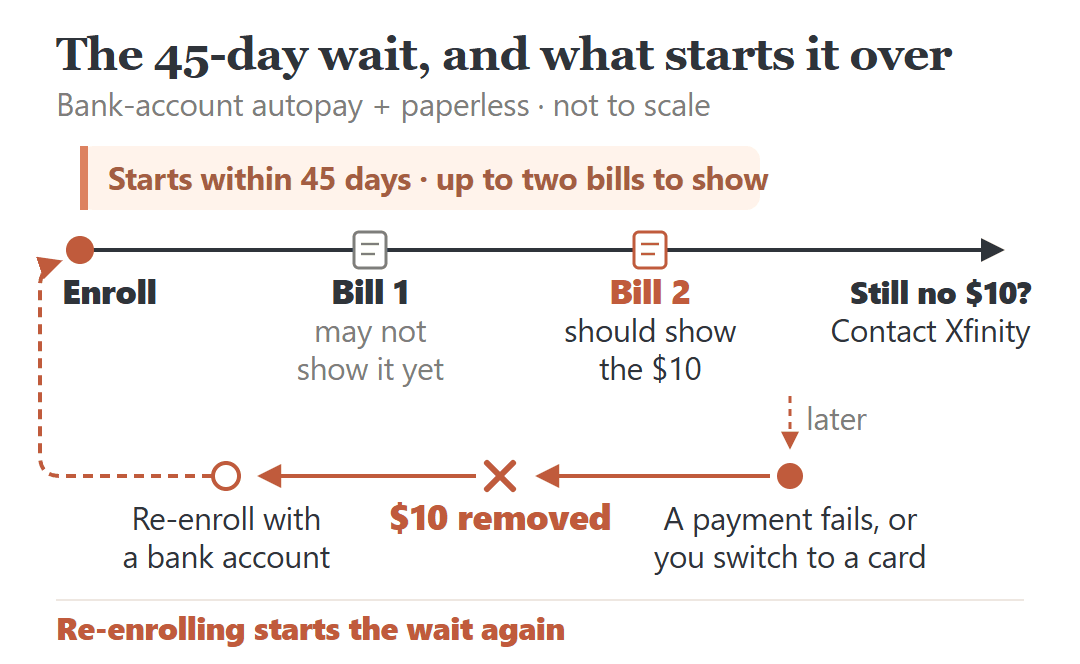
Xfinity’s discount page doesn’t mention credits for bills that went out before the discount started, so don’t count on one. You can ask, but plan around the bills ahead.
If two bills have gone out since you set everything up and the $10 still isn’t there, this is the point to contact Xfinity:
“My account has Xfinity Internet, paperless billing, and automatic payments from a stored bank account, all set up on [date]. Two bills have gone out since then without the $10 automatic payments and paperless billing discount. Can you check why it isn’t applied and tell me when it will start?”
What Makes the $10 Disappear, and How to Get It Back
The discount stays only as long as all three conditions do. Xfinity’s support page lists what stops it:
| What happened | The $10 discount | Getting it back |
|---|---|---|
| Autopay or paperless turned off | Stops | Turn both back on, with a bank account |
| An autopay payment failed | Removed, because you’re unenrolled from autopay | Set up autopay again with a bank account |
| Autopay switched from the bank to a card | Lost | Switch back to a stored bank account |
| Xfinity Internet canceled, other services kept | Stops | Not offered without Internet |
| On a Seasonal Convenience Plan | Doesn’t apply while you’re on it | Starts again when you return to normal rates |
| Billing cycle changed | No effect | Nothing to do |
The failed payment is the easiest one to miss, because it doesn’t feel like changing a setting. Take a hypothetical household with bank autopay and paperless billing, not a real account. One month the payment doesn’t go through. Xfinity unenrolls them from autopay, and that removes the discount. Setting up autopay again from the bank account brings it back within 45 days and up to two bills, and nothing in Xfinity’s terms promises a credit for the months in between.
If paperless billing won’t turn on, check your bank. When your bank’s online bill pay sends you Xfinity bill notices, Xfinity says to unenroll there first, then choose paperless billing in your Xfinity account.
Canceling Internet ends the discount for whatever stays on the account. If you’re leaving Xfinity altogether, different costs come into play. Here’s what canceling Xfinity costs and the 10-day clock for returning its equipment.
Still Have the Older Card Discount? Do the Math Before Switching
If you set up card autopay before mid-2025, your bill may still show a smaller card discount. In a June 26, 2025 notice, Comcast said the card version, then $2 a month, was closed to new customers. Customers who already had it would keep it “until further notice, unless they change services or otherwise become ineligible for the discount.” Your bill shows whether you still have one, and how much it is.
Moving to a bank account trades the card discount and your card’s rewards on the bill for the $10. The monthly gain is:
$10 − the card discount on your bill − (your monthly bill × your card’s reward rate)
A hypothetical example, not a real account: a $90 monthly bill on a card that earns 2% back, or $1.80 a month in rewards. With a $2 card discount, switching gains $10 − $2 − $1.80 = $6.20 a month, about $74 a year. With a $5 card discount instead, the same household gains $3.20. A different discount or reward rate moves the result again, so run it with your own bill.
Make the decision once. If you move to a bank account and later switch autopay back to a card, the discount goes away, and Xfinity no longer offers it for cards.
Payment Method First, Phone Call Last
Two settings and one bill tell you where you stand: the payment method on file, whether paperless billing is on, and the discounts in “Your bill explained” on your latest bill.
A card on file and no discount points to one change: move autopay to the checking or savings account. An older card discount on the bill means running the three-number check above before touching anything. Bank autopay and paperless both on, Internet on the account, and still no $10 after two bills? That’s when the script above is worth a call or a chat.
If the bill is still a stretch with the discount, the federal Lifeline program is a separate route with its own eligibility rules. Here’s who qualifies for the Lifeline phone and internet discount in 2026.
Open Billing & Pay tonight, read the payment method on file, and let the next two bills show whether the change worked.
Sources: Xfinity Support articles on the automatic payments and paperless billing discount (APPD), setting up or turning off automatic payments, signing up for paperless billing and understanding your bill; Xfinity’s Internet offer terms and 5-Year Price Guarantee page; Comcast’s June 26, 2025 notice on the discount (PDF copy). Checked Oct. 18, 2026. The $55 plan, the $90 bill on a 2% card and the failed-payment household are hypothetical examples, not real customers’ bills or Xfinity prices.