Imagine wrapping up a $1,200 repair job. The customer is happy, the invoice is paid, and you’re ready to move on to tomorrow’s appointments.
But when the payment reaches your bank, it isn’t $1,200. It’s $1,164.90.
Nothing went wrong. That’s what Jobber Payments’ published online card processing fee—2.9% plus 30 cents—does to a $1,200 payment.
If the customer had paid by bank transfer (ACH), the fee would have been $12 instead of $35.10. You would have kept another $23.10.
For a business collecting dozens of payments a month, those differences deserve attention.
But there’s a catch: the least expensive way to process a payment isn’t necessarily the most practical way to collect it.
A customer standing at the door may prefer tapping a card. Another may be comfortable paying from a bank account. And when payroll is due Friday, waiting longer for a cheaper payment method may not be attractive.
Here’s how to work out what Jobber Payments will actually cost your business—and when paying a little more may make sense.
Rates and product terms checked against Jobber’s published US information as of October 17, 2026. This is an analysis of official documentation, not a hands-on review of a Jobber account. Your account’s actual processing rates take precedence.
First, what does Jobber charge?
Jobber publishes three standard US payment processing rates across its current Core, Connect, Grow, and Plus plans.
| How your customer pays | Published processing fee |
|---|---|
| Online by credit or debit card | 2.9% + $0.30 |
| In person using Tap to Pay | 2.7% + $0.30 |
| Online by bank payment (ACH) | 1% |
Jobber Payments itself has no separate monthly or sign-up fee. The processing fees are charged per payment, in addition to whatever you already pay for your Jobber subscription.
The in-person rate also applies to Jobber’s card reader, according to its help documentation and payment terms. That doesn’t mean every manually entered card payment qualifies for the lower rate.
Source: Jobber's official pricing page.
You don’t need a more expensive Jobber subscription just to obtain the published 2.7% Tap to Pay rate or the 1% ACH rate.
What you do need is to consider how customers prefer to pay.
A $1,200 invoice is a useful starting point
Let’s use one invoice paid in a single transaction.
| Payment method | Fee | Amount remaining |
|---|---|---|
| Online card | $35.10 | $1,164.90 |
| Tap to Pay | $32.70 | $1,167.30 |
| ACH | $12.00 | $1,188.00 |
The difference between taking an online card and an ACH payment is $23.10.
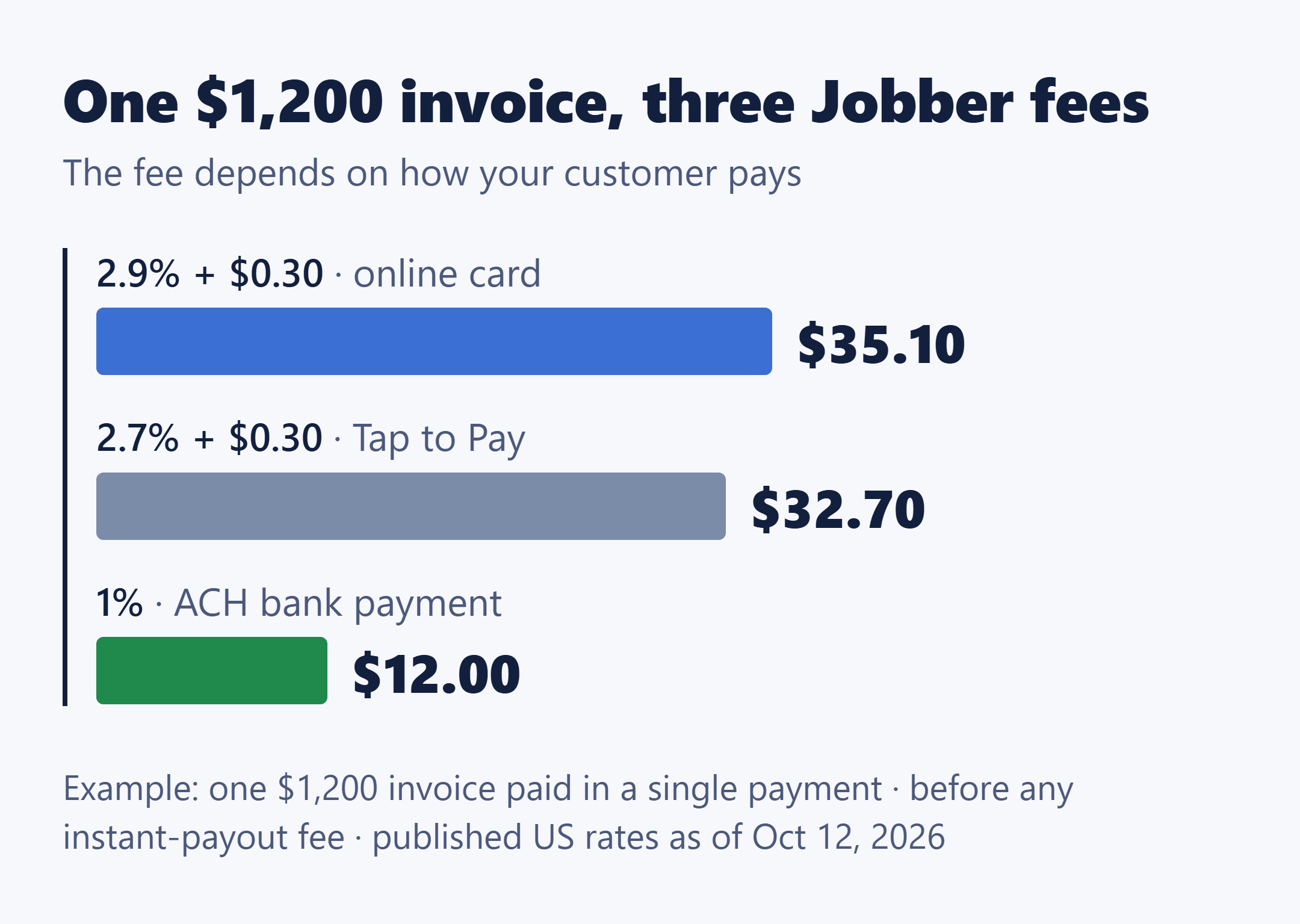
For a $300 service call, the difference is only $6. On a $5,000 installation, it’s $95.30.
| Invoice amount | Online card fee | Tap to Pay fee | ACH fee |
|---|---|---|---|
| $300 | $9.00 | $8.40 | $3.00 |
| $1,200 | $35.10 | $32.70 | $12.00 |
| $5,000 | $145.30 | $135.30 | $50.00 |
These calculations use Jobber’s published rates and assume one payment per invoice, before any instant-payout fee.
Notice something important: there isn’t a magic invoice amount where ACH suddenly becomes cheaper. At the published rates, it already costs less than either card method at all three invoice sizes—and the same relationship holds for other positive payment amounts.
The practical question is whether offering ACH fits the way your business collects money.
When ACH makes sense—and when a card may be worth the fee
Consider two hypothetical jobs.
Job A: A $5,000 installation.
The customer receives an invoice through Jobber’s client hub and is comfortable paying by bank transfer.
At the published rates, ACH saves $95.30 compared with an online card payment.
That’s meaningful enough to make ACH worth offering, particularly if the business can accommodate the longer payout schedule.
Job B: A $150 service visit.
The technician finishes the work, and the customer is standing there with a card.
Tap to Pay costs $4.35. ACH would cost $1.50—a difference of $2.85.
Would making that customer switch to an online bank payment be worth the inconvenience and possible delay?
Maybe not.
This is a judgment about the collection experience, not a claim that card payments produce better results. The answer depends on your customers and workflow.
For a small service business, the sensible approach may be to offer both methods rather than treat the lowest processing rate as the only goal.
Jobber lets US businesses configure card and ACH options separately for quote deposits and invoice payments through its payment settings.
The fee nobody wants to discover when payroll is due
A payment showing as collected and money being available in your bank account aren’t the same thing.
Jobber’s published standard payout schedules are:
- Card payments: 2-business-day payout schedule.
- ACH payments: typically 4 business days.
- First payments on a new account: a 5-business-day authorization period starts with the first collected payment. Payments received during that period are also subject to that initial window.
Your bank can take another one or two business days to post funds. These schedules are not guaranteed deposit dates.
That matters for businesses with weekly payroll, fuel purchases, subcontractor bills, or materials to purchase before the next job.
What if you need the money sooner?
Jobber offers instant payouts to eligible accounts.
They can move available funds to a linked debit card, typically within 30 minutes, including weekends and holidays.
But the convenience costs an additional 1% of the amount withdrawn.
That extra percentage is charged after the normal payment processing fees, not directly against the original invoice amount.
Return to our $1,200 online card payment:
- Customer pays: $1,200.00
- Online card processing fee: $35.10
- Remaining proceeds: $1,164.90
- Instant payout fee on a $1,164.90 withdrawal: approximately $11.65
- Remaining amount received: approximately $1,153.25
That’s about $46.75 in combined fees to collect the invoice and withdraw its remaining proceeds immediately.
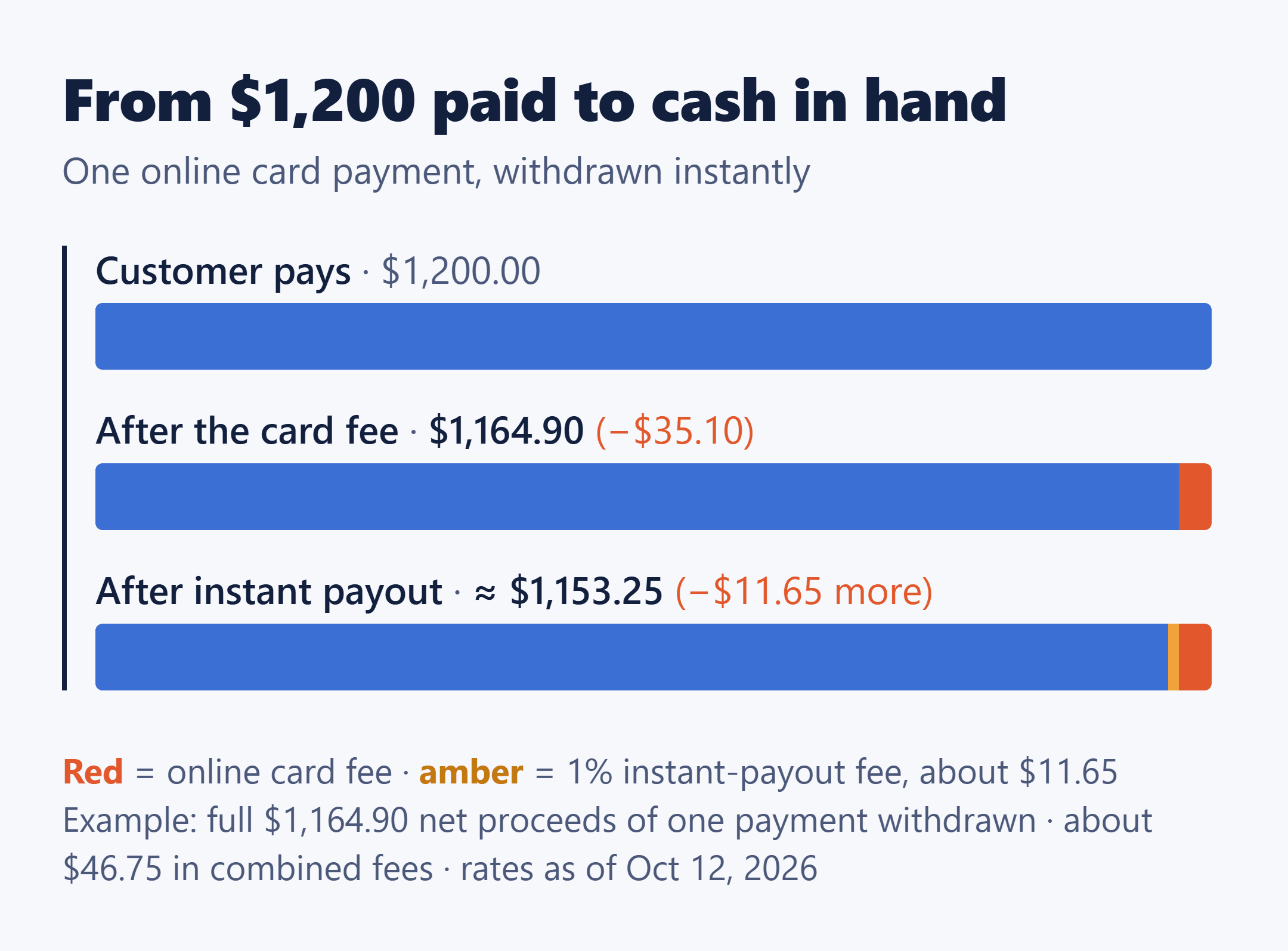
This is an illustration using the full net proceeds of one payment. Jobber actually calculates instant payouts from an available balance that may contain funds from multiple transactions. It does not publish the exact rounding method for the fee.
Instant payouts are optional. Standard payouts don’t carry that additional 1%.
Jobber also limits instant withdrawals to $9,999 per withdrawal and $10,000 within 24 hours. Eligibility depends on processing history, and only account owners can initiate instant payouts. Recent ACH funds may still be clearing.
Source: Jobber's instant payout documentation.
My practical reading: An instant payout can be useful when having cash available immediately matters more than the additional fee. But if it becomes a routine habit, that 1% should be included in the business’s regular payment-processing budget.
The monthly cost is where the small differences add up
One invoice shows the fee. A month of invoices shows its effect on the business.
Suppose a small home-service company collects $20,000 through 40 payments in one month.
These are hypothetical figures, not an industry average.
Scenario A: Every payment comes through an online card.
- $20,000 × 2.9% = $580.00
- 40 payments × $0.30 = $12.00
- Total processing fees: $592.00
Now imagine that the same business receives 15 of those payments, totaling $12,000, through ACH instead.
The remaining 25 card payments total $8,000.
Scenario B: A mix of online cards and ACH.
- Online card percentage fees: $232.00
- Fixed card transaction fees: $7.50
- ACH fees: $120.00
- Total processing fees: $359.50
Same $20,000 collected. Same 40 payments.
The difference is $232.50 for the month.
If that exact pattern repeated for 12 months, the arithmetic would amount to $2,790 in lower processing fees. That’s an illustration, not a forecast for your business.
There’s another small detail worth noticing.
The fixed 30-cent card fee applies per payment, not per invoice.
If a customer pays a $1,200 invoice by online card in two transactions—say, a deposit and a final balance—the total fee becomes $35.40 instead of $35.10.
One extra 30-cent charge is insignificant. But it’s worth including if your business regularly splits payments.
Calculate your own monthly bill
You don’t need special accounting software to estimate this.
Start with last month’s payment records and use:
Estimated fees =
(Online card dollars × 2.9%)
+ (In-person card dollars × 2.7%)
+ ($0.30 × number of card payments)
+ (ACH dollars × 1%)
Then separately add 1% of the amounts you choose to withdraw through instant payouts.
Don’t use the number of invoices as a substitute for the number of card transactions. Deposits and balances can create multiple payments against one invoice.
You’ll get a more useful answer from your own payment mix than from any generic comparison of software pricing.
Don’t ignore what happens when a payment goes wrong
The lower ACH rate looks attractive on a large invoice. But processing cost is not the only consideration.
ACH payments have a different dispute process
According to Jobber’s documentation, an ACH payment dispute cannot be contested through the same process as a card chargeback. Once an ACH dispute is formalized, the disputed funds are returned to the customer.
ACH payments can also fail during processing, for example because of insufficient funds.
Refund timing is different, too. A business cannot issue a Jobber ACH refund until the payout has been deposited, and Jobber does not allow refunds of ACH payments more than 90 days old through that process.
These limitations are reasons to understand ACH before encouraging everyone to use it—not reasons to assume that every ACH payment is risky.
Source: Jobber's bank payment guide.
Card payments have their own costs and protections
For card payments refunded through Jobber, Jobber says the original transaction processing fees are refunded to the business.
A card chargeback is different from a voluntary refund. Jobber withdraws the disputed amount and a dispute fee from the connected bank account. If the business wins the dispute, those funds and the fee are returned.
Jobber’s public documentation identifies a dispute fee but does not establish a dollar amount for this comparison, so don’t budget around an invented figure.
Source: Jobber Payments dispute guide.
The real lesson is simple: a processing-fee comparison tells you what successful payments cost. It doesn’t tell you the entire cost of collecting a difficult invoice.
One more thing: your Jobber plan can still matter
The three published payment rates are the same across Core, Connect, Grow, and Plus.
That doesn’t mean every payment-related feature works on every plan.
For example, automatic payments for recurring jobs are available on Connect, Grow, and Plus, but not Core.
If you run a recurring lawn-care, cleaning, or maintenance business and want to automatically charge a customer’s saved payment method, that difference matters more than a tiny change in card-processing fees.
Automatic payments use the normal applicable processing rates.
It’s worth separating these two decisions:
Payment processing: How much do I lose to fees when a customer pays?
Subscription features: Does my plan let me collect payments in the way my business actually operates?
They’re connected, but they’re not the same purchase decision.
Can you use Square or Stripe instead?
Yes, Jobber supports third-party payment integrations, including Square, Stripe, PayPal Express, and Authorize.net.
But there are limitations.
Jobber says these integrations are available on select plans, must be arranged through its support team, and allow only one connected payment integration at a time.
They also don’t necessarily provide the same integrated experience.
Jobber identifies saved payment methods, automatic billing, refunds handled within Jobber, payout reporting, tipping, and in-person card processing among the functions available through Jobber Payments.
If you already have a payment processor you like, don’t switch based on a headline percentage alone.
First check whether your existing processor can integrate with your particular Jobber plan and which payment features you would lose or retain.
Then compare the actual fees using the same transaction amounts.
The other processors’ rates aren’t included here because this article hasn’t independently established comparable current pricing and conditions for those services.
If Square or Stripe is the processor you’d connect, run their own published rates on similar job sizes first: Square vs. Stripe invoice fees on $300, $1,200 and $3,000 jobs.
Source: Jobber's payment integration documentation.
So, should your small business use Jobber Payments?
If you’re already using Jobber for quotes, scheduling, and invoices, Jobber Payments may be a practical way to keep payment collection connected to the same workflow.
But the right decision depends on what your business needs.
For an owner-operator who takes payment immediately after a service call, Tap to Pay may be useful even though it costs more than ACH.
For a contractor sending several large invoices each month, giving customers an ACH option could reduce processing expenses substantially.
And if some of those jobs are too large for a customer to pay at once, financing carries a different kind of merchant fee, covered in Wisetack fees for contractors: 3.9% by default, up to 9.9% for 0% APR offers.
For a company with recurring maintenance contracts, checking whether its Jobber subscription supports automatic payments may be the more important decision.
And for a business that frequently needs cash the same day, instant-payout costs deserve their own line in the budget.
Before turning on Jobber Payments—or changing how you ask customers to pay—do three things:
- Check your account’s real rates. Open Settings → Jobber Payments and look at the Processing rates panel. Jobber’s payment terms say the rates shown in your account take precedence over the public pricing page if they differ.
- Calculate one month’s actual fees. Use your payment amounts, transaction counts, and payment-method mix. Estimate how the total changes if some customers pay by ACH.
- Consider the whole collection process. A lower processing fee is useful only when the payment method also works for your customers, your cash-flow needs, and your approach to refunds or disputes.
Jobber’s payment terms also allow fee changes with 14 days’ notice, so published rates should be checked again before making a decision.
Official sources: Jobber Pricing · Jobber Payments Settings · Jobber Payments Terms
You don’t necessarily need to stop accepting cards to reduce what you spend on payment processing.
You need to understand which payments cost you the most, what you get in return, and which choices your customers will realistically use.
That’s a much better starting point than picking the lowest percentage on a pricing page.