Here’s a hypothetical that shows where this decision turns. A one-person contractor runs everything on Wave’s free Starter plan: estimates, invoices sent from a phone, the books. The software bill is $0 a month.
Then the business takes on three 1099 subcontractors, paid every month, and the owner wants those payments recorded and the 1099s filed from the same system. On Wave, that means Wave Payroll: a $40 base fee plus $6 for each contractor paid, or $58 a month and $696 a year.
On QuickBooks, Intuit sells a “Contractor Payments + Simple Start” bundle for $50 a month, or $25 for the first three months if you’re a new customer. That’s $525 in year one and $600 in year two, accounting included. The free plan is now the more expensive way to pay subs.
If you work alone and don’t pay subcontractors through software, Wave Starter covers estimates, invoices and bookkeeping at $0. QuickBooks Online starts to earn its price when one of three things changes. Someone else needs to edit your books. You want job-level profit numbers, which means QuickBooks Online Plus at $140 a month list price. Or you start paying subs on the books, where the totals land close together and depend on which QuickBooks path you can buy.
Prices are US list prices on monthly billing, before sales tax, from QuickBooks’ and Wave’s official pricing pages and help docs, checked October 17, 2026. The examples are illustrations built from those published prices, not records from anyone’s account.
The QuickBooks price on the signup page lasts three months
QuickBooks Online leads with 50% off for three months. After that, Intuit’s discount terms say you’re charged monthly at the then-current price until you cancel. The discount is for new customers who pick the monthly plan with the 3-month discount option. It applies to the monthly base price only, and it can’t be combined with the 30-day free trial, so you get one or the other.
| Plan | First 3 months → after that | Year one / year two |
|---|---|---|
| Wave Starter | $0 → $0 | $0 / $0 |
| Wave Pro, monthly | $19 (see note) → $19 | $228 / $228 |
| Wave Pro, yearly | — → $190 a year | $190 / $190 |
| QuickBooks Simple Start | $19 → $38 | $399 / $456 |
| QuickBooks Essentials | $42.50 → $85 | $892.50 / $1,020 |
| QuickBooks Plus | $70 → $140 | $1,470 / $1,680 |
Year one is three discounted months plus nine at list price. Year two assumes list prices stay where they are, which Intuit’s “then-current price” wording doesn’t promise. Simple Start includes 1 user plus access for 2 accountants, Essentials 3 users, and Plus 5 users. Advanced ($340, or $170 for three months) is built around 25 users, past the size this post is about.
About the Wave Pro note: Wave’s pricing page still shows $9.50 a month for Pro’s first three months. Its footnote limits that to new Pro subscribers buying a monthly plan on Wave’s own site, one per customer, and dates the offer December 2, 2025 to January 6, 2026. So Pro is priced here at $19; if the intro rate is honored, year one is $199.50. The $190 yearly plan doesn’t get it either way.
Two kinds of “free” are also in play. Wave Starter is a plan with no end date. QuickBooks’ free offer is a 30-day trial. The month to plan around on QuickBooks is the fourth, when Simple Start goes from $19 to $38 and Plus from $70 to $140.
Paying 1099 subcontractors: where the totals cross
Back to the contractor from the top, with every input stated. These are hypothetical: one owner, no W-2 employees, three subcontractors paid every month, $8,000 a month collected in eight $1,000 card payments, monthly billing on both sides, starting from a new signup. Swap in your own numbers before you decide.
| Setup | Year one | Year two |
|---|---|---|
| Wave Starter + Wave Payroll | $3,537.60 | $3,537.60 |
| Wave Pro + Wave Payroll | $3,708.00 | $3,708.00 |
| QuickBooks “Contractor Payments + Simple Start” bundle | $3,395.40 | $3,470.40 |
| QuickBooks Simple Start + Contractor Payments, bought separately | $3,531.90 | $3,626.40 |
| QuickBooks Plus + Contractor Payments | $4,602.90 | $4,850.40 |
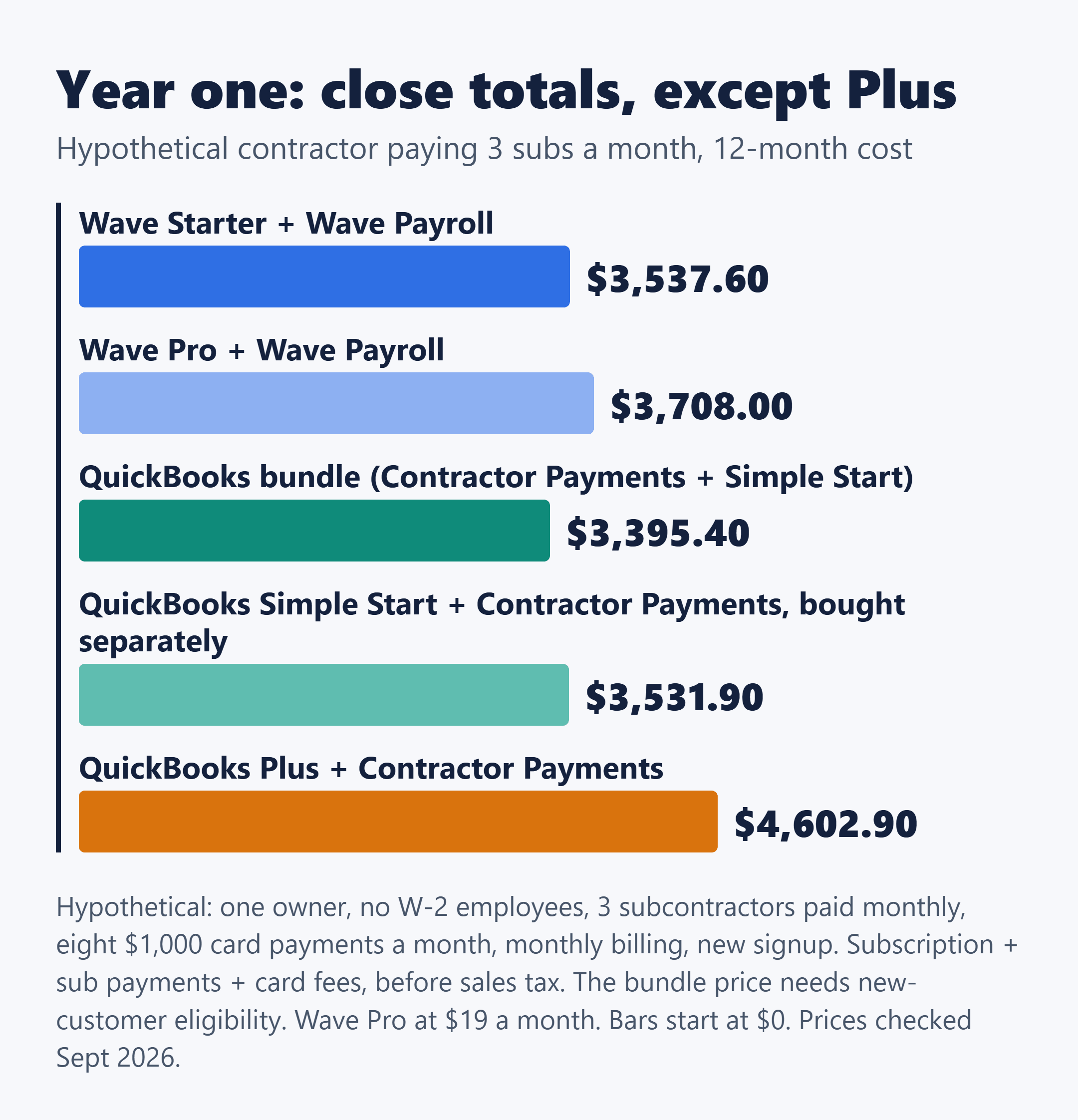
Card fees are most of every row: $2,841.60 a year on Wave Starter, $2,784 on Wave Pro (its first 10 card payments each month skip the $0.60 fee) and $2,870.40 on QuickBooks Payments. Strip those out and what’s left is the plan plus paying subs: $696 a year for Wave Payroll on Starter, against $525 in year one and $600 after that for the QuickBooks bundle. The Wave Pro row would be $3,679.50 in year one if the $9.50 intro rate is honored.
On the bundle, QuickBooks comes out $142.20 lower than Wave Starter in year one and $67.20 lower in year two. Bought separately, the two QuickBooks products total $3,531.90 in year one, $5.70 under Wave, and $3,626.40 in year two, when Wave is $88.80 cheaper. The separate route costs $136.50 more than the bundle in year one and $156 more in year two.
Which QuickBooks row you can actually buy
The bundle is listed on Intuit’s Contractor Payments page, not the main pricing page. Its $25 intro rate is for new QuickBooks Online or Workforce customers who sign up monthly with the 3-month discount option. The page doesn’t say whether someone already paying for QuickBooks Online can move to the $50 bundle.
If that’s you, the separately-bought row is the one you can count on. Contractor Payments on its own is $25 a month ($12.50 for the first three months), with 20 contractors included, $2 for each additional one and unlimited 1099 e-filing.
QuickBooks’ own pages also disagree on which plans handle 1099 contractors: the help article lists Simple Start, Essentials, Plus and Advanced, while the Plus page’s chart shows it as a Plus item. If 1099s are why you’re subscribing, check the plan screen before you buy, or start with Contractor Payments, where e-filing is stated as included.
On the Wave side, the pricing page doesn’t show a combined accounting-and-payroll product, so the plan price and payroll fees simply add up. Wave Payroll generates W-2, W-3 and 1099-NEC forms. Wave’s pricing page also shows payroll as both “from $25/month” and “from $40/month”; the US payroll page lists the $40 base, which is the figure used here.
Three costs the totals leave out
- Per-contractor fees aren’t discounted. QuickBooks’ 50% off applies to the base price only. Three subs sit inside the 20 included, so none apply in this example.
- 1099 mailing and filing fees. Printing and mailing 1099 copies to contractors costs extra on Contractor Payments, and filing 1099s inside QuickBooks Online without it carries a “fees may apply” note. Neither amount is published, so budget it as unknown, not zero.
- Next-day direct deposit. The bundle lists it as included, while a footnote on the same page says next-day deposit is available for contractors for an additional fee. Ask before you plan around it.
If you have even one W-2 employee, none of these totals apply. Intuit routes employee payroll, withholding and W-2s to its Workforce products. Payroll on its own lists at $50 a month ($25 for three months) plus $7 per employee or contractor. The version bundled with Simple Start lists at $88, with the per-employee fee shown as $6.50 on one Intuit page and $7 on another, so check the page you buy from. On Wave, it’s the same Wave Payroll at $40 base plus $6 per active employee.
If a first hire is what’s coming, it helps to see how another payroll provider counts the people it bills for: Gusto pricing for a small service crew: Simple vs. Plus, and who counts as a billed person.
Job costing is the upgrade with a four-figure price
If you remodel kitchens or build decks, job costing is what tells you which jobs actually made money. QuickBooks Online puts project profitability and job costing, including labor costs, payroll and expenses, in Plus, along with inventory tracking and purchase orders. The bundle doesn’t change that; its books are Simple Start level.
That makes the real entry price $140 a month, not $38: $1,470 for a first year against $399. In the subcontractor example above, Plus with Contractor Payments runs about $1,065 more in year one than Wave Starter with Wave Payroll.
One feature you might expect to need Plus for doesn’t. Progress invoicing, which splits one estimate into a deposit, a progress bill and a final bill, is listed as supported on Simple Start, Essentials, Plus and Advanced. You turn it on under Settings → Account and Settings → Sales, and it needs an estimate first.
On Wave, the free plan covers estimates and collecting deposits, and reports include cash flow, a balance sheet and profit and loss. Wave’s accounting, pricing and Pro pages don’t describe job costing, project profitability, inventory, time tracking or purchase orders. That isn’t proof the features are missing, and Wave’s help center couldn’t be reached during research, so if job costing decides it for you, ask Wave directly.
A second person in the books: what they do sets the price
“I need a second login, so I need to upgrade” isn’t quite right on either side.
QuickBooks Online counts only “billable” roles against your plan’s user limit: a bookkeeper, a payroll manager, a standard user who enters transactions. Roles such as View reports and Track time only are documented as not counting. Simple Start includes one user plus access for two accountants, so bringing in someone to do the bookkeeping is what moves you to Essentials at $85 a month for three users.
Intuit’s role doc doesn’t list which roles each plan offers, though, and it doesn’t say whether the two accountant seats count against the user limit. Don’t assume a free role is available on Simple Start until you see it on the plan screen.
Wave’s pricing page splits it the same way: payroll manager and Block Advisors tax pro access are described as free, while admin, editor or viewer access is Pro, at $19 a month. The check mark on that row sits only in the Pro column, and neither company publishes how many people fit the free roles. Confirm it before you promise anyone a login.
The other reason to leave Starter isn’t a person at all. Automatic bank transaction import, unlimited digital receipt capture, automated late-payment reminders and invoice branding are all listed as Pro features. On Starter, the books get updated by hand or by file upload. If that’s what’s eating your evenings and job costing isn’t the issue, Wave Pro at $19 a month is a cheaper fix than moving to QuickBooks.
Card fees, bank payments and the $667 crossover
On jobs worth thousands, processing fees can outweigh the subscription. Here’s what each company publishes for US payments.
| How the customer pays | QuickBooks Payments | Wave Payments |
|---|---|---|
| Card on an invoice | 2.99% | 2.9% + $0.60 (on Pro, no $0.60 on the first 10 each month) |
| American Express | 2.99%, same as other cards | 3.4% + $0.60 |
| Bank payment (ACH) | 1%, $1 minimum | 1%, $1 minimum |
QuickBooks also lists 2.5% for in-person cards and 3.5% for keyed-in cards, with no monthly fee, and states its rates are accurate as of September 18, 2026. Wave lists deposit times of one to two business days for cards and one to seven for bank payments, with approval subject to identity verification and a credit review.
Set the two card rates equal and they cross at $666.67 per payment. Below that, QuickBooks’ flat 2.99% costs less, because Wave’s $0.60 weighs more on small tickets. Above it, Wave Starter’s 2.9% plus $0.60 costs less. On a $1,000 payment it’s $29.90 against $29.60, or $2.40 a month across the example’s eight payments.
The Wave Pro fee break tops out at $6 a month (10 × $0.60), or $72 a year, against a $19 monthly plan. Buy Pro for bank import and logins, not for processing savings.
The bigger lever is getting paid by bank transfer. Move the example’s $8,000 a month from cards to ACH and processing drops to $960 a year on either platform, a bigger saving than any plan choice in this post.
One QuickBooks caveat: its rates page lists ACH at 1% with a $1 minimum, while a footnote on the pricing page mentions $0.50 per standard ACH transaction over monthly allotments that may vary. How the two fit together isn’t spelled out. If you plan to steer big invoices to ACH in QuickBooks, read the details first in QuickBooks ACH fees on large invoices: you pay 1%, or your customer pays a flat $25.
Refunds, cancelling and moving your data
Neither side locks you into a contract on monthly billing. QuickBooks lists no annual contract and cancel anytime, and its discount terms say that if you cancel within the first three months you won’t need to pay extra. Wave lets you unsubscribe anytime, effective at the end of the billing period.
Don’t count on a refund window for a monthly QuickBooks plan. Intuit’s 60-day money-back guarantee applies to annual QuickBooks Online subscriptions bought in the US, requested within 60 days. Monthly subscriptions and renewals are excluded. QuickBooks’ annual prices aren’t on its pricing page, which is why everything here uses monthly billing, and the refund terms for Wave’s $190 yearly plan weren’t confirmed.
Moving from Wave to QuickBooks is a CSV job, not a one-click migration, as far as the help pages describe it. Wave exports reports to CSV or PDF, and QuickBooks imports lists such as customers, vendors, products and services, and the chart of accounts under Settings → Import data. The original help pages couldn’t be opened, so verify the steps and file limits before you commit.
Those paths cover lists and reports, not full transaction history. Keep access to the old account while you close out the year, and switch at the start of a quarter or tax year if you can.
Stay on Wave, or start paying for QuickBooks?
Stay on Wave Starter while you work alone, don’t pay subs through software and don’t need job-level numbers. That’s a real plan at $0, not a trial, and nothing in this comparison says you’re leaving money on the table.
When one of the triggers shows up, price that trigger rather than the whole product. Job costing means Plus at $140 a month. A bookkeeper in your books means Essentials at $85 against Wave Pro at $19. Paying subs means the $50 bundle against Wave Payroll at $40 plus $6 per contractor, once you know whether the bundle is open to you. And compare month-four prices, not a three-month promotion against the other side’s list price.
If your account screens don’t answer these, they’re worth asking before you enter a card number:
To Intuit: Can an existing QuickBooks Online subscriber switch to the $50 Contractor Payments + Simple Start bundle? Is next-day direct deposit for contractors included in it, or an extra fee? What does it cost to mail 1099 copies? How do the 1% ACH rate and the $0.50 over-allotment fee fit together?
To Wave: Does any plan support job costing or project profitability? How many people can I invite to the free payroll manager or tax pro roles on Starter?
Official pages to recheck: QuickBooks Online pricing · QuickBooks discount terms · QuickBooks Payments rates · QuickBooks Contractor Payments · Wave pricing · Wave Payments · Wave Payroll
This compares software costs and plan conditions. It isn’t tax advice; how you classify and report payments to workers is a question for your accountant.