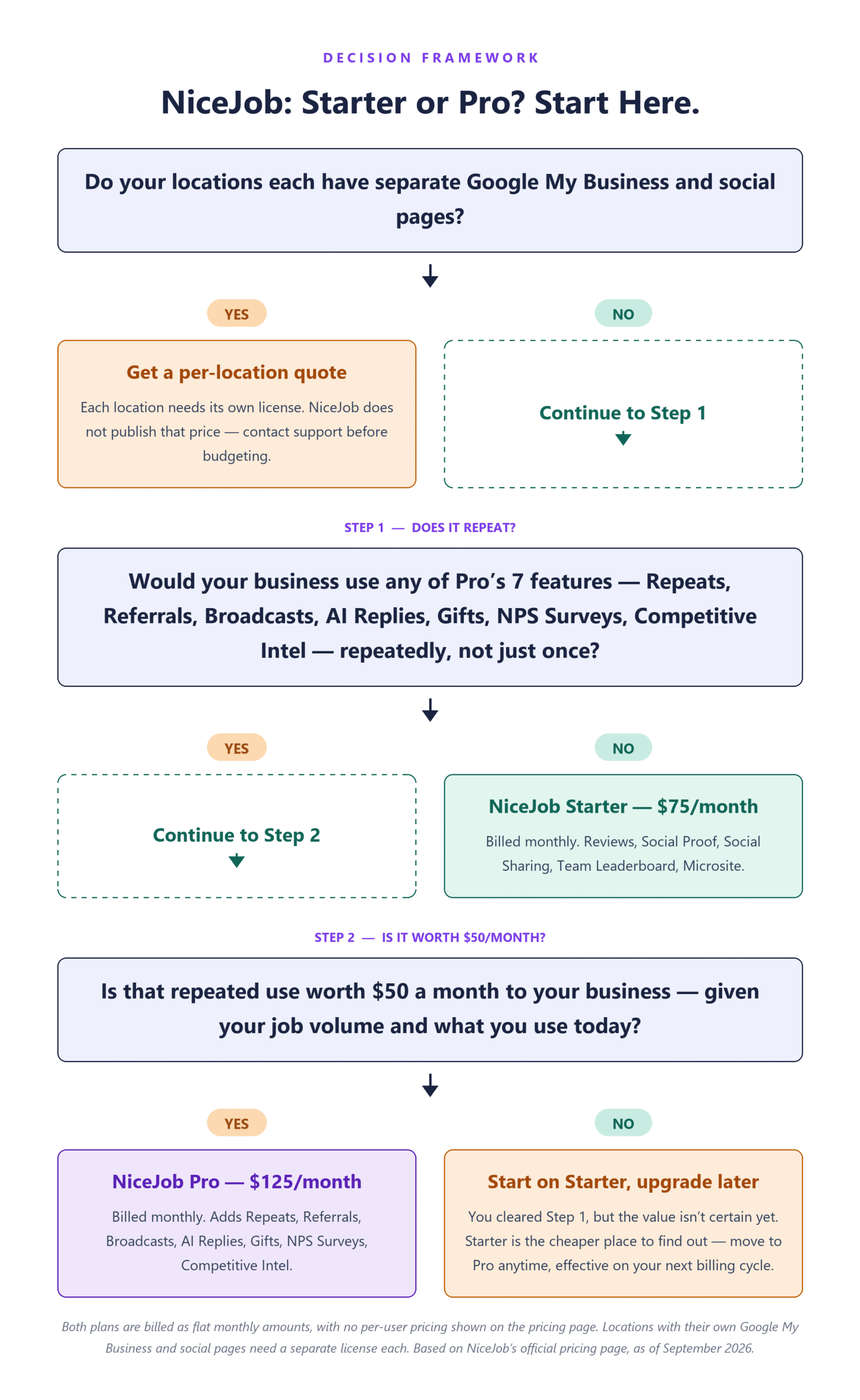
Short answer: if what you want is reviews collected without anyone on the crew remembering to ask, NiceJob Starter at $75 per month covers it. Pro at $125 per month adds seven features Starter does not have — Repeats, Referrals, Broadcasts, AI Replies, Gifts, NPS Surveys, and Competitive Intel — and choosing between the two takes two passes, not one. First: is there anything in those seven you would use repeatedly, month after month, because of how your work already runs? Switching a feature on once to see what it does is not that. Second: if something clears that bar, is the repeated use worth $50 a month at your job volume, at the frequency it actually comes up, and against whatever you are doing about it today — by hand, or with a tool you already pay for? That second question has no universal answer, and anyone handing you a single rule for it is skipping the part that depends on your business. If nothing clears the first pass, stay on Starter. If something does but the second pass is a coin flip, Starter is the cheaper place to find out: the pricing FAQ says you can move up at any time, with the change taking effect on your next billing cycle. And if you run several locations with their own Google My Business pages, the answer to the whole question can easily be no.
Both plans are published as flat monthly amounts in US dollars, with no per-user pricing shown on the pricing page. The page lists no seat count and no cap on review requests either way, so a three-person crew and a ten-person crew see the same published price — with one documented exception, covered below, for businesses whose locations each have their own Google My Business page. Sites, the managed website product, is priced separately at $99 per month plus a one-time $199 setup fee.
Good fit if:
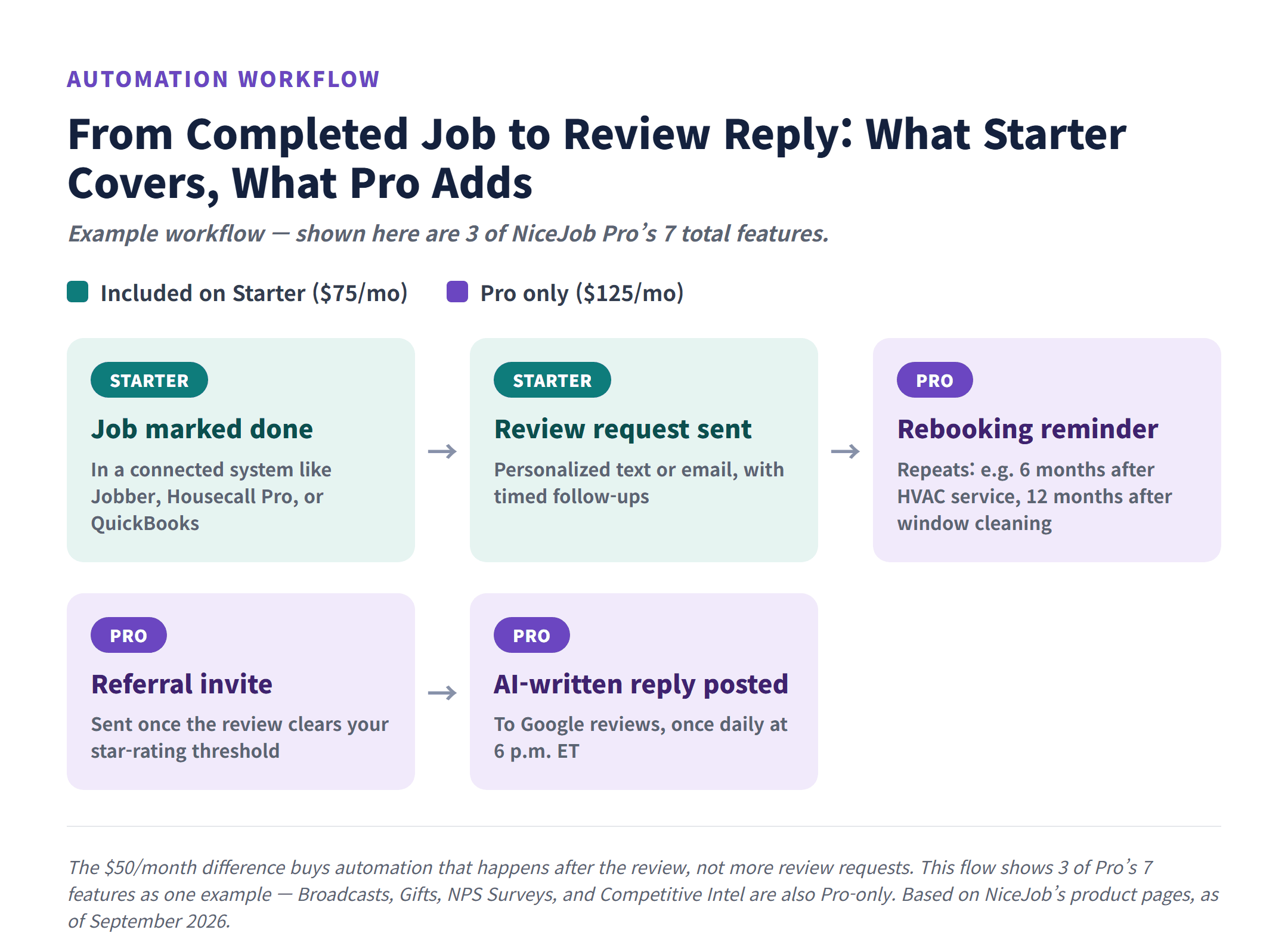
- You run one location with one Google My Business page, and review collection is the job you want done. Reviews is on the Starter plan, and NiceJob’s product page describes the trigger plainly: when a job is marked done, a personalized text or email review request goes out, with timed follow-ups after it.
- You already run jobs through Jobber, Housecall Pro, ServiceTitan, QuickBooks, or another field service or accounting tool. Nothing NiceJob publishes puts integrations behind Pro, so connecting to the system you already use is not by itself a reason to pay $125. What “included” means on the cheapest plan is muddier than it should be, though, and the section below lays out why.
- Your work comes back on a schedule. Pro’s Repeats feature is built around exactly that, with NiceJob’s own examples being six months after HVAC maintenance and twelve months after window cleaning.
Probably not a fit if:
- Your locations have separate Google My Business pages and separate social pages. NiceJob’s help center states that in that case “each of the locations will need a separate license,” and the price of that license is not published.
- You are buying the Sites website and might change vendors inside three years. NiceJob provides an HTML/CSS export only after a site has been live for 36 months, and removes the site’s content from the internet when you cancel.
- Your reviews land on Yelp or Facebook and AI replies are the reason you are considering Pro. The AI Replies product page describes replying to Google reviews; it does not say whether other platforms are covered.
- You were counting on an annual-billing discount to bring the cost down. NiceJob doesn’t publish an annual billing option or an annual discount on its pricing page, so the only path posted publicly is the monthly one.
The biggest advantage: a 14-day free trial with no credit card required. You can connect your job system and watch whether review requests actually fire off your job data before any payment method exists on the account.
The biggest limitation: “No contracts” does not mean one-click exit. Subscriptions renew automatically at the end of each monthly term, and the Terms of Service require written or in-app notice before the end of the current term, with the cancellation not valid “until receipt of confirmation of cancellation is received.” If you add Sites, the 36-month export rule is the term that really locks you in.
Prices, plan contents, and contract terms in this guide come from NiceJob’s official pricing page, its Terms of Service, its help center, and its product pages, checked October 17, 2026. This is a documentation review rather than a report on running the software, and prices on tools like this move, so open the pricing page before you put a card down.
In this guide
- NiceJob pricing: what Starter, Pro, and the Sites add-on actually cost
- What actually happens when your 14-day free trial ends
- Who NiceJob fits, and who should look elsewhere
- The limitations most reviews don’t mention
- Starter or Pro? How three small teams would decide
- Final decision checklist: Starter, Pro, Sites, or skip it
NiceJob Pricing: What Starter, Pro, and the Sites Add-On Actually Cost
These are the published US prices as of October 17, 2026. All of them are monthly, and NiceJob’s pricing FAQ confirms that every plan on the page is denominated in US dollars.
| Plan | Published price (monthly) | What the pricing page lists |
|---|---|---|
| Starter | $75 per month | Reviews, Social Proof, Social Sharing, Team Leaderboard, Microsite — five items. Integrations is not one of them on this page; see the note below. |
| Pro | $125 per month | Everything in Starter, plus Repeats, Referrals, Broadcasts, AI Replies, Gifts, NPS Surveys, Competitive Intel |
| Sites | $99 per month, plus a one-time $199 setup fee | A fully managed, done-for-you website. Priced separately from Starter and Pro; whether you can keep it without a NiceJob plan is not settled — see below. |
| AI Leads | No published price, marked “Coming Soon” | Nothing you can put in a budget yet |
The structure is simple, because Pro is not a different product. It is Starter plus seven named features. What that structure does not hand you is a shortcut, because spotting one feature on the list that looks useful is a different thing from that feature being worth $50 a month inside your business. All seven have their own product pages, so you can check each one before you sign up rather than after.
- Repeats sends automated rebooking reminders off the booking, payment, or invoice data your connected system passes to NiceJob. Its own examples are six months after HVAC maintenance and twelve months after window cleaning. Which systems qualify is wider than the product page implies, and the limitations section below has the detail.
- Referrals invites customers to refer a friend once their review clears a star rating you set, and gives each referrer a trackable link.
- Broadcasts sends one-off email campaigns to the customer emails you have already collected. The page describes it as the thing most businesses never do with the addresses sitting in their system.
- AI Replies writes and posts responses to your Google reviews, generated from the content of each review rather than a template.
- Gifts automatically sends real, physical gifts to new customers and loyal regulars. It is marked available in the US and Canada only. The page does not say whether the cost of the gifts or their shipping is covered by the $125, so do not assume it is.
- NPS Surveys sends a short survey after a completed job and collects private feedback. That is a different job from collecting public reviews: it is how you hear about a bad visit before the one-star review shows up.
- Competitive Intel tracks local competitors’ review volume, star rating, and recency.
Read that list against your own week, and read it in two passes. The first pass is about repetition: which of the seven would you be using month after month because of how the work already runs, rather than once out of curiosity? For a cleaning company on recurring routes that is usually Repeats. For a shop in a crowded market it can be Competitive Intel. For a contractor sitting on a thousand old customer emails it can be Broadcasts. The feature that clears this pass is rarely the same one twice, which is why none of the seven is a throwaway you can leave out of it.
The second pass is the one that decides the money, and it depends on your business rather than on the feature. Take whatever survived and ask what it replaces: how many jobs or customers a month does it touch, how often does the situation actually come up, and what happens about it today? Sending rebooking texts by hand at the kitchen table is a different answer from having your field service app already send them. A hundred recurring customers is a different answer from eight. NiceJob publishes no figures on time saved or revenue recovered, and this guide is not going to invent a break-even number for you — that arithmetic is yours, and it is worth doing before the $50 is on a card rather than after.
What the $50 does not buy is worth stating too. It is not more review requests, and it is not access to integrations. Review collection is on the $75 plan, and nothing NiceJob publishes puts integrations behind Pro. The upgrade buys what happens around and after the review: bringing the customer back, asking for a referral, emailing your list, answering what was written, sending a gift, catching private feedback, and watching the competition.
A caveat on integrations, because NiceJob’s own pages do not agree. The product menu on NiceJob’s site groups Integrations under “Starter features” and labels that group “Included in every plan.” The Starter card on the pricing page lists five things — Reviews, Social Proof, Social Sharing, Team Leaderboard, and Microsite — and Integrations is not among them, nor is it a row in that page’s plan comparison table. The pricing FAQ does answer “Does NiceJob have integrations with other software?” with a yes, but it names no plan either way. Two official pages, two different pictures of what $75 includes. Nothing published says integrations are Pro-only, so the tier question is not a reason to pay $125 — but “Starter connects to my tools” is something to get confirmed, not something to treat as settled.
The individual connections do not work the same way as each other either, which matters more than the tier question if one specific tool is the reason you are buying:
- Jobber and QuickBooks Online. Their setup articles in NiceJob’s help center do not mention a plan requirement at all. That is silence, not a documented guarantee that Starter covers them.
- Housecall Pro. The only setup article that names a plan, and the name it uses — “the Standard Reviews plan” — does not appear anywhere on the current pricing page. The same article says you can connect while on the free trial or on “our standard plan,” so that one document is not pointing at Pro. What the legacy name maps to on today’s lineup is not documented, and nothing about that article carries over to the other connections.
- ServiceTitan. Connected through Zapier rather than a one-click app connection. You supply a Tenant ID, Client ID, and Client Secret and send them to NiceJob support. Whether a paid Zapier plan is needed on top is not addressed.
That pattern holds across the catalog. We read the official setup article for every one of the thirteen apps NiceJob’s own Repeats documentation names, and Housecall Pro is the only one that states a NiceJob plan requirement at all. The other twelve say nothing about plans. Read that for what it is: NiceJob has not documented the answer, which is not the same as NiceJob telling you Pro is unnecessary. So if a particular tool is the whole reason NiceJob is on your list, open that tool’s setup article in the help center before you pick a plan, and ask support to confirm the requirement in writing. A summary in an article like this one is not what you want to be relying on when the connection is the point of the purchase.
What a year actually costs
The pricing page lists no user or seat limit, so a three-person cleaning crew and a ten-person HVAC shop see the same published price. The documented exception is multi-location businesses, which is covered further down. With that caveat, the annual math is short.
| What you buy | Per month | One-time | First 12 months |
|---|---|---|---|
| Starter only | $75 | — | $900 |
| Pro only | $125 | — | $1,500 |
| Upgrading Starter to Pro | $50 more | — | $600 more |
| Sites without a NiceJob plan (only if that is actually allowed — see the note below) | $99 | $199 | $1,188 plus $199 |
| Starter plus Sites | $75 plus $99 = $174 | $199 | $2,088 plus $199 |
| Pro plus Sites | $125 plus $99 = $224 | $199 | $2,688 plus $199 |
Three conditions sit under those totals. The setup fee is charged once and is kept in its own column rather than folded into a monthly figure. Sales tax is not included, because the Terms of Service describe fees as “exclusive of any applicable taxes,” so any sales tax that applies in your state rides on top. And the twelve charges are counted from your billing date, which the FAQ defines as the day your 14-day trial ends if you go on to a paid plan — not from the day you sign up for the trial.
One row in that table needs a warning label. NiceJob’s home page offers Sites and its other standalone products with “no plan required,” and the Sites product page says the same thing. The Terms of Service say the opposite: “Sites Services are provided as an optional add-on to NiceJob Services and shall terminate automatically on termination or cancellation of the NiceJob Services.” Both statements are published by the same company, and they cannot both describe what you would be signing. The difference is not small either: if the Terms are what govern, keeping the site alive means keeping at least a Starter subscription underneath it, which is another $900 a year. Ask support to confirm in writing which one applies before you buy Sites, not after.
If you were hoping to knock the price down by paying for a year up front, there is no published route to that. NiceJob doesn’t publish an annual billing option or an annual discount on its pricing page as of October 17, 2026, and the Terms of Service describe payment renewing “at the end of your monthly term.” That is an absence of a posted option rather than proof that no annual arrangement exists, so ask if you want one. For a small shop the monthly-only path cuts both ways: no prepayment discount to capture, and no prepaid year to lose if you stop using the tool in month three.
A few smaller cost items worth knowing before you build the budget. NiceJob accepts major credit and debit cards, including Visa, Mastercard, American Express, and Discover. If you take the Sites product, extra landing pages are $145 one-time plus $15 per month each, and adding a CMS is $245 setup plus $15 per month, so “fully managed website” does not mean an unlimited number of pages. And if you have seen references to a cheaper Lite reviews plan, the help center says it was discontinued in 2020 and is “no longer available for new signups,” which makes $75 the current floor.
What about Podium and Broadly?
If you are weighing NiceJob against these two, the comparison runs into a different problem in each case.
Podium does not publish prices. Its pricing page routes you to a sales conversation, so there is no number to place next to $75 or $125 as of October 17, 2026. That is not a statement about whether Podium is expensive; it is a statement about how long it takes to find out.
Broadly does publish prices, and the fair comparison is not the one its headline bundle suggests. Those bundles start at $399 per month with a $350 onboarding and setup fee, which is a different kind of package than a NiceJob subscription, where no setup fee is published on Starter or Pro. The closer match is Broadly’s individual service line: Reputation AI, listed as starting at $79 per month. Put that next to Starter’s $75 and the two are in the same neighborhood, with the caveat that “starting at” is a floor and NiceJob’s $75 is the price itself. We are not putting the two in a side-by-side table, because the packages are not built from the same parts, and a table would imply a precision that the published information does not support.
One note on the company behind the product. NiceJob launched in 2017 and was acquired by Paystone in October 2021, and it is headquartered in London, Ontario, Canada, though everything on the pricing page is priced in US dollars. Paystone’s current situation is worth knowing before you commit to anything long-term, and it is covered in the limitations section below.
What Actually Happens When Your 14-Day Free Trial Ends
If your worry is the charge that lands quietly on day 15, start with what NiceJob publishes. Its home page lists the trial terms as “14-day free trial,” “No credit card required,” “No contract,” and “We help you get set up.” No card is required to start, so unless you add one, there is no payment method on the account for a charge to land on.
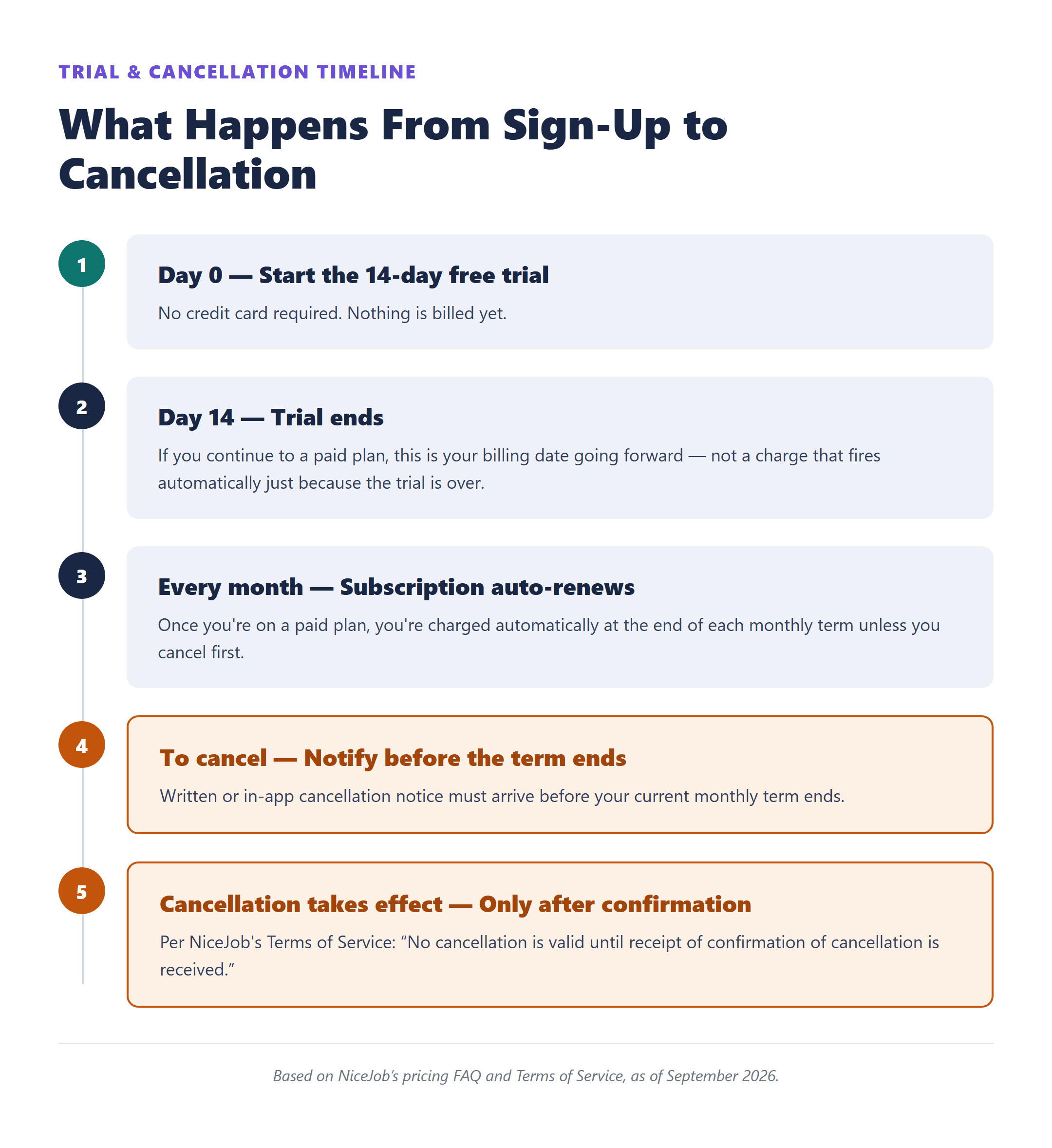
If you do move to a paid plan, the billing calendar is set by the trial, not by the calendar month. The pricing FAQ puts it this way: “Your billing date will be the day your 14-day trial ends or, if you sign up after the trial ends, on that date.” Read that as a definition of which date your billing lands on, not as a promise that a charge fires automatically the moment the trial runs out. Either way, the practical step on day one is to put the trial end date in your calendar.
The documentation does not describe what happens to an account that reaches day 15 with no card on file, and it does not say at what point a trial converts to a paid subscription. If you want the trial to simply lapse rather than convert, do not treat that as settled. Ask support how it is handled.
Now the part that catches people. NiceJob’s FAQ says you are “not locked into a contract at any time during your NiceJob subscription plan,” and the pricing page headline reads “No contracts. No fluff.” Both are accurate about long-term commitments. They are not a description of how cancellation works. The Terms of Service state that “Your payment to us will automatically renew at the end of your monthly term, unless you timely cancel,” and they define cancellation as notice given “prior to the end of the current monthly term,” delivered by emailing [email protected] with the subject line “Cancellation of Membership” or by following the in-app cancellation steps. The clause to read twice: “No cancellation is valid until receipt of confirmation of cancellation is received.”
In practice that means three things for a business owner. Cancel a few days before your renewal date, not on it. Keep the confirmation email. And do not assume a mid-month cancellation comes with a refund or a prorated credit, because the Terms of Service do not address either one, so it is a question for support rather than something to plan around.
Three more billing mechanics are worth knowing up front:
- Switching plans is allowed but not instant. The FAQ says you can move from Starter to Pro or back “at any time,” with changes taking effect on your next billing cycle. That is the whole of what NiceJob publishes about switching. It does not say what happens to the current month’s charge in either direction, so do not assume an upgrade opens the new features the same day, and do not assume a downgrade lowers that month’s bill.
- Prices can change with 30 days’ notice. The Terms of Service allow fees to be updated “upon notice to you at least 30 days prior to the end of the current monthly term.” Today’s $75 is today’s price.
- A failed payment does not delete you immediately. The terms say that if payment fails, “you will be downgraded to a free version of the NiceJob Services or Sites Services.” What that free version includes is not described anywhere public, and no free plan appears on the pricing page, so treat it as a holding state rather than a fallback you can plan on.
Who NiceJob Fits, and Who Should Look Elsewhere
The product is aimed squarely at owner-operator service businesses, and the giveaway is in the integration list: Jobber, Housecall Pro, ServiceTitan, FieldPulse, JobTread, DripJobs, CompanyCam, QuickBooks, FreshBooks. Those are contractor, cleaner, landscaper, HVAC, and plumbing tools. NiceJob’s directory describes the connection as read-only, “NiceJob reads your data, never writes back,” which lowers the risk of testing it against a job system you depend on.
Team access is set up in a way that suits a crew rather than an office. The help center describes four access levels: Owners have full access, Managers have access to everything except billing settings, Team members are “limited to access of customer actions,” and a fourth level called No access “adds your team member to the Team Leaderboard without inviting them to create an account.” That last one matters more than it sounds: your field techs can be on the Team Leaderboard without anyone creating accounts for them. The permissions documentation does not mention a per-seat charge, and the pricing page does not publish a user limit. That is not the same as unlimited users, so if headcount is central to your decision, confirm it with support rather than reading it into the silence.
Where it stops fitting is multiple locations. The help center says adding multiple locations under a single user is straightforward, then adds the condition that decides your budget: “if you have separate Google My Business pages and social media pages for your locations, each of the locations will need a separate license.” The trigger is not the number of vans or addresses, it is whether each location has its own Google and social presence. The price of an additional license is not published, and the help article points you to support for it. If you run three locations with three Google My Business pages, planning around $75 or $125 is planning around the wrong number. Get a quote first.
Two other groups should probably pass. If you already pay for a review tool that does the job, NiceJob is a second subscription doing the same work. And if what you actually need is a CRM, pipelines, and marketing automation rather than review collection, you are shopping in the wrong category; our look at whether GoHighLevel is worth it for a small service business covers that decision instead.
The Limitations Most Reviews Don’t Mention
The pricing is straightforward, so the things that should slow you down are mostly in the fine print of individual features. Two of them deserve their own space before the list.
Sites has a 36-month ownership clock. NiceJob’s help center says that once your site has been live “for 36 months, we’ll be happy to provide you with an HTML/CSS export.” Before that point there is no export. And on cancellation, “NiceJob removes all content from the internet,” so copying what you want to keep is your job, done before you cancel, not after. Stock images used on the site are licensed to NiceJob, not to you, so reusing them elsewhere means buying them. If there is any chance you will move to another provider inside three years, price that in as a rebuild, not a migration.
One more thing to weigh before a commitment that long: who you are actually contracting with. NiceJob’s own Terms of Service state that “NiceJob is a tradename owned and operated by Paystone Inc.” According to the court-appointed Monitor’s public case record, Paystone Inc. is one of four applicants that obtained protection under Canada’s Companies’ Creditors Arrangement Act — a court-supervised creditor protection process — on June 5, 2026, and a court-approved sale and investment solicitation process began in July 2026. In August 2026 the court approved a sale of the Paystone applicants’ business and assets to 1001632600 Ontario Inc., a company controlled by Paystone’s co-founders. When the deal closes, contracts designated for assignment move to that buyer. As of October 17, 2026 the deal had not closed: the court extended the deadline to November 13, 2026 (Monitor’s Seventh Report, October 9; court endorsement, October 16). The court’s August 27, 2026 assignment order is public, and its list of contracts to be transferred names NiceJob on two vendor agreements (with 1Password and Stripe). Customer and partner agreements sit in a sealed exhibit, so we could not confirm whether NiceJob customer subscriptions are among them. NiceJob and Paystone have not posted a customer notice about any of this on their public sites, so if you are about to commit to the Sites product in particular, it is a fair question to put to support in writing first.
The rest are smaller, but each one has changed somebody’s mind about which plan to buy:
- Repeats needs a connected system to repeat anything — and the list is wider than the marketing page suggests. The Repeats product page names Jobber, ServiceTitan, Housecall Pro, and QuickBooks, which reads like a four-item requirement. The help center article is broader: as long as you have an app automation sending booking, payment, or invoice data, the campaign can run, and it names thirteen apps in two groups. Tools that send booking or visit events — Housecall Pro, Jobber, ResponsiBid, Mindbody, ServiceTitan, AccuLynx — trigger two texts and two emails per customer. Payment- and invoice-based tools — Clio, FreshBooks, PayPal, QuickBooks, Square, Xero, Stripe — trigger one of each, so a shop running on Square or Stripe is not shut out, it just gets half the sequence for the same $125. Only five of the thirteen — Housecall Pro, Jobber, ServiceTitan, ResponsiBid, and Mindbody — let you drop a booking link into the message, which is the part that turns a reminder into an actual booking. Those thirteen are the apps that article names rather than a complete list, so check yours in the help center instead of ruling yourself out. If your jobs live only in a spreadsheet or a paper calendar, though, the headline feature of the Pro plan has nothing to read from. Sort that out before you pay for Pro, not after.
- AI Replies runs once a day, not in real time. Replies post daily at 6 p.m. ET. Each one is generated from the specific content of the review rather than a template, and you can set the tone, cap the length, filter by rating so only four stars and above get an automatic response, or route everything through an approval queue first. It is a good description of a tool that saves you an evening task, and a poor description of an instant response system. The page describes replying to Google reviews and does not say whether Yelp or Facebook replies are included, which matters a lot if that is where your reviews accumulate.
- Referrals sends the invitation; you pay the reward. The feature invites customers whose review clears your star threshold and gives each referrer a unique trackable link. Fulfilling whatever you promised, a discount or a gift card, stays with your business. Budget for the incentive separately from the software.
- Nothing published says how many requests you get. Neither the pricing page nor the Reviews product page lists a cap on review requests or text messages. Absence of a published limit is not a promise of unlimited sending, so if you plan high-volume texting, ask before you assume.
- Your content can go when the account goes. The Terms of Service state that termination “may result in the deletion of all of your Content,” and that NiceJob “will not be obligated to provide any backup or retrieval.” Your reviews live on Google and Facebook regardless, but anything that exists only inside NiceJob should be exported while the account is still open.
- Sites paperwork has loose ends. The “no contracts” answer in the FAQ is written about the NiceJob subscription plan, and the 14-day trial language is published the same way, so neither clearly covers the Sites product. On top of that, as covered in the pricing section, the home page’s “no plan required” offer sits directly against the Terms of Service clause calling Sites an add-on that terminates automatically when NiceJob is canceled. Whether the $199 setup fee is refundable is not addressed anywhere public. None of that is a dealbreaker, but get it in writing from support before you sign up for Sites rather than after.
Cancellation is its own piece of friction, and it is covered in the trial section above rather than repeated here.
Starter or Pro? How Three Small Teams Would Decide
Feature lists do not decide this. Work patterns do. Here is how the published facts land on three common setups.
A three-person cleaning company running recurring routes. The work repeats by design, which is exactly what Repeats is built for, and NiceJob’s own example is a twelve-month reminder after window cleaning. If jobs are tracked in something NiceJob can read — Jobber and Housecall Pro among them, but a payment or invoicing tool counts too — both the review requests and the rebooking reminders have data to run on. First pass: Repeats clears it, because rebooking here is not an occasional idea, it is the business model, and NPS Surveys is a plausible second, since a recurring route lives or dies on catching an unhappy customer before the next visit. Second pass: with recurring customers coming due every month, those reminders are work somebody is already doing by hand or not doing at all, so the $50 is taking a standing task off the schedule rather than adding a feature to admire. Reverse the picture and the second pass reverses with it — if the route list is short enough that the owner already texts every client personally and nobody is slipping through, Starter stays the better buy. That is a call about this particular book of business, not about the feature. At three people you see the same published price as a ten-person shop, since the pricing page lists no seat limit — the exception being locations that each have their own Google My Business page, which need a license each.
A five-person HVAC shop with a maintenance season. Same logic, stronger. Repeats is documented with a six-month reminder after HVAC maintenance, and the crew showing up on the Team Leaderboard without needing individual logins fits how a five-tech shop actually runs. Two conditions gate the first pass: your jobs need to sit in a system that sends NiceJob booking, payment, or invoice data, and your reviews need to be landing on Google for AI Replies to mean anything. Maintenance agreements make Repeats repeated use by definition, so a shop like this usually clears that pass. The second pass is where a five-person shop should be blunt with itself. If your field service app already fires its own maintenance reminders and they work, NiceJob’s version is a second tool doing a job that is already done, and $600 a year for a duplicate is a poor trade. If nobody has chased last spring’s customers at all, the same $600 reads differently. Broadcasts for a pre-season tune-up email to your whole list, and Competitive Intel if the shop across town is out-reviewing you, go through both passes the same way rather than counting as automatic yeses. If you use QuickBooks Online rather than a dedicated field service app, QuickBooks is on the integration list as well.
A solo operator with one-off jobs and no website. Here the first pass does all the work, and it comes up empty. Run the seven past that setup: Repeats and Referrals have little to work with when every job is a one-time install, Broadcasts needs an email list you have not built yet, and Gifts, NPS Surveys, and Competitive Intel are refinements rather than the thing you are missing. AI Replies is the one that could still tempt you, and only if Google reviews are arriving faster than you answer them — at a handful a month, replying yourself is a ten-minute job. Nothing on the list is repeated work for this business yet, so the second pass never gets a chance to run, and Starter is the answer rather than a compromise. Starter at $75 covers what you need: automatic review requests when a job is marked done, plus the Microsite and social proof tools on the same plan. Revisit it the day you start selling maintenance plans, because that is the day the first pass comes out differently. The website question is separate. Sites at $99 per month plus $199 setup is a real option when the alternative is having no site at all, but read the 36-month export rule above before you commit, because it is the least reversible decision in this entire lineup. And if the plan is to take Sites without a NiceJob subscription under it, get that confirmed in writing first — NiceJob’s own pages and its Terms of Service do not agree on whether that is allowed.
If you are genuinely unsure, Starter is the cheaper place to be unsure. Start there, and move to Pro when you can name both halves of the decision: the specific thing you would do with one of the seven features, and how often you would be doing it. The pricing FAQ says you can move from Starter to Pro or back at any time, and that the change takes effect on your next billing cycle. That is the extent of what NiceJob publishes about switching, so treat the timing as the known part and ask support about anything else before you count on it.
Final Decision Checklist: Starter, Pro, Sites, or Skip It
Six questions, each of which points to one of the four outcomes.
- Do your locations have separate Google My Business and social pages? If yes, stop budgeting and email [email protected] for a per-location license quote. That price is not published, and it changes the math entirely.
- Is the system you actually run on one of the integrations or data sources NiceJob can read? Not only the four CRMs the marketing pages name — booking tools, payment processors, and invoicing apps all count, so check the full list in NiceJob’s help center rather than assuming your setup is out. Then open the setup article for your own tool before you choose a plan. Of the thirteen setup articles behind Repeats, only the Housecall Pro one states a NiceJob plan requirement, and it names a legacy plan that is no longer on the pricing page; the other twelve do not mention plans at all, which means the answer is undocumented rather than settled in your favor. The pricing page’s Starter card does not list Integrations either. If nothing you run sends booking, payment, or invoice data, Pro’s Repeats feature has nothing to trigger from, which removes one of the reasons to pay $125.
- Which of Pro’s seven features would you use repeatedly? Repeats, Referrals, Broadcasts, AI Replies, Gifts, NPS Surveys, Competitive Intel. Go through all seven and count only the ones that match work you do month after month, not the ones you would switch on once to see what they look like. Seven noes mean Starter, and that is a real outcome rather than a consolation prize.
- For whatever survived that, is it worth $50 a month to this business? Put it against your own numbers: how many jobs or customers the feature would touch, how often the situation comes up, and what is happening about it today — by hand, or through a tool you already pay for. If the honest answer is that you cannot tell yet, start on Starter and move up once you can. The FAQ says the switch is available at any time and takes effect on your next billing cycle.
- Are your reviews on Google? AI Replies is documented for Google reviews and posts once daily at 6 p.m. ET. If Yelp or Facebook is where your reputation actually lives, confirm coverage with support before Pro’s price tag is part of your decision.
- Could you be leaving within three years? If that is even possible, Sites is the wrong purchase. The HTML/CSS export comes only after 36 months live, and cancellation takes the site down.
Whichever way it goes, two practical steps make the trial useful. Start it without a card, since none is required, and connect your job system on day one so review requests actually fire during the 14 days instead of after. Then put the trial end date in your calendar, because if you go on to a paid plan, the FAQ makes that date your billing date for as long as you stay.
One small thing for after you subscribe: NiceJob customers on a paid plan can refer another business and receive a $75 Amazon gift card once that business has paid for at least two months. It will not decide anything for you, but it is money against your own subscription.
Before you enter a card, check the current numbers yourself: plan prices and the billing FAQ on the official pricing page, renewal and cancellation language in the Terms of Service, the multi-location condition in the help center article on multiple locations, the export rule in the article on website ownership, and the feature details on the AI Replies and Repeats product pages. The Paystone proceedings described in the limitations section are documented on the court-appointed Monitor’s case page.