A detailing year that runs busy through the warm months and goes quiet in winter raises a billing question before a feature question. Does paying Urable for twelve months up front make sense when a couple of them will be slow?
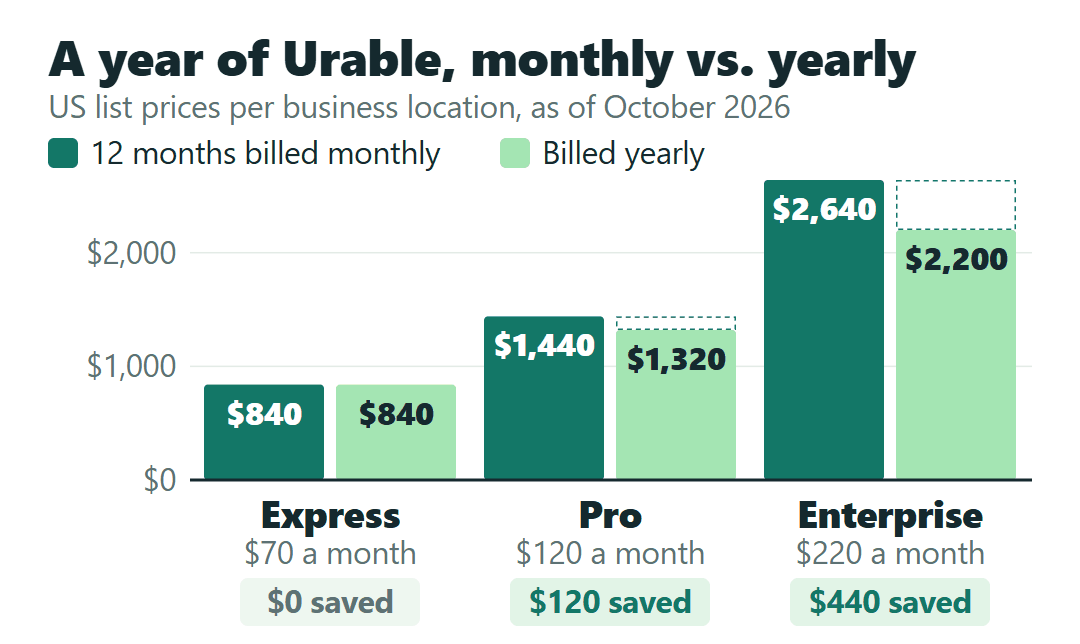
Here’s the price you’d be weighing. Billed monthly, Urable costs $70 for Express, $120 for Pro and $220 for Enterprise, per business location, with unlimited users on every plan. Billed yearly, it’s $840, $1,320 or $2,200: no saving on Express, one month free on Pro and two months free on Enterprise. Urable also offers a pause of up to two consecutive months in any 12, written around billing cycles.
For a detailer, Pro is the step up for online booking with deposits or a QuickBooks Online sync. Enterprise is for automatic membership billing and video inspections, but customer subscriptions are available on any plan if you process payments through UrPay, Urable’s own payment processor. If you take cards through Stripe or Square inside Urable instead, Urable adds its own 0.5% fee per transaction in the US.
This is written for a detailing business with one location and a crew of one to six, whether mobile, shop-based or both. Prices are Urable’s US list prices from its pricing page and Help Center, as of October 2026. Every business in this post is a hypothetical example, and nothing here comes from using a Urable account.
Urable’s pricing page shows you the yearly price first
Open the pricing page and the Pro card shows $110, the Enterprise card $183. Neither is a price you can be billed month to month. The page opens on its Yearly toggle, and each card shows the yearly price spread over 12 months.
When I compared the pricing page with Urable’s Subscription Plans article, the two figures turned out to be $1,320 ÷ 12 = $110 for Pro and $2,200 ÷ 12 = $183.33, shown as $183, for Enterprise. Switch the toggle to Monthly and the cards read $120 and $220.
| Plan | Billed monthly | 12 months, billed monthly | Billed yearly | Yearly saves |
|---|---|---|---|---|
| Express | $70 | $840 | $840 | $0 |
| Pro | $120 | $1,440 | $1,320 | $120 (1 month) |
| Enterprise | $220 | $2,640 | $2,200 | $440 (2 months) |
The gap matters if you budget from the default view. Plan for $110 on Pro and then choose monthly billing, and you’re $10 a month short; on Enterprise the gap is $37. On Express, the yearly price is exactly 12 × $70, so paying for the year up front buys no discount.
Two rules keep the rest of the math simple. Every plan includes unlimited users, so adding a detailer or an office helper doesn’t change the bill. And each business location needs its own subscription: a second shop, or a mobile brand you run as a separate business, is a second plan. The two can sit on different tiers and share one login.
For example, a hypothetical shop that also runs a separate mobile unit, with Pro for the shop and Express for the van, both billed monthly, pays $120 + $70 = $190 a month.
Which features push a detailer up a tier?
Express covers more of a detailer’s routine than its price suggests. Pro and Enterprise each add a short list, and only a few items on it are real reasons for a small shop to move up.
- Express ($70 billed monthly) already includes repeat jobs on custom cadences, route optimization for mobile work, VIN scanning, HD inspection photos, on-my-way texts with an ETA, text and email invoicing, and payments by Stripe or Square, ACH, saved cards and Affirm or Afterpay financing.
- Pro ($120) adds an online booking and lead-capture page where customers book shop or mobile slots, automated deposits at booking, custom lead forms, long-term follow-up messages and the QuickBooks Online integration.
- Enterprise ($220) adds customer subscriptions with recurring billing, video inspections, customizable workflows, line-item scheduling and automated payment-request reminders.
A few rows in Urable’s full comparison table don’t match its plan cards, so for any feature not listed here, check that table on the pricing page before you pick a tier.
Example: a solo mobile detailer who wants online booking
A hypothetical one-person mobile detailer wants customers to pick a slot online and pay a deposit when they book. Express has no booking page, so this business needs Pro: $120 a month, or $1,320 for the year, which saves $120.
If QuickBooks Online is what pulls you toward Pro and you haven’t settled on accounting software yet, the QuickBooks Online vs. Wave comparison for small contractors covers when paying for bookkeeping starts to make sense.
Memberships, card fees and the UrPay trade-off
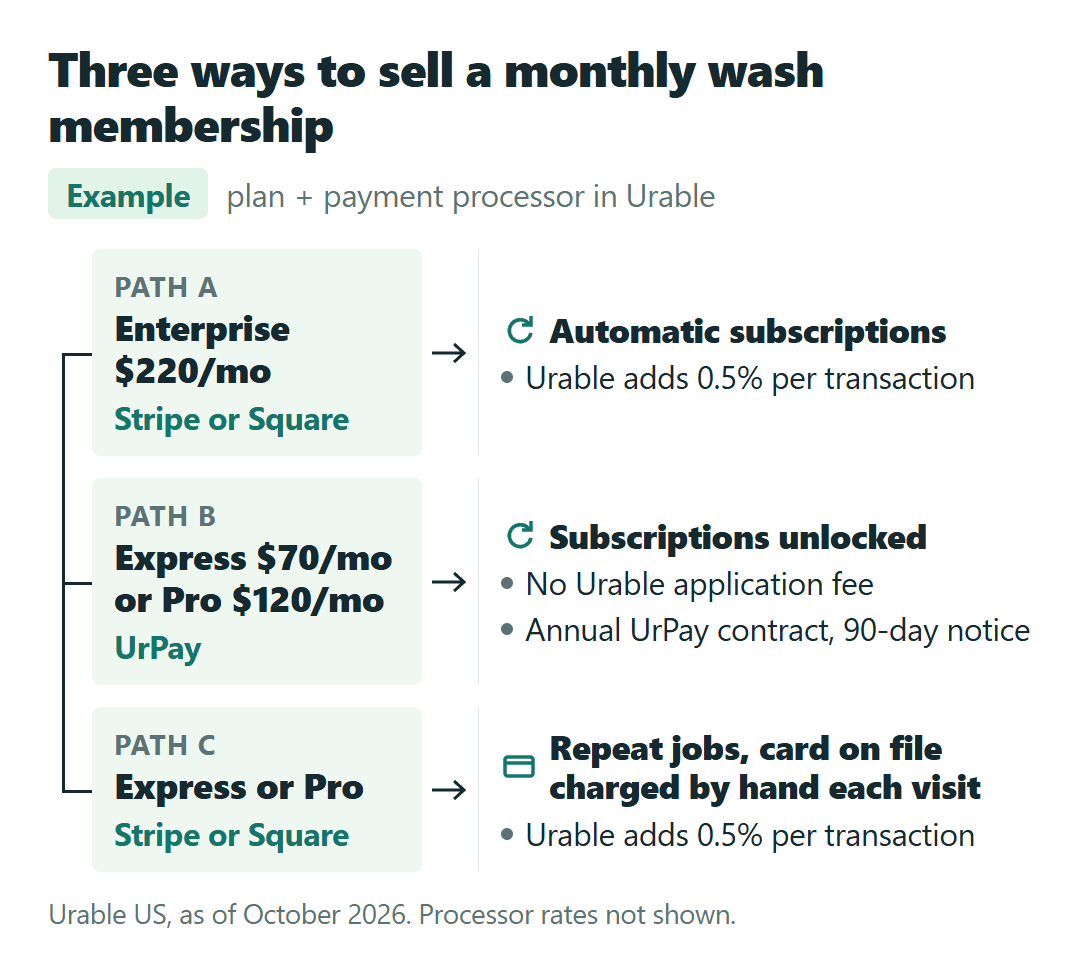
Take a hypothetical shop that wants to sell regulars a “Monthly Maintenance Wash” membership. On the pricing page, “Recurring billing” appears on the Enterprise card only. Customer subscriptions let Urable schedule each visit and charge the card automatically, under names like “Monthly Wash” or “Quarterly Maintenance,” and the Help Center opens them to every plan for shops that process through UrPay. Without them, you can still book members as repeat jobs on Express or Pro and charge the card on file after each visit, by hand.
The other half of the decision is how you take cards. Payments run through Stripe or Square inside Urable carry a 0.5% Urable processing fee per transaction in the US, on top of whatever Stripe or Square charges you (Urable’s Stripe and Square article lists it). The pricing page doesn’t mention it.
UrPay charges no Urable application fee. UrPay contracts are annual, though, with a 90-day cancellation notice, and UrPay quotes its own processing rate, so get that quote in writing before you compare it with what you pay now.
Three ways the membership shop could set this up
Assume the hypothetical shop has three people and runs $12,000 a month in card payments through Urable. These are examples, not a ranking, because processor rates aren’t compared here.
- Enterprise on Stripe or Square: automatic subscriptions for $220 a month (or $2,200 a year), plus 0.5% × $12,000 = $60 a month in Urable fees, before Stripe’s or Square’s own fees.
- Express or Pro on UrPay: subscriptions unlocked on a $70 or $120 plan with no Urable application fee, in exchange for an annual processing contract with 90 days’ notice and UrPay’s own rate.
- Pro on Stripe or Square, no automation: members booked as repeat jobs and charged by hand each visit, for $120 a month plus the same $60 in Urable fees.
The 0.5% grows with volume. At hypothetical card volumes of $5,000, $10,000 and $20,000 a month, it comes to $25, $50 and $100 a month. At $10,000, the Urable fee matches the $50 monthly step from Express to Pro, so on a busy shop the processing choice can weigh as much as the plan choice.
Stripe’s and Square’s own fees aren’t covered here. The Square vs. Stripe invoice fee breakdown on $300, $1,200 and $3,000 jobs works through that side of the bill.
Monthly or yearly for a shop with a slow winter?
Yearly billing saves $120 on Pro and $440 on Enterprise, and nothing on Express. For a detailer whose winter is slow, Urable’s pause plan is the other number to weigh.
A subscriber can pause for up to two consecutive months in any 12, with no charge for the next two billing cycles. Your data, booking page and long-term reminder messages keep running, and the plan un-pauses on its own.
Take a hypothetical Pro shop in a cold-winter state. Billed yearly, it pays $1,320. Billed monthly with a two-month winter pause, it pays 10 × $120 = $1,200; without the pause, $1,440. On Express, the same comparison is $840 yearly against 10 × $70 = $700.
That comparison is monthly-with-pause against yearly. Urable’s pause article talks about billing cycles and doesn’t say a yearly plan can pause, so don’t count on getting two months back after prepaying.
“No contracts” on the pricing page, 12 months in the Terms
The pricing page says “No contracts, no hassle and you can upgrade, downgrade or cancel at any time,” and its FAQ answers the commitment question with “No. You can pay monthly and cancel at any time.” The Help Center adds that a canceled plan stays available until the end of the billing cycle.
Urable’s Terms of Service (last updated June 8, 2026) set different defaults, each one “unless otherwise set forth in the Order Form”:
- A 12-month term that renews automatically unless you give written notice at least 90 days before it ends.
- Ending early means forfeiting prepaid fees or paying the monthly fee for each month left in the term.
- Processing payments through Urable’s integrated platform within 60 days; otherwise Urable may restrict features, raise fees or charge a non-integrated processing fee. That clause matters if you plan to stay on Stripe or Square.
The published pages don’t settle which of these applies to a plan you activate yourself on the website. Before you enter a card, check what Urable’s Billing activation screen says about the contract term and payment processing, and if it says nothing, get the answer from Urable in writing. A short message does it:
I’m about to activate Pro, billed monthly, for one location, and I take cards through Stripe. Is this a month-to-month plan I can cancel at any time, or a 12-month term with 90 days’ notice? And does the 60-day requirement to process through Urable’s payments apply to my account?
The free trial doesn’t ask for a card up front, so there’s nothing to cancel if you don’t activate. Check how many trial days you have left in your account rather than assuming a number.
“One month free” comes at the end of the decision
Start with what the shop would use every week. If customers need to book online and leave a deposit, or your books live in QuickBooks Online, that’s Pro. If memberships or video inspections are the draw, that’s Enterprise, or a cheaper plan on UrPay if an annual processing contract suits you. If none of that applies, Express already handles repeat jobs, routes, VIN scans and card payments.
Then price the payment side with your own monthly card volume. Staying on Stripe or Square sends 0.5% of it to Urable on top of the processor’s fees, while UrPay removes that fee and adds a year-long processing commitment. The pricing page leaves the 0.5% out, and for a membership shop the payment side can matter as much as the tier.
Settle the contract wording on the activation screen before the card goes in, and leave the billing term for last. On Pro, the difference between monthly and yearly billing is $120 a year.