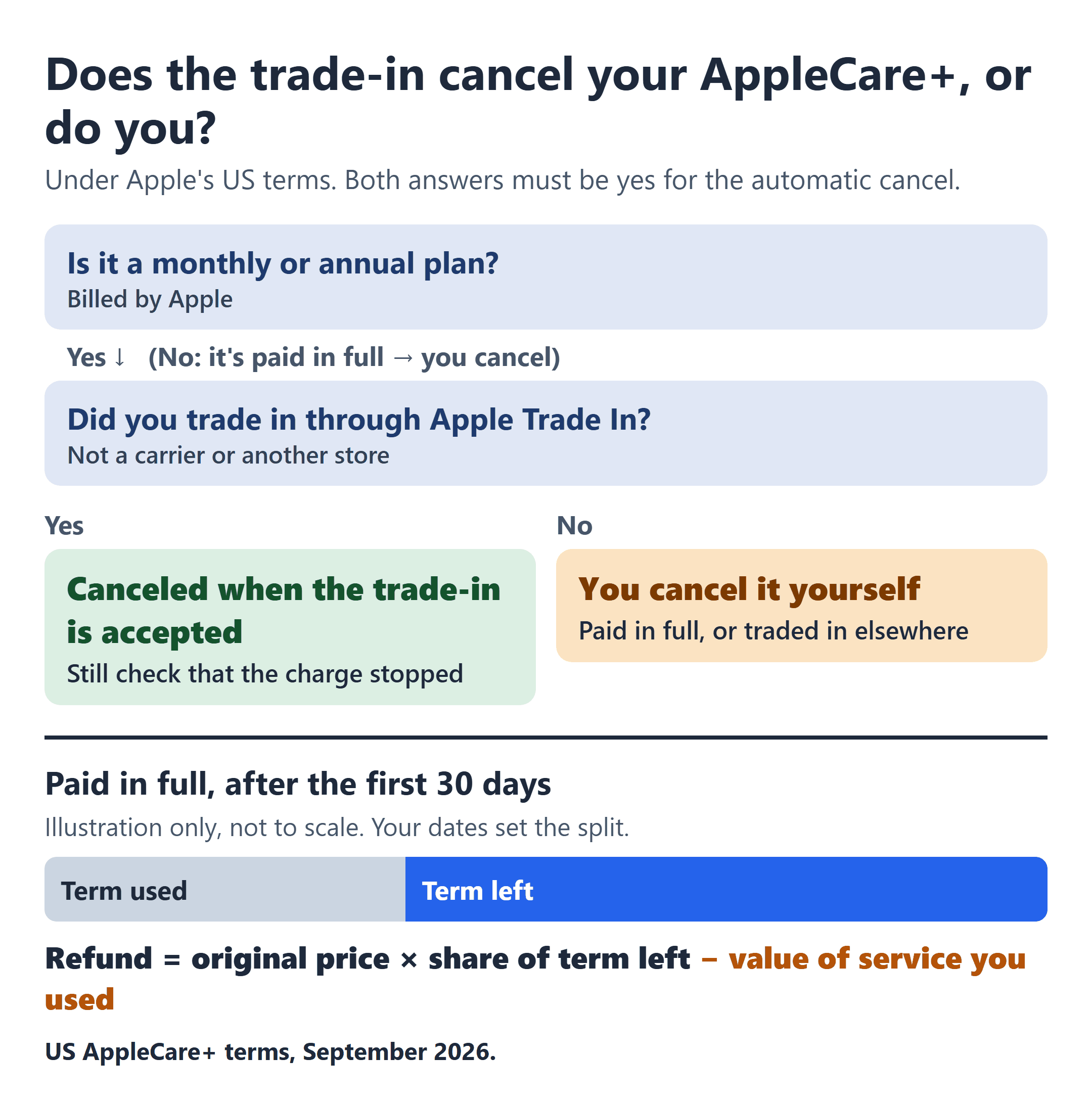
The short version you’ll hear is that trading in an old iPhone cancels its AppleCare+. The sentence in Apple’s US terms is longer, and the extra words matter: “For Monthly and Annual Plans, if you trade-in your Covered Equipment through the Apple Trade In Program, that trade-in will be deemed an expression of your intent to cancel your Monthly or Annual Plan and it will be cancelled at the time the trade-in is accepted.”
Read it again and notice how narrow it is. It names monthly and annual plans, and it names Apple Trade In. A plan you paid for in full up front isn’t in that sentence, and neither is a trade-in at a carrier or another store. The current terms have no matching clause for either one. In either case, cancel the plan yourself and check that the charges stop or the refund posts.
So whether you have to act, and what comes back to you, depends first on how you pay for AppleCare+. On a monthly or annual plan billed by Apple, canceling ends coverage right away and refunds the unused part of the current month or year to your payment method, while only turning off renewal keeps coverage to the end of that period with no refund. On a plan paid in full, after the first 30 days you get a pro-rated share of the original price for the time left, less the value of any service you received under the plan, and Apple doesn’t publish how it values that service.
This covers AppleCare+ under Apple’s US AppleCare+ terms as of October 2026, which cover iPhone along with iPad, Apple Watch, AirPods, HomePod and Apple TV plans. It’s written for plans bought from Apple; if you bought yours from a carrier or another store, the cancel routes are further down. If your coverage came through your carrier’s own protection program or a promotion, that program’s terms apply. Mac plans have separate terms.
First, Find Out Which Kind of AppleCare+ You Have
Apple sells AppleCare+ three ways: a “fixed term of coverage,” a “monthly recurring term of coverage” and an “annual recurring term of coverage.” Monthly and annual plans “automatically renew every month or year… unless and until cancelled.” A fixed-term plan runs “through the date specified in your Plan Confirmation.”
If you see the plan in Settings > General > AppleCare & Warranty and in your Subscriptions, it’s monthly or annual. If you paid for it in full and it doesn’t renew, it’s fixed-term. It’s still fixed-term if you’re paying it off in installments through a financing company.
Before you cancel anything, these are the values from your own account that decide the outcome:
- Plan type and billing: monthly, annual, or paid in full.
- Purchase date and coverage end date: both are on your Plan Confirmation, which you can find at mysupport.apple.com/products for plans bought from Apple.
- AppleCare agreement number and the device’s serial number: Apple Support says to “sign in to your Apple Account and select your device.” You’ll need both to cancel or transfer.
- Where you bought the plan, Apple or a carrier or another store, and whether it was financed.
- Any repair or replacement you got under the plan.
- How the old phone is leaving: Apple Trade In, a trade-in somewhere else, or a private sale or gift.
The Trade-In Sentence, and the Plans It Doesn’t Reach
Two trade-ins in the same week
Picture two people trading in their iPhones the same week. This is a hypothetical, not real accounts. The first pays for AppleCare+ monthly through Apple and trades in through Apple Trade In. Under the terms, that plan is canceled when Apple accepts the trade-in.
The second paid for the plan in full and trades in at a carrier store. The current terms don’t cancel that plan for them. The cancellation is theirs to make, using the route for where they bought the plan.
The terms also don’t say what refund comes with the automatic cancellation in the first case. Even there, I’d still check the next statement and your Subscriptions to make sure the AppleCare+ charge has stopped.
Monthly or Annual: Cancel, or Only Turn Off Renewal?
There are two ways to stop a monthly or annual plan billed by Apple, and they end differently.
Cancel the plan. Cancellation is effective immediately. If you cancel more than 30 days after you first bought the plan, the terms give you “a pro rata refund based on the percentage of unexpired time remaining” on your current monthly or annual term, credited to the payment method you pay with. That covers only the unused part of the current month or year, not payments from earlier periods.
Only turn off renewal. The plan stays active until the end of the month or year you last paid for, then ends. The terms say plainly that “no cancellation refund will be provided.” That’s true for monthly and annual plans alike.
On an annual plan, this is where I’d slow down, because the unused part of the year is what’s at stake. Neither choice is wrong in itself. If you still have the device and want coverage until the period ends, turning off renewal does that. If the phone is already gone, canceling is the route that returns the unused part.
The first 30 days have their own rule, and it depends on when you bought the plan. For monthly and annual plans bought on or after September 9, 2026, canceling within 30 days of the initial purchase gets you “a full refund of the Monthly or Annual payment you made.” Plans bought before that date don’t have this line and follow the terms version for their purchase date.
These rules are for plans billed through Apple. If a carrier or another store bills you, that seller is where you cancel.
Paid in Full: A Formula With One Number You Can’t See
For a fixed-term plan, Apple’s terms set two windows. Within 30 days of the plan’s purchase, or of when you received it if that’s later, you get “a full refund less the value of any benefits provided to you under the Plan.” After 30 days, you get “a pro-rata refund of the original purchase price,” based on “the percentage of unexpired Plan Term from the Plan’s date of purchase, less the value of any benefits provided to you under the Plan.”
In plain terms, after 30 days the refund is the original price, times the share of the term still left (counted from the date you bought the plan), minus the value of any service you received under the plan. Your purchase date and end date from the Plan Confirmation tell you how much of the term is left. That gives you the pro-rated part before any deduction for service you used.
The deduction is the number you can’t work out at home. The terms subtract “the value of any benefits provided,” but they don’t define that value or list a price for any repair or replacement. A repair or replacement under the plan lowers the refund, and the exact figure comes from Apple when you cancel. This deduction is written only into the paid-in-full rules, not the monthly and annual ones. A few states, such as Wisconsin and Nevada, don’t allow the service deduction, so check the state section of your terms.
Apple’s current US terms don’t list a cancellation fee for these plans. If you’ve had service under the plan, this is what I’d ask before agreeing to cancel:
“Before you cancel this plan: what value of benefits provided under the plan will be deducted from my refund, and where will the refund be sent?”
| What you do | Monthly or annual (billed by Apple) | Paid in full |
|---|---|---|
| Cancel within 30 days | Full refund of the payment only if bought on or after Sept. 9, 2026 | Full refund, less the value of any service received |
| Cancel later | Coverage ends now; unused part of this month or year refunded | Pro-rated share of the price for time left, less the value of any service received |
| Only turn off renewal | Coverage to the end of the period; no refund | Doesn’t apply; it doesn’t renew |
| Trade in through Apple Trade In | Canceled when the trade-in is accepted | Not covered by that rule; cancel it yourself |
| Sell or give it away | Can’t be transferred; cancel it | Transfer once to the new owner, or cancel |
Selling or Giving It Away: Only a Paid-in-Full Plan Can Go With the Phone
The terms allow “a one-time permanent transfer” for fixed-term plans, except plans paid for directly by a third-party financing company. To transfer, you notify Apple with your Plan Agreement Number, the device’s serial number, and the new owner’s name, address, phone number and email. Apple’s transfer page says to contact Apple Support.
“Monthly and Annual Plans cannot be transferred,” so for those, cancel the plan. For a paid-in-full plan, transferring and canceling are both open to you, and which fits depends on your sale. The order matters here: a canceled plan leaves nothing to transfer, and a transfer needs the new owner’s details, so decide with the buyer before you do either.
Where You Bought the Plan Decides Where You Cancel
Apple’s cancel page and its terms list these routes:
- Monthly or annual plan bought from Apple: Settings > General > AppleCare & Warranty, Subscriptions, Report a Problem, or 800-APL-CARE (800-275-2273).
- Paid-in-full plan bought from Apple: the Apple Support app or getsupport.apple.com, then Hardware Coverage, then Cancel an AppleCare Plan. You can also call 800-APL-CARE.
- Monthly or annual plan bought from a carrier or another store: contact that seller to cancel.
- Paid-in-full plan bought from a carrier or another store: within the first 30 days, you may need to cancel through that seller. After 30 days, cancel with Apple by calling 800-APL-CARE, emailing [email protected], or by mail, with the serial number, your Plan Agreement Number, the original proof of purchase and your contact information. The online self-service options are for plans bought from Apple.
- Paid-in-full plan you’re paying off through a financing company: contact Apple or the financing company. Apple may send any refund owed to the financing company rather than to you.
What I’d Settle Before the Old iPhone Leaves Your Hands
I’d answer one question before the phone goes in the box: is this plan monthly, annual or paid in full? If it’s annual, I’d decide between canceling and only turning off renewal on purpose rather than by default. If it’s paid in full and the phone is being sold, I’d decide on transfer or cancel with the buyer before doing either.
Then I’d put a reminder on the next statement date, whether I canceled the plan or a trade-in did it, and check that the AppleCare+ charge stopped and any refund posted. If a charge keeps coming after you’ve canceled, here’s how to ask for a refund, dispute a charge after canceling, and stop the next one. And if a home warranty is the next protection plan on your list, its refund is a subtraction with different deductions, covered in what comes out of a home warranty refund when you cancel mid-term.
The trade-in quote tells you what the old phone is worth. Your plan type and where you trade it in tell you whether its AppleCare+ is still yours to cancel.
Sources and scope: Apple’s US AppleCare+ terms and Apple Support’s cancel and transfer pages, as of October 2026. Older plans follow the terms version for their purchase date, which Apple lists on its terms page. If your plan includes Theft and Loss, part of it is an insurance policy, and any refund of that part follows your state’s Theft and Loss documents.