Switch Service Fusion’s pricing page from Monthly to Annual and the Starter card reads $208 per month. Under it, in smaller type, there’s an asterisk: “Charged as one annual payment at sign-up.”
So the $208 isn’t a monthly bill. On Starter it’s about $2,500 charged on day one, and Service Fusion’s Subscription Agreement says fees are non-refundable, with no pro-rated refund if you change plans later. Read that footnote before you read the feature lists.
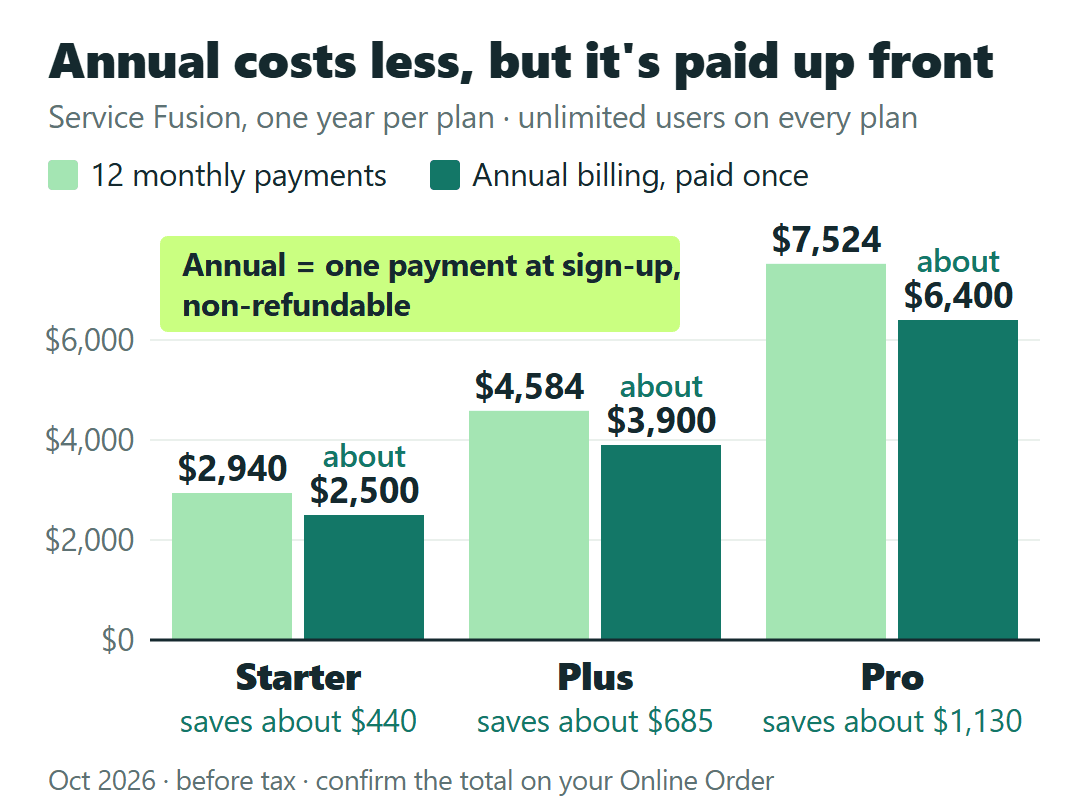
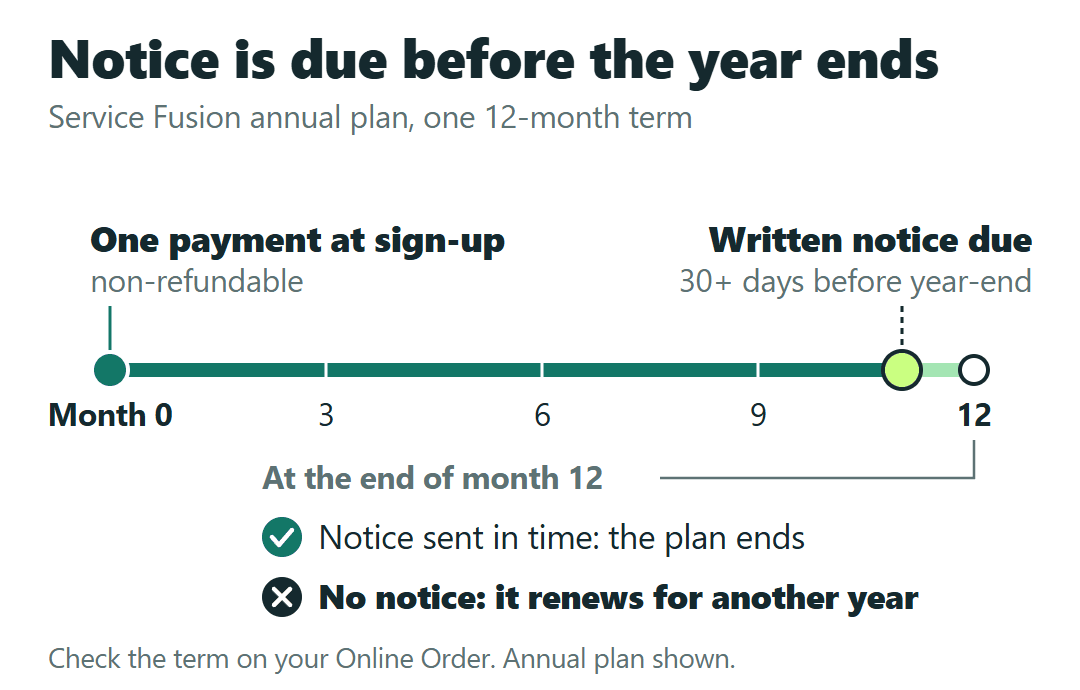
Service Fusion charges one flat price per plan, with unlimited users: Starter $245, Plus $382 and Pro $627 a month on month-to-month billing. Billed annually, it’s about 15% less ($208, $325 and $533 a month), but that’s paid as one payment of about $2,500, $3,900 or $6,400 at sign-up. Add-ons cost extra, and Service Fusion doesn’t publish their prices. The subscription renews for the same term unless you give 30 days’ written notice before it ends.
Everything here comes from Service Fusion’s published US list prices as of October 2026, before tax, and its Subscription Agreement (last modified March 23, 2026). None of it comes from a Service Fusion account, a demo or an Online Order, and every shop in this post is a hypothetical example.
What each plan costs, month-to-month vs. billed annually
Here are the three plans side by side. The annual columns are the ones that need the asterisk.
| Plan | Month-to-month, per month | Billed annually, shown per month | Annual, one payment at sign-up | Saved vs. 12 monthly payments |
|---|---|---|---|---|
| Starter | $245 | $208 | about $2,500 | about $440 |
| Plus | $382 | $325 | about $3,900 | about $685 |
| Pro | $627 | $533 | about $6,400 | about $1,130 |
For comparison, twelve monthly payments come to $2,940 on Starter, $4,584 on Plus and $7,524 on Pro.
The pricing page shows the annual plans only as a per-month figure, so the exact amount charged at sign-up isn’t published. Confirm the total on your Online Order before you pay. That order, not the web page, is where the price you’re agreeing to is written.
Three smaller things sit around these numbers: taxes are extra, each declined electronic payment carries a $35 charge, and Service Fusion can change its fees on notice. Treat every figure here as an October 2026 price.
Adding techs or office staff won’t change the plan price
Every plan comes with unlimited users. Service Fusion’s own FAQ puts it plainly: one technician and one dispatcher, or 20 technicians and a full office, the price is the same.
That cuts both ways. A flat price is cheap for a growing shop and expensive for a very small one. Service Fusion doesn’t charge per user, but dividing the plan price by the people who’d log in shows which side you’re on.
Take a hypothetical plumbing shop with three techs plus the owner, four logins, that needs only the core scheduling and invoicing. Starter at $245 a month works out to about $61 per login. A two-person shop on the same plan carries $122.50 per login.
Now a hypothetical HVAC shop with six techs and two office staff on Plus at $382 a month: eight logins, $47.75 each. If it hires four more people, the bill stays at $382, and the cost per login drops to about $31.83.
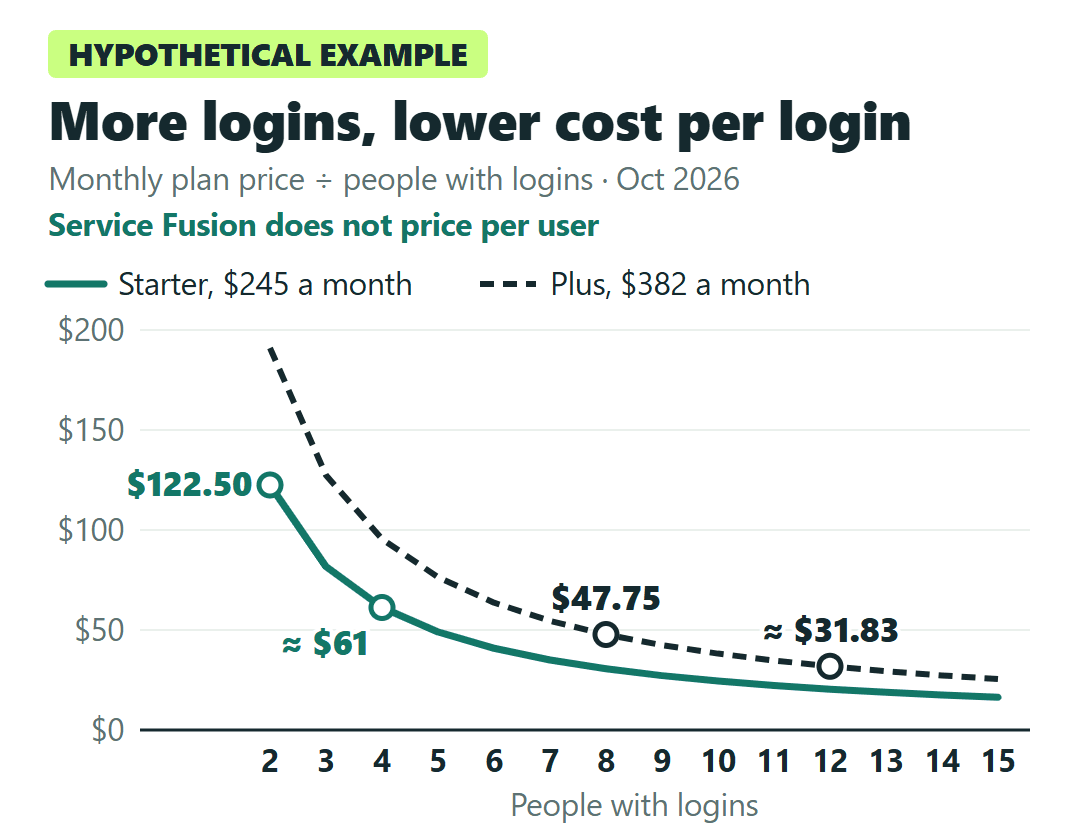
My practical reading: if you expect to add techs or office help in the next year, the flat price works in your favor. If you’re two people with no plans to hire, you’re paying the full plan price on two logins, so the plan’s features have to justify it on their own.
If Jobber or Housecall Pro is also on your demo list, our Jobber vs. Housecall Pro comparison for a small HVAC team shows which plan each one needs for QuickBooks Online sync and how Jobber’s price depends on who logs in. That’s useful to have before you weigh it against a flat price.
Starter, Plus or Pro: what each step up buys
All three plans share the same core for running jobs, including a QuickBooks integration. The full feature list is on Service Fusion’s pricing page. The decision is in the two steps up:
| Step | Extra per month | What it adds |
|---|---|---|
| Starter to Plus | $137 / $117 | Job photo uploads, inventory management, job costing, integrated voice & text |
| Plus to Pro | $245 / $208 | Open API integration, custom documents, eSign documents, customer web portal, progress billing & recurring invoicing |
| Any plan, including Pro | Add-on, price not published | GPS Fleet Tracking, ServiceCall.ai (VoIP and AI call handling) |
The features a plan doesn’t include aren’t off-limits. On Starter, job photo uploads, inventory management and job costing are listed as add-ons, and Pro’s extras are add-ons on Plus. But Service Fusion doesn’t publish a price for any add-on. You find out during the sales process.
Service Fusion says its QuickBooks integration works with both QuickBooks Online and Desktop. If you’re still on Desktop and wondering whether to switch before connecting a new system, our guide to moving a small contracting business from QuickBooks Desktop to Online covers which plan you’d land on and what doesn’t convert.
Example: an HVAC shop that wants job photos and job costing
Go back to the hypothetical eight-login HVAC shop. It wants techs to attach photos to jobs and wants to see what each job actually cost. Plus at $382 a month includes both. On Starter, both would be add-ons at whatever Service Fusion quotes.
Plus costs $137 more a month on monthly billing, or $117 on annual billing. That’s the only published number to weigh the add-on quote against. If the quote for the add-ons you need comes in near or above it, Plus is the simpler buy, and it also brings inventory and integrated voice & text. If it comes in well below, Starter plus add-ons can cost less. This is a way to compare your own quote, not a break-even Service Fusion publishes.
These are the questions I’d ask during the demo, and I’d ask for the answers in writing:
On Starter, what is the monthly price for job photo uploads, inventory management and job costing? What do GPS Fleet Tracking and ServiceCall.ai cost for my number of trucks on the plan I’m choosing?
When Pro is the plan to price
The step from Plus to Pro is $245 a month. In my view it’s worth pricing only if one of those five rows is part of how you sell or bill every week: customers signing documents electronically, a customer web portal, progress or recurring invoices, custom documents, or an integration you’d build on the open API.
Even on Pro, GPS Fleet Tracking and ServiceCall.ai are paid add-ons with no published price.
Monthly or a prepaid year: what the 15% costs you in flexibility
The saving is real: about $440 a year on Starter, $685 on Plus and $1,130 on Pro. What you give up shows up in the Subscription Agreement:
- Fees are non-refundable. A year paid at sign-up stays paid.
- Changing plans doesn’t refund the difference. An upgrade or downgrade gives no pro-rated refund. Upgrades take effect immediately, and the higher fee is charged from that date.
- The plan renews for the same term. A year renews into another year unless it’s canceled.
- Cancelling takes 30 days’ written notice before the end of the current term.
The pricing page says all plans come with no contract requirement and are offered month-to-month, and that’s what the monthly option is. The agreement still sets a term: it’s whatever your Online Order states, and it renews for the same length. Check the term on your order instead of assuming it.
Back to the hypothetical four-login plumbing shop. A prepaid year on Starter is about $2,500 instead of $2,940 over twelve months. If the written notice doesn’t go out at least 30 days before the year ends, the plan renews for another year, and that payment isn’t refundable either.
You also can’t try it on your own first. The pricing page offers a free demo, not a trial. Personalized onboarding and unlimited support by email, phone or live chat are included on every plan.
That’s why I’d start monthly. Pay the month-to-month price while the crew settles in, see whether anyone actually uses photos or job costing, then decide on the year. Upgrades take effect the day you make them, so moving up later is easy. Prepaying for the wrong plan can’t be undone with a refund.
One more clause for anyone planning ahead: if you leave and ask Service Fusion to export your data, the export is billed as a paid professional service.
Before you sign the Online Order
- Get add-on prices in writing during the demo: photos, inventory and job costing if you’re looking at Starter, and GPS Fleet Tracking or ServiceCall.ai on any plan.
- Hold the Starter add-on quote against the $137 a month that Plus costs over Starter.
- Read the term and the total on the Online Order, because that’s the price and the term you’re agreeing to.
- Start monthly unless you’re sure of the plan and you’ll be using Service Fusion a year from now.
- If you do prepay, put a date on your calendar at least 30 days before the year ends, and decide by then whether you’re renewing. Notice has to be in writing.
The flat price is the easy part of this decision. The date you’d have to send that notice is the one worth writing down on the day you pay.
Sources: Service Fusion Pricing · Service Fusion Subscription Agreement (last modified March 23, 2026)