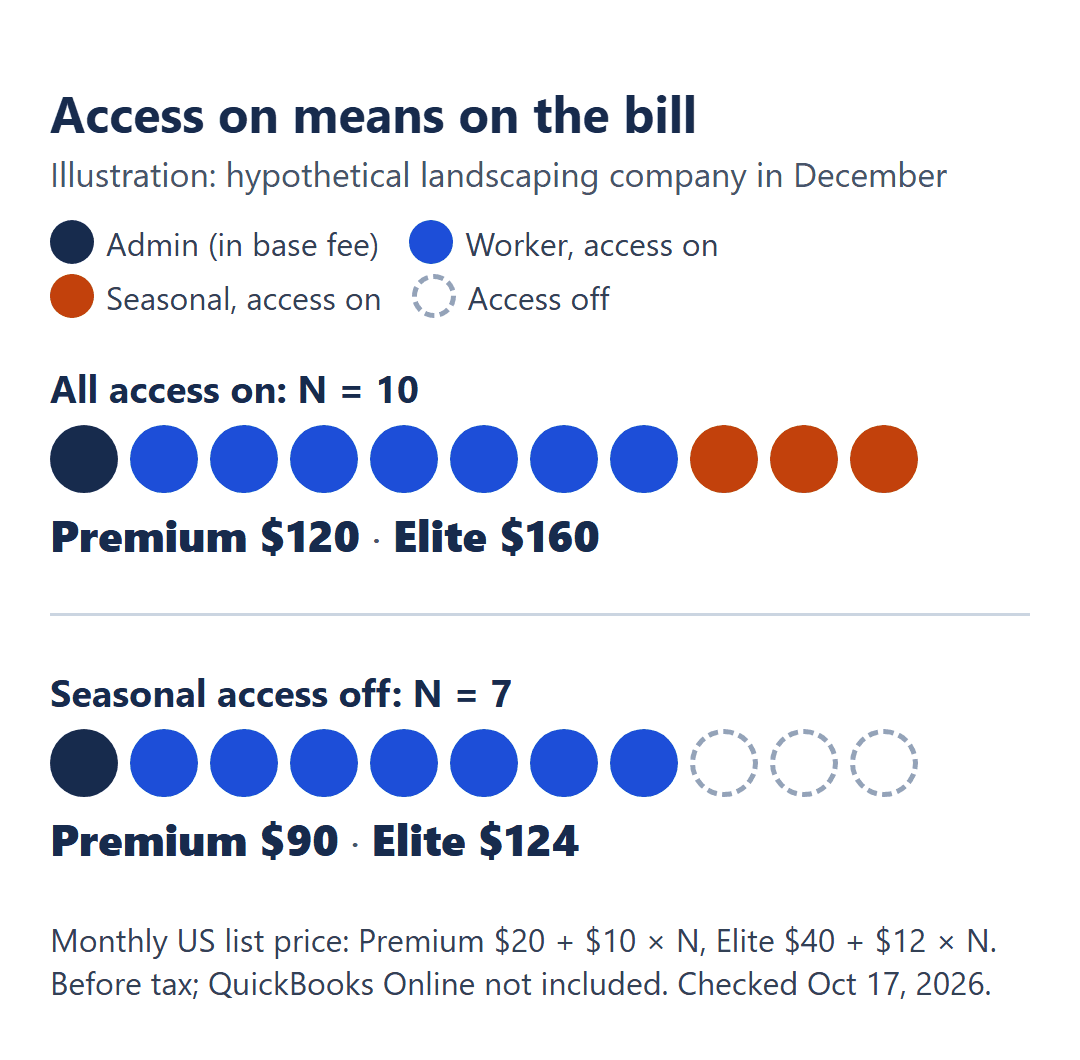
Picture a hypothetical landscaping company in December. The owner runs QuickBooks Time as the admin. The office manager and six field workers clock in every day. Three seasonal laborers finished their last jobs in October and haven’t clocked in since, but nobody touched their profiles.
Intuit’s billing rule is about access, not hours: team members with access turned on are included on the QuickBooks Time bill. If those three still have access on, the owner is paying for ten people beyond the admin. On Time Premium that’s $20 + $10 × 10 = $120 a month. Turn the three seasonal workers off and it’s $20 + $10 × 7 = $90.
QuickBooks Time is a paid add-on to QuickBooks Online, billed monthly as a base fee plus a fee for each user. Time Premium is $20 a month plus $10 per user; Time Elite is $40 a month plus $12 per user. Both base fees include one admin, and the whole thing sits on top of your QuickBooks Online subscription. The per-user rate went up $2 on both plans in mid-2026, from $8 and $10; the base fees didn’t change. Elite costs $20 + $2 per user more than Premium each month, and what it adds is mileage, project tracking, timesheet signatures and job-site geofencing.
Prices are Intuit’s US list prices in USD, billed monthly, before tax, from the QuickBooks Time pricing page, checked October 17, 2026. QuickBooks Online is billed separately and isn’t in any figure here. These are published prices, not figures from a QuickBooks Time bill, and the landscaping company is an illustration.
The access toggle decides who’s on the bill
Intuit’s help article on turning team member access on or off sets the rule in two sentences. Team members with access turned on can track time and are included on your QuickBooks Time bill. If you turn off access for a team member, you won’t be charged for them.
The same article adds a detail worth knowing before you invite anyone: access is on by default for newly added team members, unless you’re integrated with an accounting or payroll software. So check the setting after you add people, whichever way your account is set up.
The pricing page puts one admin in the base fee. It doesn’t say whether a second admin or manager is billed differently, so this post counts everyone else with access on, office manager included, as a paid user. I’ll call that number N.
If you’re still choosing a time clock and want to see a different way of counting heads, a crew time-clock plan that’s free up to 10 users and then priced per hub is worth pricing against your N.
Premium and Elite, line by line
| Monthly fee | Time Premium | Time Elite |
|---|---|---|
| Base fee, includes 1 admin | $20 | $40 |
| Each user beyond the admin | $10 | $12 |
| Per-user rate on Intuit’s page in June 2026 | $8 | $10 |
US list prices, monthly, before tax. QuickBooks Online not included.
The 2026 increase was per user only. Intuit’s pricing page showed $8 and $10 per user in June 2026 and $10 and $12 by July 2026, with the $20 and $40 base fees unchanged. If you were already subscribed, check your latest bill for the per-user rate you’re paying.
QuickBooks Online comes first. Intuit’s pricing page says a QuickBooks Online account is required, and the Time fees are added on top of your QuickBooks Online plan.
Your monthly bill, from N
Once you have N, the bill is one line per plan:
Premium = $20 + $10 × N per month
Elite = $40 + $12 × N per month
Elite costs more by $20 + $2 × N per month
| Crew | Premium | Elite | Elite costs more by |
|---|---|---|---|
| 1 admin + 3 | $50 | $76 | $26 |
| 1 admin + 5 | $70 | $100 | $30 |
| 1 admin + 10 | $120 | $160 | $40 |
| 1 admin + 20 | $220 | $280 | $60 |
The landscaping company from the top sits on the 1 admin + 10 row while its seasonal workers still have access on: $120 on Premium, $160 on Elite. With them switched off it’s N = 7, which works out to $90 on Premium and $40 + $12 × 7 = $124 on Elite.
The mid-2026 increase adds $2 × N a month on either plan. At N = 10, that’s $20 a month more than at the old per-user rate.
What the extra $20 + $2 per user buys
Elite’s extra cost grows with the crew, from $26 a month at 3 workers to $60 at 20, but crew size doesn’t settle the choice. What settles it is whether you’ll use what Elite adds. On Intuit’s plan cards and help pages, these are on Elite and not on Premium:
- Mileage tracking: relevant if you reimburse or bill for the miles your crew drives.
- Project tracking, project estimates vs. actuals and a project activity feed: relevant if you want to see how hours on a job compare with what you estimated.
- Timesheet signatures: relevant if you need signed timesheets.
- Geofencing: you add a geofence to a job or customer so team members get reminders to clock in and out at that job site. Intuit’s geofencing help article lists it as an Elite feature.
Both plans include the mobile app, a time kiosk, time off, alerts, photo attachments, payroll and invoicing sync, and unlimited support. I’d decide this with one question: is there a row in that list you’d use in the first month? If not, Premium covers time tracking and the sync to QuickBooks.
Two checks before checkout
Your payroll plan. If you already pay for Intuit’s Workforce Premium or Elite payroll plans (not the Time plans with the same names), Intuit says time tracking is included, so you may not need to buy Time separately. If you run payroll somewhere else, or don’t run it in software yet, who counts as a billed person on a small crew’s payroll plan covers the other per-person bill you’ll be counting.
The intro offer. Intuit currently advertises 50% off the monthly base fee for the first 3 months: $10 instead of $20 on Premium, $20 instead of $40 on Elite. Per-user fees aren’t discounted, and Intuit can change or end the offer. Intuit’s pages word the eligibility differently, so check the offer shown to you at checkout. Every figure in this post uses list price.
Before you add a single name, then, decide who actually needs access, and put a reminder in your calendar for the week your season ends. The number that sets this bill lives in a settings screen, not on a timesheet: in the December example, three workers who hadn’t clocked in for two months were $30 a month on Premium until someone switched them off. Current prices are on the QuickBooks Time pricing page.