Two short passages from the vendors’ own help centers settle most of this comparison. Zapier’s: “Zap triggers never use tasks.” Make’s, from the worked example in its article on operations: a Google Sheets “watch new rows” trigger that checks a spreadsheet costs “1 operation (one per check).” Make bills that unit as a credit now, and for ordinary modules one operation is one credit.
Read side by side, they say Zapier bills only the actions that run after something happens, while Make bills the trigger too. And if that trigger checks on a schedule, Make bills every check, whether or not anything new turned up.
Neither platform is cheaper across the board. Three things about your own setup decide it: whether your triggers arrive instantly by webhook or poll on a schedule, how many steps run after each trigger, and how many people need their own login. Zapier Professional starts at $19.99 a month billed annually ($29.99 billed monthly) for 750 tasks and one seat; a second person moves you to Team at $69.00 a month billed annually ($103.50 monthly) for 2,000 tasks and up to 25 users. Make’s plan comparison lists Unlimited users, so headcount doesn’t force the same jump there.
One caveat on Make’s side: in September 2026 its own official pricing pages showed more than one paid-plan lineup, so this post doesn’t quote a Make paid-plan name or price. Make Free, at 1,000 credits a month, is the stable reference point; for anything paid, use the plan, credit allowance and billing cycle that Make’s pricing page shows you when you sign up.
Zapier’s prices and both metering rules come from Zapier’s and Make’s own pricing pages and help-center articles, checked October 17, 2026. They’re published rules and prices, not results from building workflows in either tool, and every workflow below is an illustration. Ease of use, app catalogs, reliability and AI agent products are outside this comparison.
What a task is, and what a credit is
Zapier: a task is a successful action. Triggers, polling for new data and Zapier’s built-in data tools don’t consume tasks, and failed actions aren’t counted. A few things do use tasks without looking like actions: steps in error-handler paths, steps rerun when you replay a Zap, actions inside sub-Zaps, and search steps set to continue when nothing is found.
Make: a credit is a module run, and the trigger is a module. Modules after the trigger run once for each bundle they process, but the trigger runs once per check however many bundles come back. A check that returns five new rows costs one trigger credit plus five runs of every module after it.
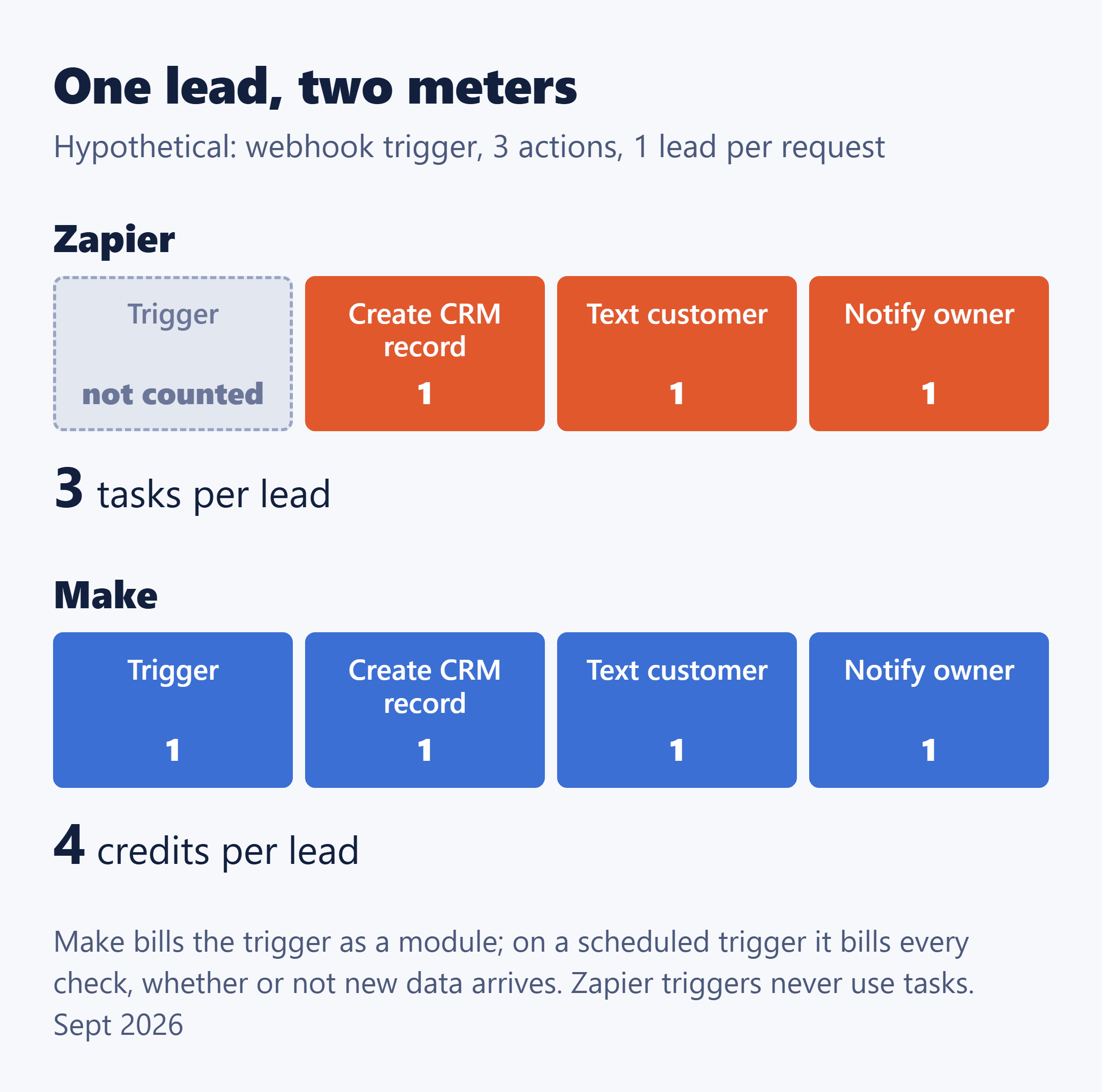
Take a typical service-business workflow: a lead comes in, the platform creates a CRM record, texts the customer and notifies the owner. That’s one trigger and three actions. If each trigger brings in one lead, it costs 3 tasks on Zapier and 4 credits on Make per lead.
Not every step costs exactly one unit, though. On Zapier, Lead Router uses 5 tasks per lead routed and Zapier MCP 2 tasks per tool call, and AI and Code steps vary; on Make, advanced AI features may use more than one credit.
Webhook or schedule: the setting that moves Make’s bill
Make’s help center splits triggers in two. An instant trigger is notified when new data arrives, so it spends a credit only when a request actually comes in. A scheduled (polling) trigger checks for new data on the scenario’s schedule and spends a credit on every check, data or not. On Zapier, neither kind uses a task.
Case 1: a lead form that posts by webhook
Hypothetical inputs: your web form posts each lead to the platform by webhook, each request carries exactly one bundle (one lead), the workflow runs the three actions above, and one person uses the account. On Make that’s 1 credit for the request plus 3 module runs, or 4 credits per lead. On Zapier it’s 3 tasks per lead.
| Leads a month | Zapier tasks | Make credits |
|---|---|---|
| 60 | 180 | 240 |
| 200 | 600 | 800 |
| 500 | 1,500 | 2,000 |
Make Free’s 1,000 credits cover the first two rows, with the 200-lead month close to the ceiling. At 500 leads you need a paid Make plan, sized from the live pricing page. Zapier needs a paid plan in every row, because Free allows two-step Zaps only and this workflow has four steps. 180 and 600 tasks fit Professional’s 750-task entry tier; 1,500 needs a higher Professional tier.
Case 2: a scenario that checks a mailbox every 15 minutes
Hypothetical inputs: one scenario checks a mailbox or a spreadsheet every 15 minutes, around the clock, for a 30-day month, and no check finds anything, so nothing after the trigger runs. That’s 24 × 4 = 96 checks a day and 96 × 30 = 2,880 credits for the month on Make, all from checks. Make Free’s 1,000 credits would last 1,000 ÷ 96, about 10 days. On Zapier, polling costs 0 tasks.
On a day the scenario does find something, add only the module runs after the trigger, one per bundle per module. The check you already counted is the trigger charge, so don’t add a second trigger credit for that run.
My practical reading: on Make, the credit allowance is shared between the work you want done and the checks that find nothing. If several of your scenarios poll on a tight schedule, count the checks before you compare plan allowances.
What the plans cost, on the same billing cycle
| Plan | Includes | Annual | Monthly |
|---|---|---|---|
| Zapier Free | 100 tasks, two-step Zaps, 1 seat | $0 | $0 |
| Zapier Professional | 750 tasks, 1 seat | $19.99 | $29.99 |
| Zapier Team | 2,000 tasks, up to 25 users | $69.00 | $103.50 |
| Make Free | 1,000 credits, 2 active scenarios, 15-minute minimum interval | $0 | $0 |
| Make paid | Plan, credits and price as shown on make.com/en/pricing when you buy | ||
Tasks and credits count different events, so don’t compare the allowance column across the two platforms; run your own workflows through both meters instead. Zapier’s Professional and Team prices are the lowest step of a slider, not a ceiling.
Zapier’s annual billing saves 33%, which is the gap between $19.99 and $29.99, or $69.00 and $103.50. Make advertises annual savings too, but because its paid lineup varied across its own pages in September 2026, read its pair from your own pricing view. Whichever you compare, keep both sides on the same billing cycle: Zapier’s annual price against Make’s annual price, never one platform’s annual price against the other’s monthly.
The second login changes Zapier’s price, not Make’s
Zapier’s published seat counts are Free 1, Professional 1 and Team up to 25. Make’s plan comparison lists Unlimited users.
Hypothetical inputs: an owner and an office manager each need their own access, task volume stays low, and both platforms are priced on annual billing. On Zapier, Professional’s single seat sends you to Team at $69.00 a month instead of $19.99, about 3.5 times as much, because a second person logs in rather than because more ran. On monthly billing it’s $103.50 instead of $29.99. On Make, the second login doesn’t by itself move you to another plan; which paid plan you need still comes from your credit count and the live pricing page.
Those are published seat counts, not a statement about which sharing features each plan includes. If a second person will need access within the year, price that in before you commit to annual billing.
When the allowance runs out: a bigger bill or a stopped workflow
Zapier depends on one setting. With pay-per-task on, Zaps keep running past the limit and the extra tasks are billed at 2.5 times the base rate on monthly plans or 1.25 times on annual plans, with usage capped at 3 times the subscription amount. With pay-per-task off, usage stops at the task limit until the next billing cycle.
Make stops. Scenarios don’t run until credits are added, and Make notifies you at 75% and again at 90% of your purchased credits. Extra credits can be bought, and Make’s current guidance describes auto-purchase on eligible paid plans; check that option on the plan you’re actually offered.
If a stalled lead workflow would cost you a job, Zapier with pay-per-task on keeps running at a known multiplier. If a surprise charge is the worse outcome, Make’s hard stop, or Zapier with pay-per-task off, protects the budget. Either way, set Zapier’s toggle on purpose rather than finding out where it was.
Counting your own month
There’s no single crossover point between the two, because trigger type, step count, run volume and headcount all move it. What there is, is a count you can do for each workflow:
Zapier tasks a month = actions that run per run × runs a month, added up across your Zaps. Triggers and polling count zero.
Make credits a month, webhook scenario = 1 per request received + module runs after the trigger (one per module per bundle).
Make credits a month, scheduled scenario = checks per day × days in the month + module runs only on the checks that returned bundles. The check is the trigger charge; count it once.
Then count logins: two or more people who need their own access put the Zapier side on Team. Compare the Zapier total with its task tiers and the Make total with the credit allowance on the live page, on the same billing cycle.
If most of these workflows start from an online booking, the scheduling tool carries its own bill, and Calendly vs. Acuity Scheduling: what 3, 5 and 10 staff actually cost works it out. If you’re weighing an all-in-one CRM at the other end of these workflows instead of wiring separate tools together, whether GoHighLevel is worth it for a small service business prices that side.
Before you open either pricing page, write down two numbers: how many of your workflows poll on a schedule, and how many people need to log in. If both are small, the choice comes down to tasks against credits on your own lead volume. If either is large, that number, not the headline price, is what you’ll really be paying for.
Official pages to recheck: Zapier pricing · Make pricing