Here’s a hypothetical calendar, not anyone’s real account: a yearly My Best Buy Total membership renewed 25 days ago. The charge has posted, the member hasn’t used a single member perk since, and it feels like another year is already paid for.
It isn’t locked in. Best Buy’s June 2026 terms put the full-refund window at “60 days from the date of purchase of the initial annual term or any annual renewal term.” That member is back inside it, with about 35 days to go.
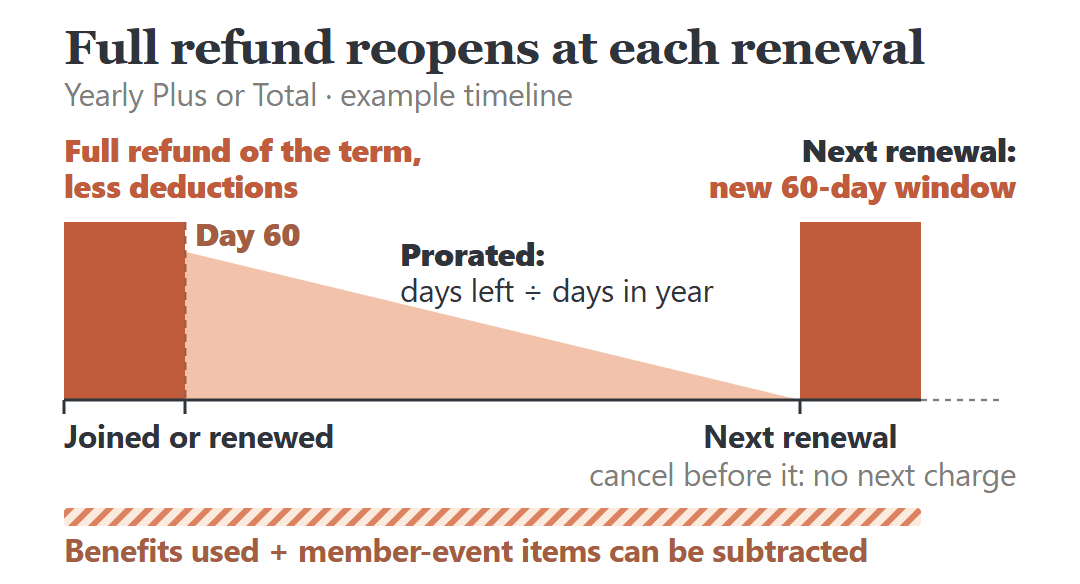
For a yearly Plus or Total membership, everything starts from one date: the day you joined, or the day your current year renewed.
- Within 60 days of that date: you can get a refund of the full fee for the current term.
- After day 60: the refund is prorated by the days left in your billing year after the day you cancel.
In both cases Best Buy may subtract the value of member benefits you’ve used this term, like member-only discounts and services, and the price you paid for limited-supply items bought during members-only or priority-access events. That’s why two members who paid the same fee can get very different amounts back.
Total adds one more consequence. Canceling it automatically and immediately cancels the Best Buy Protection and AppleCare+ plans that came with the membership.
Your Renewal Date Decides Which Rule You’re Under
Start with the date your current membership year began. For a renewal, that’s the day the yearly charge went through, so your card statement is a good place to find it.
Count 60 days forward from there. Inside that window, the whole term’s fee is refundable, less the deductions covered below. Past it, the refund works out roughly like this:
What you paid for this term × (days left in the billing year after you cancel ÷ days in the year) − what Best Buy deducts
Use the amount you were actually charged for this term, not the price on Best Buy’s site today. Best Buy changed its membership prices in June 2026, so the two may not match.
Monthly Total runs on much shorter clocks: 20 days from the first monthly purchase and 3 days from each monthly renewal. The rest of this post is about yearly memberships.
The renewal is the other date to watch. Plus and Total renew every year at the then-current price, and Best Buy has to give 30 days’ notice of a price change. Cancel before your renewal date and the next charge never happens. Let it renew, and that charge starts a new term with its own 60-day window.
What Best Buy Can Take Out of Your Refund
The terms name two kinds of deductions, and both apply inside the 60 days and after them:
- The value of member benefits you’ve used this term. Best Buy’s examples are product discounts and services.
- The price you paid for limited-supply items bought during priority access or members-only events.
The second one is easy to misread. It isn’t the discount you got on that item. The wording is “the price you paid,” so a limited-supply purchase from a members-only event can take its full price out of the refund. The terms say Best Buy may do this, not that it always does.
Either deduction can shrink the refund, possibly to nothing. The terms don’t spell out how Best Buy puts a value on the benefits you used, which is one more reason to ask for the number before you confirm.
On Total, the slice of the fee set aside for protection plans has its own rule: benefit deductions don’t apply to it, but a Best Buy Protection repair or replacement this term can come out of it. And if you got Total at a bundle discount and cancel part of the bundle, Best Buy charges the difference between the discounted price and full retail on what you keep.
Three Example Memberships, Three Different Answers
These are hypothetical members with assumed prices and dates, not real customers’ bills. They show why there’s no single refund figure to quote.
Member A: Total, renewed 25 days ago, nothing used
Assume a yearly Total charge of $199.99, leaving tax aside, 25 days into the term, with no member discounts, services or member-event purchases since the renewal and nothing bought under the membership. That’s inside the 60-day window with nothing to deduct, so the refund would be the full $199.99, and no protection plan is at stake.
Member B: Total, 200 days in, a discount used and a TV bought
Assume Total was bought 200 days ago for $179.99, leaving 165 days of a 365-day year. Prorated, that’s $179.99 × 165 ÷ 365 = $81.37 before deductions. Say this member also used a member-only price that saved $60. If Best Buy valued that benefit at the full $60, the refund could drop to around $21.
Because the protection-plan slice isn’t hit by benefit deductions, and Best Buy doesn’t publish its size, the real figure could come out higher. The bigger change is the TV: its protection plan ends the moment Total is canceled.
Member C: Plus, 100 days in, one member discount
Assume a yearly Plus membership at $29.99, 100 days in with 265 days left. Prorated, that’s $29.99 × 265 ÷ 365 = $21.77 before deductions. One member-only discount valued at $25, also assumed, would be enough to wipe it out.
Same rules, three outcomes. Yours depends on your date, what you’ve used and what you bought.
On Total, Your Protection Plans End When the Membership Does
Qualifying products bought from Best Buy while you’re a Total member get protection for up to 24 months, but only as long as the membership stays active. It’s easy to assume that coverage keeps running on its own schedule. It doesn’t.
Best Buy’s terms say any cancellation of Total “will result in the automatic, immediate cancellation” of the Best Buy Protection or AppleCare+ plans provided under the membership. Letting Total lapse at renewal cancels the remaining months the same way.
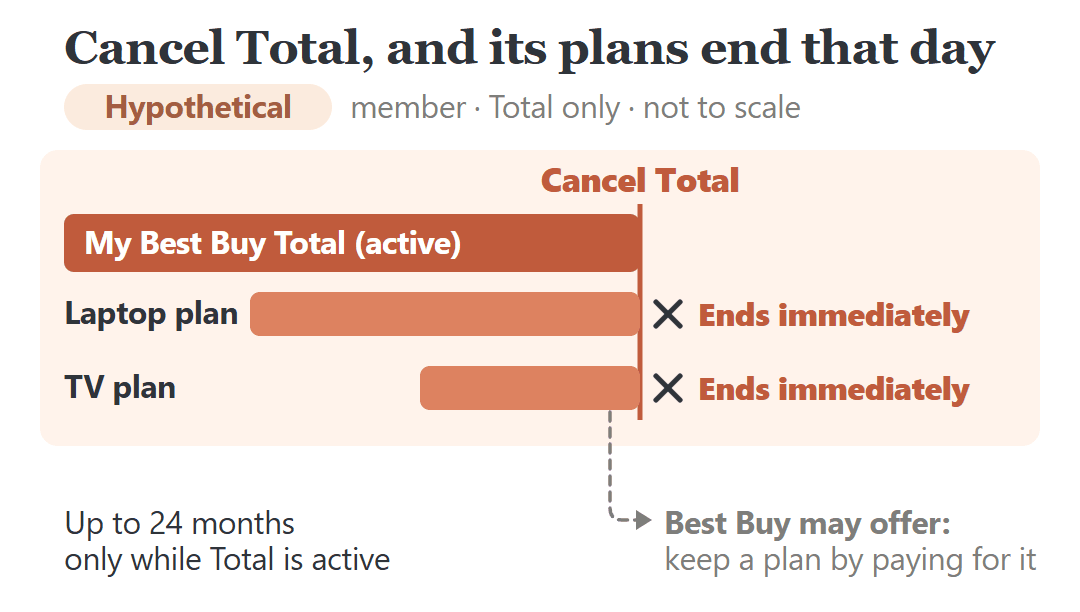
There is one opening. At Best Buy’s discretion, you may be offered the option to take over payment and keep a plan. That’s something Best Buy may offer, not something to count on, so ask before you cancel.
Before deciding, list what you bought during the membership. Plans issued under Total should show up in your account at bestbuy.com/services/planlist. Products bought before you joined, and Marketplace items from third-party sellers, never had membership protection to begin with.
That list is where the real decision sits. A membership with no plans attached is a simpler cancellation than one carrying coverage on a laptop or TV bought a few months ago. If you’re in the second group, put what you’d get back next to what you’d give up, and ask what keeping the plan would cost.
How to Cancel, and What to Ask First
Best Buy’s terms list the same three routes for Plus and Total:
- Call 1-888-BEST-BUY (1-888-237-8289).
- Go to a Best Buy store.
- Cancel from your online profile at bestbuy.com/services/planlist.
If you bought the membership at a Magnolia Design Center inside a Best Buy store, you may need to go back to a Magnolia location for the refund.
Whichever route you pick, get the numbers before you confirm. A request along these lines covers it:
“I’d like to cancel my yearly My Best Buy [Total / Plus] membership. Before I confirm, can you tell me the refund amount, which deductions are included and how each one was calculated, and which protection plans will end? Is there an option to keep any of those plans by paying for it myself?”
A renewal charge that shows up after you’ve already canceled is a billing problem, not a refund-window question. Our guide to getting your money back when you’re charged after canceling a subscription walks through asking the company first and then disputing the charge with your card issuer.
Three Things to Write Down Before You Call Best Buy
- Your date. The day you joined or last renewed, and whether today falls within 60 days of it.
- Your deductions. Member discounts, services and members-only event purchases since that date.
- Your plans. On Total, every product with a membership plan, checked against the plan list.
If you’re inside the window and have nothing covered, canceling now gets back the whole term’s fee, less anything Best Buy deducts for benefits you used or member-event items you bought. If you’re carrying plans on products you’d still want covered, weigh those first and ask about keeping them. Either way, decide before the next renewal date, so a new year doesn’t start by default.
The phrase I’d want every member to notice in these terms is “or any annual renewal term.” The full refund isn’t only for people who just signed up. It comes back for 60 days every year.
Sources: Best Buy’s My Best Buy Total Terms of Service and My Best Buy Plus Terms of Service (both the June 2026 versions), and the My Best Buy Memberships FAQ for current prices. Checked October 16, 2026. The members, dates and amounts in this post are hypothetical examples, not real customers’ accounts.