Picture two dates on one household’s Norton account. This is a hypothetical example, not a real customer’s: the subscription page says Norton 360 Deluxe expires October 25, 2026, and the card statement shows a Norton charge dated September 20, 2026 for $124.99 plus tax. That’s the plan’s list renewal price on Norton’s March 2026 US price list; your own charge may differ.
If that household wants the money back, only one of those dates matters, and it isn’t the one labeled “expires.”
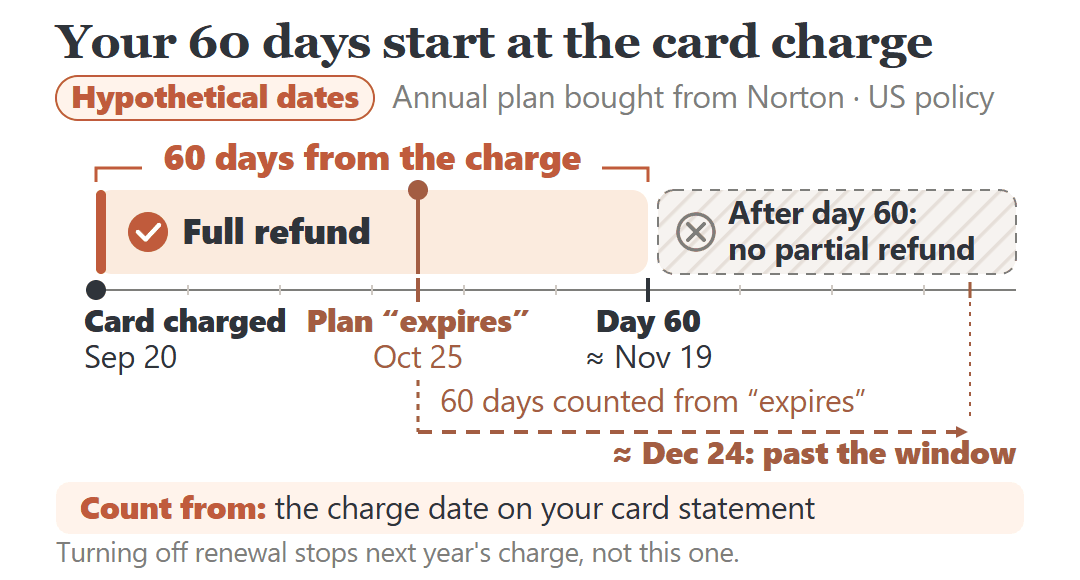
If you bought Norton directly, each annual renewal charge is eligible for a full refund if you ask within 60 days of being charged. Count from the date on your card statement. Norton’s Terms of Sale say it tries to charge your stored card before your subscription’s expiration date, so counting from the “expires” date runs past the window.
After day 60, Norton’s published policy for US customers doesn’t include a partial refund. Turning off auto-renewal at that point stops next year’s charge. It doesn’t bring this one back.
One check comes before all of it: confirm the charge is real on your card statement, or by signing in to your Norton account yourself. Not by calling a number or clicking a link in a renewal email.
Is It a Real Norton Charge, and Who Billed You?
Fake renewal notices copy this exact moment. The FTC warns that scammers send emails or texts saying you’ve been “charged hundreds of dollars to renew your tech support subscription,” using well-known names, Norton among them. When you call to cancel, they ask for your bank or card information “to process the refund.”
The FTC’s check is the one to use: look for the charge on your credit card or bank account. If no such transaction is there, the message was a scam. If it is there, type Norton.com/account into your browser yourself, sign in, and find the subscription and its order.
The statement line also tells you who handles the refund. Norton’s refund policy covers plans bought directly from Norton; when a third party sells or bills the plan, different terms may apply.
- Norton’s online store, or a retail card or key you activated: ask Norton Member Services & Support.
- Billed by your internet or phone company: Norton says it can’t issue refunds for subscriptions billed through partners. Contact the company whose bill the charge is on.
- Bought in the Apple App Store, Google Play or Microsoft Store: Norton says you can only cancel or change it in that store, so the refund question goes there too.
Certain bundles, such as a Norton subscription sold with a new computer, fall outside Norton’s own refund policy. The exceptions are listed in Norton’s Cancellation and Refund Policy.
Your 60 Days Start on the Charge Date, Not the Expiration Date
Norton’s Terms of Sale explain why the two dates don’t match: “To ensure that you have continuous protection, we will attempt to charge your stored payment method prior to your subscription’s expiration date.” The exact day depends on things like when the first charge attempt ran and pending card authorizations, so there’s no fixed number of days you can subtract.
Your starting point has to come from a record of the charge itself: the posting on your card statement, or the renewal order in your Norton account. Norton also emails before each annual renewal with the price and billing date, which helps you match things up, but the statement is what you count from.
Back to the hypothetical household: charged September 20, 2026, plan expiring October 25. On October 16 they’re at day 26, and their 60 days run to around November 19. Had they counted from October 25, they’d be aiming at around December 24, more than a month after the window closed.
Norton’s wording is “within 60 days of being charged,” and the policy doesn’t say whether the 60th day itself counts. I wouldn’t plan around the last day. Ask with time to spare.
Annual or Monthly: Which Charges Can Come Back
On an annual plan, the first purchase and each later annual charge get their own 60-day full-refund window. If the plan started with a free trial, the first annual charge after the trial gets 60 days from that charge, and so does every renewal after it.
Monthly plans work differently. Only the first charge is refundable, within 14 days of purchase, or within 14 days of the first charge after a free trial. Norton’s policy says subsequent monthly charges aren’t eligible for a refund.
| Your situation | Under Norton’s US policy | What to do |
|---|---|---|
| Annual plan, still within 60 days of the charge | Full refund of that charge | Ask Norton now, not near day 60 |
| Annual plan, more than 60 days after the charge | No partial refund in the published policy | Turn off auto-renewal to stop the next charge |
| Monthly plan, first charge, within 14 days | Full refund | Ask Norton now |
| Monthly plan, any later monthly charge | Not eligible | Turn off renewal before the next billing date |
| Billed by an internet or phone company, or an app store | Handled by that company or store, under its terms | Ask that company or store |
Past Day 60? What Norton’s US Policy Leaves You
Take a second hypothetical household with the same plan, charged on July 28, 2026 and noticing it on October 16. That’s day 80. Their window ran to around September 26.
You may have read that Norton refunds the unused months once the 60 days are up. That rule exists, but in the current policy it’s written for customers in Germany, the Netherlands and the UK, with a separate prorated rule for Quebec. The default section that covers US direct purchases has the 60-day full refund and nothing after it.
So under Norton’s published US terms, this household has no full or partial refund of the July charge. What they still control is the next one: turning off auto-renewal now means the plan runs to the end of the year already paid for, then ends without another charge.
A different situation is a charge that came after you’d already turned off auto-renewal. That’s a billing problem, not a refund-window question, and Norton’s policy says it’s independent of any statutory rights you have. Our guide to getting your money back when you’re charged after canceling a subscription covers asking the company first and then disputing the charge with your card issuer.
How to Ask Norton for the Refund
For a plan bought from Norton’s online store or a retail card, the request goes to Norton Member Services & Support. Start from Norton’s help page for an annual renewal fee refund, which links to its contact options, rather than a number from an email or a search result.
Have one of these ready: your order number, product serial number or product key. For a retail card, Norton asks for a copy of the subscription key label and the original receipt showing the purchase date and price. Support verifies your account before processing.
Norton says requests are typically processed within a few days, and the refund goes back to the payment method that was charged. After a refund the software may deactivate, and you’re expected to uninstall and delete it, so plan for that if the computer still needs protection.
If you’re asking by chat or phone, this covers what they’ll need:
“My annual Norton renewal was charged on [date], and I’d like a full refund of that charge under the 60-day money-back guarantee. My order number is [number]. Can you confirm the refund will go back to the card that was charged, and that no further renewal charges will be made on this subscription?”
Some purchases aren’t covered at all, including Not For Resale and complimentary products, repeat purchases that were refunded before, and services already redeemed or set up.
Stopping Next Year’s Charge Is a Separate Step
Turning off auto-renewal doesn’t refund anything. It stops the next charge, and it has to be done before your billing date.
Sign in to your Norton account, open My Subscriptions, choose Cancel Subscription Renewal or Manage Renewal next to the plan, then Unsubscribe next to Plan Renewal. Norton may show offers to keep you; choosing to cancel finishes it. Allow up to 24 hours for the change to show in your account. Norton’s stop-renewal steps have the current screens.
Your protection continues through the end of the period you’ve already paid for. After that, the subscription ends and you aren’t charged again.
With Your Statement Open, Before the Window Closes
- Find the Norton charge on your card or bank statement. If it isn’t there, don’t call or click anything in the renewal message.
- Note the date it was charged. That’s the date your 60 days count from, or 14 days for a first monthly charge.
- Check who billed you: Norton, your internet or phone company, or an app store.
- If you’re inside the window and want out, ask that company for the refund with your order number or product key in hand.
- Either way, turn off auto-renewal if you don’t want next year’s charge.
What stood out to me in Norton’s terms is how quiet this window is. Sixty days is generous, but it starts on a date most people never look at, and the partial refund people mention for later isn’t in the US policy at all. Both answers start with the card statement, not the “expires” date on the account page.
Sources: Norton Cancellation and Refund Policy, Norton’s annual and monthly subscription refunds page, the Terms of Sale, the US renewal price list (effective March 2026), and the FTC’s guide to spotting tech support scams. Checked October 2026 against Norton’s Cancellation and Refund Policy (updated September 2026). The households and dates in this post are hypothetical examples, not real customers’ accounts.