In Connecteam’s pricing, one person changes the bill: the 11th user.
Here’s a hypothetical janitorial company to show how. Its Connecteam account shows 10 users, active and archived together, and two of them are summer helpers who were archived when the season ended. The crew clocks in with GPS on the free plan. Then the owner hires one more cleaner.
That hire is user 11, and Connecteam’s help center says that once you add your 11th user, you need to choose a plan. To keep a GPS clock-in, the lowest paid option on the Operations hub is Basic: $29 a month billed yearly ($348 a year) or $35 billed monthly ($420 over 12 months), per hub, for the first 30 users. If those two archived helpers didn’t count, the new cleaner would have been user nine.
The other side of that cliff is flat. The next 19 people the company adds, up to 30 users, don’t change that Operations price at all.
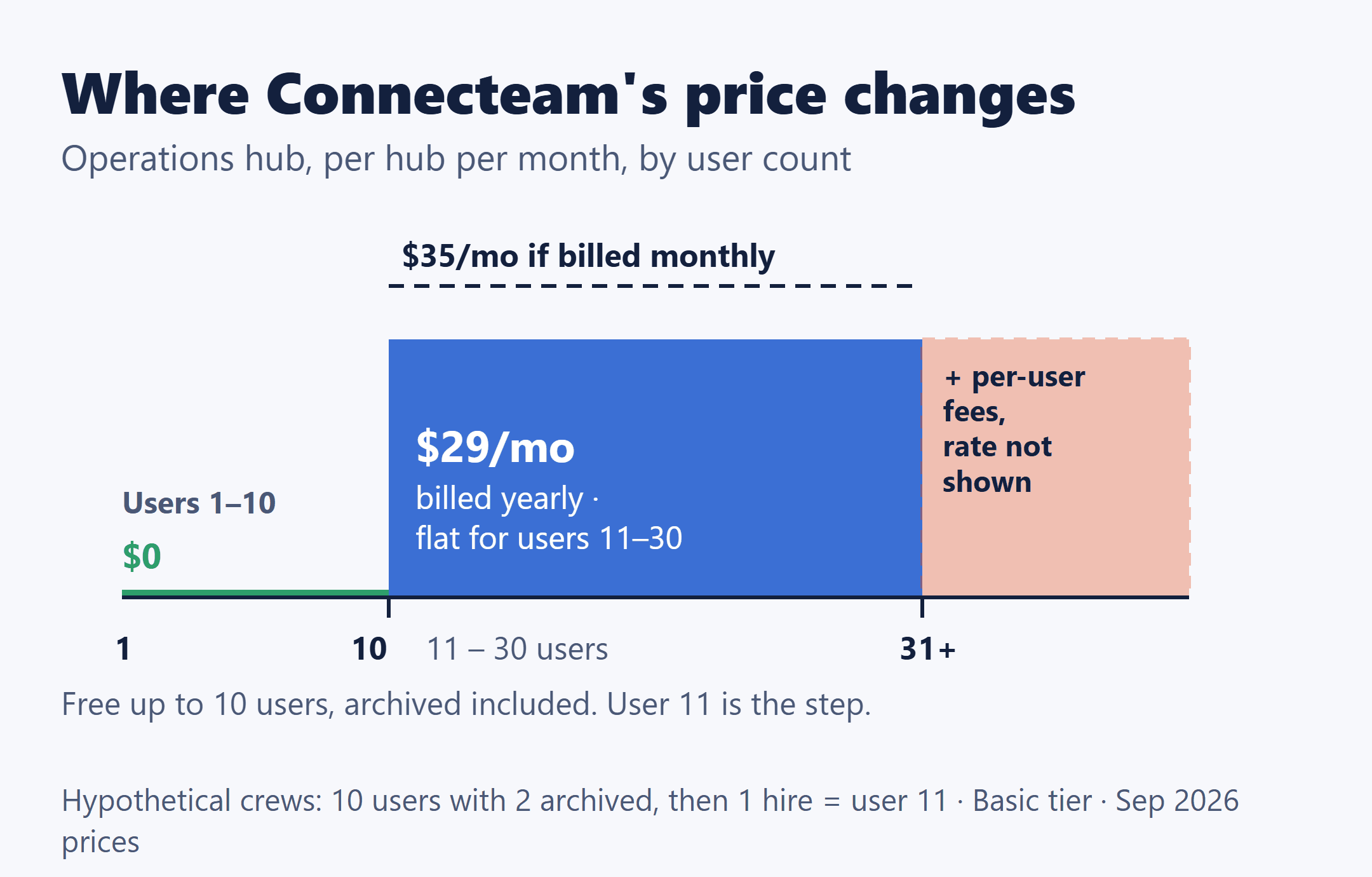
Connecteam is $0 for up to 10 users, counting active and archived users together. From user 11, each hub is priced separately, at a flat price for the first 30 users. On the Operations hub, where the time clock and job scheduling live, GPS clock-in starts at Basic ($29 a month billed yearly or $35 billed monthly), geofencing at Advanced ($49 / $59), and live Breadcrumbs tracking at Expert ($99 / $119), all per hub for the first 30 users. A free Limited plan still exists past 10 users, without GPS location stamps.
Prices are in USD as listed on Connecteam’s pricing page and help center, checked October 17, 2026. They’re published prices, not results from running an account, and the crews in this post are illustrations.
Who fills the ten free seats
The free tier is the Small Business Plan: $0, “free for life,” with all three hubs, for up to 10 users. Ten is included; the 11th user is the trigger. Three details decide whether your crew really fits.
- Archived users count. On the Small Business Plan, active and archived users are counted together toward the 10. A seasonal helper archived last fall still holds a seat.
- Only deleted users leave the count, and deleting is permanent. Connecteam says deleting a user permanently deletes all information and activity tied to that account, and neither the user nor the data can be restored.
- One time clock and one job schedule. To stay on the free plan, the account can have no more than one of each, so a setup that needs a second time clock falls outside it even at 10 users or fewer.
Count users the way Connecteam does, not the way you’d count your crew this week.
From user 11: one price per hub, the same at 11 users or 30
Past 10 users, Connecteam prices each of its three hubs on its own. The Operations hub holds Time Clock, Job Scheduling, Forms and Quick Tasks. Communications and HR & Skills are separate hubs with the same plan structure, subscribed and priced separately.
A crew that only needs clock-in and scheduling needs only the Operations hub. If your crew also used chat or time-off tools on the free plan, those sit in the other two hubs, and past 10 users each needs its own plan, paid or that hub’s Limited plan. What those Limited plans include is outside this post.
| Tier | Billed yearly | Billed monthly |
|---|---|---|
| Limited | $0 | $0 |
| Basic | $29 | $35 |
| Advanced | $49 | $59 |
| Expert | $99 | $119 |
In Connecteam’s words, you can start with 1 user and grow to 30 “without paying a single extra penny.” Connecteam describes the yearly subscription as equal to 10 months of the monthly price and labels it “save 18%.” From user 31, each paid hub adds a per-user fee on top; those rates are on the pricing page and outside this post.
The $0 plan that’s still there past ten
The Limited plan is free for up to 30 users per hub, and it can’t add seats beyond 30. On the Operations hub, though, Connecteam’s comparison table doesn’t include GPS location stamps, timesheet export or payroll integration on it. For a crew that needs a GPS clock-in, Limited isn’t the answer, and Basic is the first tier that has one.
Which tier your field features put you on
The free Small Business Plan includes GPS location stamps, geofencing and Breadcrumbs. So what user 11 costs depends on which of those your crew was relying on.
| Field feature | Lowest paid tier |
|---|---|
| GPS location stamps | Basic |
| Timesheet export | Basic |
| Payroll integration | Basic |
| Geofence, up to 10 sites | Advanced |
| Breadcrumbs live tracking, unlimited geofence sites | Expert |
Keeping GPS clock-in means at least Basic ($29 billed yearly or $35 monthly). Keeping geofencing means at least Advanced ($49 / $59). Keeping Breadcrumbs means Expert ($99 / $119). Those are Operations hub prices per month, per hub, for the first 30 users, with other hubs extra. They map features to tiers; they aren’t a recommendation about which tier a crew should buy.
One cell is worth checking before you count on it. Connecteam’s pricing table currently lists payroll integration as not included on the free plan, while timesheet export is included. Confirm with Connecteam before you rely on a direct payroll sync there.
What a year on the Operations hub costs
With 10 users or fewer, active and archived, and one time clock and one job schedule, the answer is $0. With 11 to 30 users:
Yearly cost = for each hub you need, that hub’s tier price per month × 12, at the billing cycle you choose.
| Tier | Billed yearly | Billed monthly, 12 months |
|---|---|---|
| Basic | $348 | $420 |
| Advanced | $588 | $708 |
| Expert | $1,188 | $1,428 |
The math is the monthly price × 12: $29 × 12 = $348, $35 × 12 = $420, and so on down the table. The Limited plan stays at $0 on either cycle.
These figures leave out any other hub, per-user fees from user 31, and payroll-provider or connector fees. If you also subscribe to Communications or HR & Skills, add that hub’s own tier price × 12; check its current price on the pricing page.
Inside the 11-to-30 range, head count isn’t the lever. On Operations Basic billed yearly, 11 users and 30 users both come to $348 a year, per hub. What moves the number is the tier your features need and how many hubs you subscribe to.
If you only cross ten in summer
The billing terms are where a seasonal crew should slow down. Per Connecteam’s pricing page and help center:
- Monthly can be canceled any time, but prepaid amounts aren’t refunded.
- Yearly has a prorated refund only if you cancel within the first 30 days.
- Either cycle: cancellation takes effect at the end of the billing period, and seats added mid-subscription are charged pro-rated.
- Going back to free is manual. If you drop to 10 users or fewer, Connecteam doesn’t move a paid account back to the Small Business Plan; you choose it yourself from the upgrade page.
Here’s how those rules combine for a hypothetical crew of 8 year-round workers plus 5 summer helpers, 13 users in all. Archive the 5 helpers in October and the free plan’s rule still counts 13, so the free plan stays out of reach. The only way down to 10 is deleting users, which permanently erases their records, and even then the switch back is a manual step. That’s a description of Connecteam’s rules, not a suggestion to delete anyone. On paid plans, only active users count toward seats; the archived rule belongs to the free plan.
My practical reading: for that crew, the useful question isn’t whether summer pushes them past 10. It’s whether they’d ever get back to 10 or fewer with the helpers’ records intact, and on these rules they wouldn’t. That’s worth knowing before you pick a billing cycle on the assumption that the paid months are temporary.
Before you add the eleventh name
Open your user list and count active plus archived. If it’s already at 10, your next hire is user 11.
Then pick the field features you can’t give up from the five in the tier table. That choice, not the head count between 11 and 30, sets your Operations price. Decide whether you need a second hub, and pick yearly or monthly knowing the yearly refund window closes 30 days in.
If what your crew needs is scheduling tied to quotes and invoices rather than a standalone time clock, Jobber vs. Housecall Pro for a small team, where the price depends on who logs in works through that kind of app. And if customers book visits online themselves, Calendly vs. Acuity Scheduling for 3, 5 or 10 bookable staff covers how booking tools count seats.
Prices were as listed in September 2026; check today’s figures at connecteam.com/pricing before you subscribe.