Somewhere in your inbox is the email Starlink sent when you placed your order. Before you search for “the” Starlink cancellation fee, open that email.
Starlink’s US terms say your agreement includes “the details you agree to in your online order.” That order shows whether you bought the kit, are paying it off on a 0% installment plan, got it free in exchange for a service commitment, or are renting it. Each of those has its own exit cost, so there’s no single price for canceling Starlink.
Within 30 days of your first bill, which Starlink calls your Payment Due Date, you can return an undamaged kit ordered on starlink.com for a full refund, and a commitment’s Change Fee doesn’t apply. That window doesn’t start on your order date.
After the window, canceling works out like this:
- Bought outright, with no commitment or installment plan on your order: no cancellation fee, and the kit is yours.
- 0% installment plan: the rest of your kit balance is charged at once.
- Free kit with a service commitment: canceling before the commitment ends triggers the Change Fee on your order. Under Starlink’s current US terms that’s $249 or $325, as applicable; older offers may differ, so your confirmation email has the number that counts.
- Rented kit: no cancellation fee, but the kit has to go back in good condition within 30 days of canceling, or you’re charged its full retail price.
Whichever you have, Starlink doesn’t refund part of a month, so cancel before your billing day. This covers Starlink Residential service in the US, based on Starlink’s US Terms of Service, Retail Installment Agreement and help center as checked October 16, 2026. Roam, Business, other plans and other countries have their own terms.
What to Look for in Your Order Confirmation
Match your order to one of these:
- Bought outright. You paid for the kit, and Starlink transfers title to you on delivery. No service commitment and no installment plan appear on the order.
- 0% installment plan. You’re paying off the kit under Starlink’s Retail Installment Agreement, which is based on staying subscribed for 12 months.
- Free kit with a service commitment. The kit came free in exchange for staying subscribed for 12 or 24 months. For the older 12-Month Residential offer, Starlink points you to “the 12-month Residential confirmation email you received after placing your order.”
- Rented kit, including a no-cost rental. The kit stays Starlink’s property.
- Bought at a store or other retailer. Starlink says, “If you purchased your Starlink from an authorized retailer or reseller, contact them directly to return your Starlink.” The Starlink subscription still follows Starlink’s billing rules, and a commitment chosen through a retailer still carries Starlink’s Change Fee.
Then write down the one value that sets your own cost: your Change Fee and commitment end date, your remaining installment balance (in your own agreement or account), or the kit’s retail price listed on a rental order.
The 30 Days Start at Your First Bill, Not Your Order
Starlink’s terms let you return an “undamaged, untampered and unmodified Starlink Kit and any accessories purchased on starlink.com within 30 days of the Payment Due Date for a full refund for any reason.”
The Payment Due Date is “the earlier of (i) the date you activate the Starlink Kit; (ii) 7 days after Starlink delivers your Starlink Kit, or (iii) if no delivery date is available, 30 days from the date your Starlink Kit was shipped.” In practice, that’s the date of your first bill.
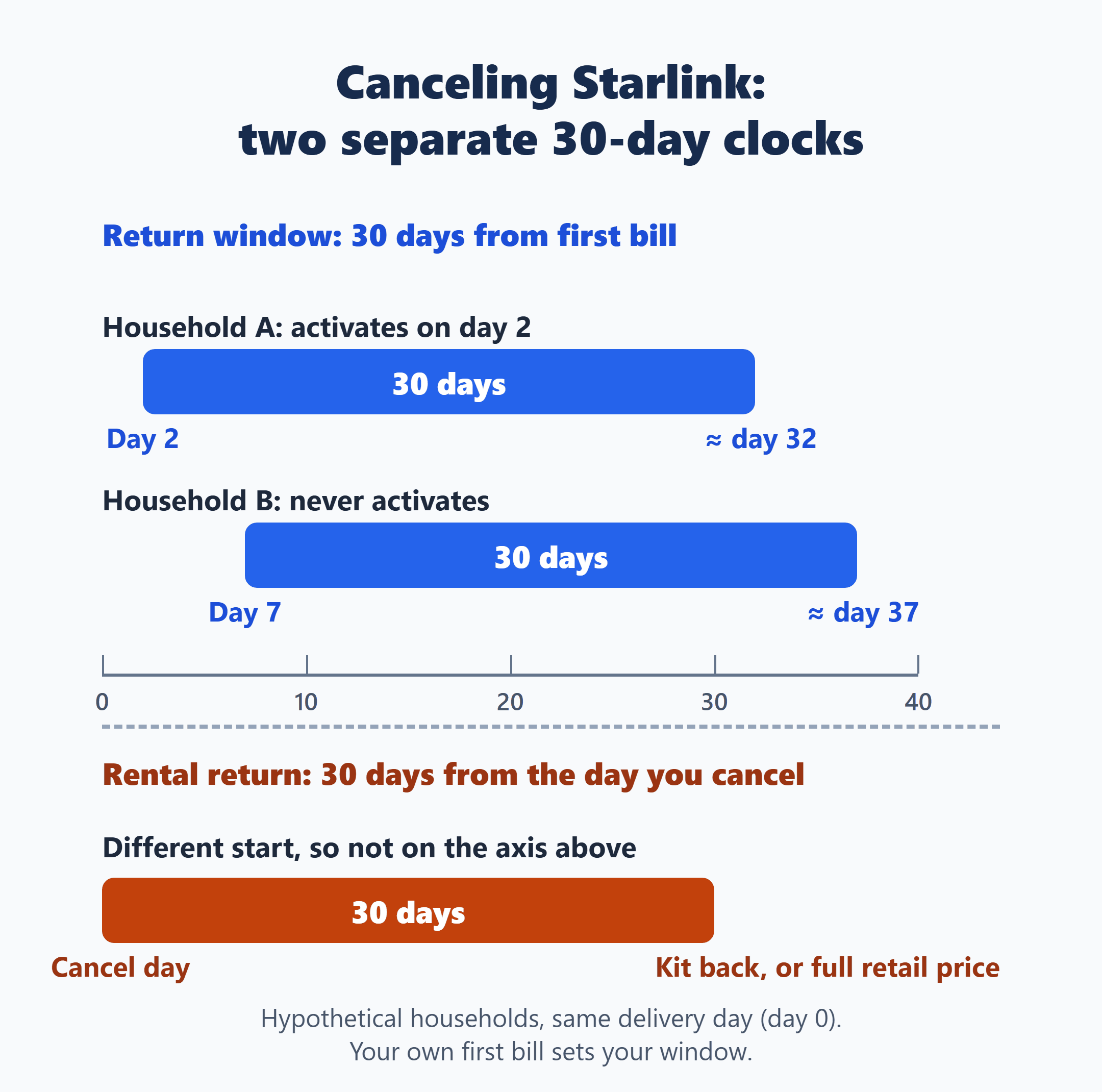
Here’s a hypothetical to show how that plays out. Two households get their kits delivered on the same day. The first activates two days later, so its Payment Due Date is day 2 and the return window runs to about day 32. The second never activates, so its Payment Due Date is day 7 and the window runs to about day 37. Same delivery day, different deadlines.
A return inside the window gets back:
- For a bought kit, the price of the equipment. For a rented kit, “your Activation Price only.”
- Also “the first month’s service fee or rental fee, as applicable, the Monthly Kit Access Fee and the Demand Surcharge.”
- For a free kit with a commitment, returning it during this trial period means “a Change Fee will not be applied.”
“Shipping and handling charges will apply and are non-refundable.” Starlink says the refund arrives “within 10-15 business days” after the return. Bought at a retailer? Its return policy applies instead.
Past the 30 days, “if you are outside the 30-day return window, you will not be eligible for any refund” on kits, mounts and accessories. That’s about getting money back for hardware. A rented kit still has to go back after you cancel.
Sources: Starlink Terms of Service (US) and Starlink Help: How do I return my Starlink kit?
After the Window, Your Kit Type Sets the Bill
| Your kit | Within 30 days of first bill | After that |
|---|---|---|
| Bought outright on starlink.com | Return it for the equipment price and first month’s fee | No cancellation fee; the kit is yours, no refund |
| 0% installment plan | Starlink’s 30-day full-refund return | Remaining kit balance charged at once |
| Free kit with a commitment | Return it: no Change Fee | The Change Fee on your order until the commitment ends |
| Rented kit | Return it: Activation Price and first month refunded | No fee if returned in good condition within 30 days of canceling; otherwise full retail price |
| Bought at a retailer | Return through the retailer | Subscription follows the matching row above |
The middle column counts from your first bill. The rental deadline in the last column counts from the day you cancel. They’re two different clocks.
If you got the kit free with a commitment
Under Starlink’s current US terms, you agree to stay subscribed “for a minimum of 12 or 24 months, as applicable.” During that period, canceling, changing your plan, changing your service address or transferring the service or kit to someone else triggers “a $249 or $325, as applicable, change fee,” charged right away to your payment method. The terms say unpaid amounts can go to a collection agency or be reported to a credit bureau.
Your own fee is the one on your order or confirmation email. For the older 12-Month Residential offer, now closed to new activations, Starlink says the fee “may be either pro-rated or a flat rate depending on the market,” so read your confirmation email rather than assuming either. Read your commitment end date there too, instead of counting it yourself.
Once the commitment ends, or you’ve paid the Change Fee, the commitment rules no longer apply. On the older 12-month offer, Starlink says that after 12 months of continuous service you “own your Starlink Kit outright—no further payments or returns required.”
Deciding between canceling now and later? Put two numbers from your own account side by side: the Change Fee on your order, and your monthly price times the billing cycles left before your commitment ends. Those inputs differ from household to household, so there’s no month at which one choice always wins.
If you’re on the 0% installment plan
Canceling accelerates the plan: Starlink charges “the full remaining balance” of the kit to your payment method right away. That’s the unpaid part of the kit price coming due now, not an extra penalty on top. The plan is 0% APR, and you “may prepay all or any part of your loan at any time without penalty.” Your balance is in your own agreement or account (Starlink Retail Installment Agreement (US)).
If a phone on a carrier payment plan is also on your list of things to cut, the device side of that exit is covered in leaving Verizon before your phone is paid off: what you’ll owe and what you could forfeit.
If you rent the kit
Starlink’s terms say you must return it “within 30 days of Service cancellation or you will be charged the full retail price of the Kit as described in the Order.” Starlink issues a return shipping label. This clock starts when you cancel; it isn’t the first-bill window.
Choose the Cancel Day From Your Billing Day
Starlink doesn’t give partial-month refunds. The terms say, “To avoid being billed for the following month of Services you must cancel Services prior to your invoice statement being generated.” After you cancel, “Your service will remain active up until the date paid for.”
The cut-off runs on UTC. Starlink’s help center says billing “is tied to UTC time; changes must be made before 12:00 AM UTC on your billing day.” In US time zones, midnight UTC falls on the evening (Eastern) or afternoon (Pacific) of the day before your billing date. The safe move is to cancel at least a day before your billing date.
To cancel, log in to your Starlink account, go to “Your Subscription,” select “Manage” next to your Service Plan, then “Cancel Service.” If you’re returning a kit, check “I would like to return my hardware” when you cancel. The prepaid label arrives by email with the subject “Your Starlink Return.”
Three edge cases worth a glance before you click:
- Standby Mode is a paid pause, not a fee-free exit. It isn’t available on promotional offers and some rentals, and on an installment plan, turning it on triggers the remaining-balance charge (Starlink Help: Standby Mode).
- If your order included a discount or an extra kit tied to your plan, check its terms before canceling.
- If Starlink emails you about a change to your terms that comes with a right to cancel, read that notice. The terms say the Change Fee isn’t charged in that case, though a kit you got free may have to be returned.
If cable is what’s replacing Starlink, that provider’s final bill runs on its own dates; for one example, see whether Spectrum prorates your final bill, and which dates to check before you cancel.
Sources: Starlink Help: How do I cancel service? and Starlink Help: What is the 12-Month Residential Service Option?
If the Kit Goes Back, the Box Is Part of Canceling
The step I’d watch hardest is the one that happens after the click. If you’re renting, a 30-day clock starts the day you cancel, and missing it turns a free exit into the kit’s full retail price. If you’re returning inside your first-bill window, that clock is already running too.
So read the order email, find your first bill date and billing day, and cancel with a day to spare. If your row says the kit goes back, pack it the day the label arrives and keep a record of the shipment.
Based on Starlink’s US Terms of Service, Retail Installment Agreement and help center pages, checked October 16, 2026. Your own order, confirmation email and account show the amounts and dates that apply to you.